Cat Bloom
Bloomfield Watchfaces- 3 歳以上対象年齢
- カスタマイズカテゴリ
- 2022/8/30更新日
- ¥140価格
com.bloomfield.catbloomのGoogle Play公式ページにリンクしています。最終確認:2026/11/24。
このアプリについて
Googleによる英語 (アメリカ合衆国)からの自動翻訳です。
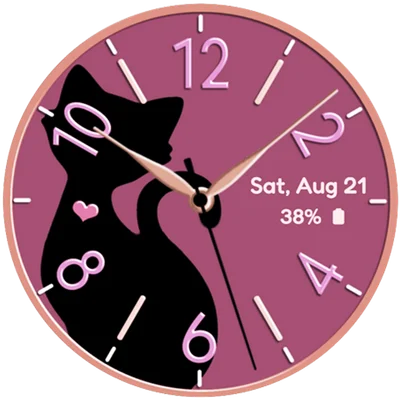
スタイリッシュなアナログウェア
WEAR OS用の猫をテーマにしたミニマリストウォッチフェイス
インストールに関する注意事項!
*時計が電話に正しく接続されていることを確認してください。ウォッチフェイスがウォッチに転送されるまで数分待ち、ウォッチでプレイストア アプリを開き、ウォッチフェイスを検索してインストールします。
* 携帯電話と Play ストアの間で同期の問題が発生している場合は、時計から直接アプリをインストールしてください。Play ストアの時計から「CatBloom」を検索し、インストール ボタンをクリックしてください。
* デバイスの非互換性/「このアプリはお使いのデバイスでは利用できません」については、スマートフォンの Play ストア アプリを使用する代わりに、PC またはラップトップから WEB ブラウザー (CHROME) で Play ストアを使用してください。
ウォッチフェイスのリンクをWEBブラウザ(CHROME)にコピー&ペーストしてインストール。
* 設定 -> アプリケーション -> 権限からすべての権限を有効にします。
* このウォッチフェイスは、Samsung Galaxy Watch 4 のような新しい Wear OS Google / One UI Samsung オペレーティング システムに基づくデバイス用に、Samsung の「Watch Face Studio」ツールで開発されました。
特徴:
-12時間アナログ時計
-日付 (多言語)
-3 つのプリセット アプリ ショートカット (シングル タップで開く)
設定、アラーム、カレンダー
-1 カスタマイズ可能なショートカット (変更可能)
さまざまな合併症から選択できます。天気、歩数、タイムゾーン、未読通知音、日の入り/日の出、気圧計、次の予定など。
(ディスプレイを長押しします。カスタマイズオプションをタップして、優先ディスプレイを変更します)
***一部のコンプリケーション データは、すぐには表示されない場合があります。表示は、時計にインストールされているアプリによって異なります。
-常時オン (AOD)
-変更可能なLCDとフォントの色(ディスプレイを長押し。カスタマイズオプションをタップ)
*一部の機能は、一部の時計では利用できない場合があります。
完全なコレクション: https://play.google.com/store/apps/developer?id=Bloomfield+Watchfaces
お問い合わせ先: Bloomfieldwatchfaces@gmail.com
Facebook ページ: https://www.facebook.com/bloomfieldwatchfaces
ギャラクシーストア:https://galaxy.store/ALwatches
原文を表示
Cat Themed Minimalist Watch Face for WEAR OS
INSTALLATION NOTES!
* Make sure the watch is properly connected to the phone. Wait for a few minutes for the watchface to be transferred on watch, open the playstore app on your watch and search for the watchface then install.
* If you are having synchronization problems between your phone and Play Store, install the app directly from watch: search "CatBloom" from Play Store ON WATCH and hit on install button.
* For device incompatibility / "This app is not available for your device", use Play Store on a WEB browser (CHROME) from PC or Laptop instead of using the playstore app on phone.
Copy and paste the watch face link on a WEB browser (CHROME) and install.
* Enable all permissions from settings -> applications -> permissions.
* This watch face was developed with Samsung's "Watch Face Studio" tool for devices based on the new Wear OS Google / One UI Samsung operating system like Samsung Galaxy Watch 4.
Features:
-12hr analog clock
-Date (Multi-language)
-3 Preset App Shortcuts (Single tap to open)
Settings, Alarm & Calendar
-1 customizable shortcuts (changeable)
Different complications to choose from; weather, steps, time zone, unread notification sound, sunset/sunrise, barometer, next appointment and more.
(Touch and hold display. Tap on customize option and change preferred display)
***Some complications data may not appear immediately on display. Display depends on the installed apps on your watch.
-Always-On (AOD)
-Changeable LCD and font colors (Touch and hold display. Tap on customize option)
*some features may not be available on some watches.
Full Collection: https://play.google.com/store/apps/developer?id=Bloomfield+Watchfaces
Contact us at: bloomfieldwatchfaces@gmail.com
Facebook Page: https://www.facebook.com/bloomfieldwatchfaces
Galaxy Store: https://galaxy.store/ALwatches
データ セーフティ
このアプリが収集・共有するデータについて、Bloomfield WatchfacesがGoogle Playで申告している内容です。
- 第三者と共有されるデータはありません詳しくは、デベロッパーが共有を申告する方法についての説明をご覧ください
- データは収集されません詳しくは、デベロッパーが収集を申告する方法についての説明をご覧ください
開発元の連絡先
- ウェブサイトfacebook.com
- メールbloomfieldwatchfaces@gmail.com
- プライバシーポリシーsites.google.com
- 住所0015 BLOCK 5 BLK Beverly Homes Hugo Perez, Trece Martirez City 4109 Philippines
情報
- 提供元
- Bloomfield Watchfaces
- カテゴリ
- カスタマイズ
- 更新日
- 2022/8/30
- リリース
- 2022/8/30
- 必要条件
- Android 9以降
- 対象年齢
- 3 歳以上
- 価格
- ¥140
- パッケージ名
- com.bloomfield.catbloom