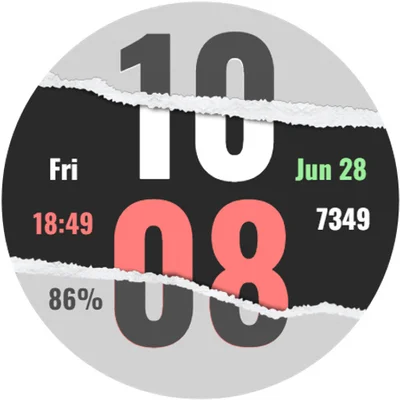
CC Torn Watch Face
Cave Club- 3 歳以上対象年齢
- カスタマイズカテゴリ
- 2026/9/10更新日
- ¥160価格
com.caveclub.tornのGoogle Play公式ページにリンクしています。最終確認:2026/11/24。
このアプリについて
Googleによる英語 (アメリカ合衆国)からの自動翻訳です。
破れた紙風の文字盤
このウォッチフェイスはWear OS向けに設計されています。
破れた紙のようなデジタルウォッチフェイス
★ 機能:
• 時刻(12/24時間)
• 曜日と日付 *
• 歩数 *
• 心拍数 *
• バッテリー残量 *
• コンプリケーション合計5箇所 *(自由に編集可能)
すべてのコンプリケーションはオープンで、自由に編集できます。
+ 10色のスタイルオプション
★ インストール時の注意事項:
//ウォッチがBluetooth経由でスマートフォンに正しく接続されていることを確認してください//
インストールのドロップダウンメニューからウォッチデバイスを選択してください。
Playストアアプリのドロップダウンメニューからインストール対象デバイスを選択し、「インストール」をタップしてください。
1. ウォッチがスマートフォンに正しく接続されていることを確認し、スマートフォンの電話アプリを開いて「タップして続行」をタップし、ウォッチの指示に従ってください。
数分後、ウォッチフェイスがインストールされます。インストールされたウォッチフェイスを選択できます。
スマートフォンにダウンロードされたアプリは、Wear OSウォッチへのウォッチフェイスのインストールと検索を容易にするためのプレースホルダーとしてのみ機能します。
または
2. または、PCのウェブブラウザからウォッチフェイスをインストールしてみてください。
- PCまたはMacのウェブブラウザ(Chrome、Firefox、Safariなど)でウォッチフェイスのリンクを開きます。
こちらのリンク:
https://play.google.com/store/apps/details?id=com.caveclub.torn
play.google.comでウォッチフェイスを検索するか、Playストアアプリからリンクを共有できます。
- 「他のデバイスにインストール」をクリックし、ウォッチを選択します。同じGoogleアカウントでログインしている必要があります。
ご購入前のご注意:
ご心配なく。Googleは、同じGoogle(Playストア)アカウントから購入されたコンテンツに対して、1回のみ課金する場合があります。 Playストアでは、お客様が既にフェイスウォッチアプリをご購入いただいたかどうかを確認するのに多少お時間がかかる場合があります。追加のご注文はGoogleから自動的に返金され、返金されます。
同じウォッチフェイスを二重に購入することはできません。
// ループに関する注意 //
お支払いループ(Playストアが再度お支払いを要求)で停止した場合、ウォッチとGoogle Playサーバー間の同期に問題がある可能性があります。ウォッチをスマートフォンから切断/再接続して、もう一度お試しください。この操作を素早く行うには、ウォッチを10秒間「機内モード」に設定してください。「ご購入前の注意」と「インストールに関する注意」をご覧ください。
すべてのCCウォッチフェイス:
https://play.google.com/store/apps/dev?id=8299637161404814943
Cave Club
原文を表示
This watch face is designed for Wear OS.
Ripped - Torn paper style digital watch face
★ Features:
• Time (12/24)
• Day & Date *
• Steps *
• Heart rate *
• Battery status *
• Total 5 Complication places *(Free to edit)
All complications are open- free to edit as you wish.
+ 10 color Style options
★ INSTALLATION NOTES:
//Make sure the watch is properly connected to the phone via Bluetooth//
You have to select your watch device from the install drop-down menu.
Select the target device in the Play Store app from the drop-down and tap on install.
1. Make sure the watch is properly connected to the phone, open the Phone App on the phone and tap on "Tap to continue" and follow instructions on watch.
After a few minutes, the watch face will be installed. You can choose the installed watch face.
App downloaded to your phone serves only as a placeholder to make it easier to install & find the watch face on your Wear OS watch.
or
2. Alternatively, try installing the watch face from a web browser on your PC.
- Open watch face link in a web browser (Chrome, Firefox, Safari...)
on PC or Mac.
This Link:
https://play.google.com/store/apps/details?id=com.caveclub.torn
You can search for the watch face in
play.google.com or share a link from the Play Store app.
- Click 'Install on more devices' and select your watch. You must be logged with the same Google Account.
Note before purchasing:
You don't have to worry , Google can charge you only one time for the content purchased from the same Google (Play Store) Account.
Sometimes the Play Store takes a little longer to confirm that you already bought the face watch app. Any additional order will be automatically refunded by Google, you will receive the money back.
There is no way to pay twice for the same watch face.
// LOOP Note //
If you're stuck at the payment loop (Play Store asks you to pay again), this could be a sync problem between your watch and Google Play server. You can try disconnecting / reconnecting the watch from your phone and try again. To do this quickly, set the "Airplane mode" on watch for 10 seconds. Please see "Note before purchasing" and "Installation Notes".
All CC Watch Faces:
https://play.google.com/store/apps/dev?id=8299637161404814943
Cave Club
データ セーフティ
このアプリが収集・共有するデータについて、Cave ClubがGoogle Playで申告している内容です。
- 第三者と共有されるデータはありません詳しくは、デベロッパーが共有を申告する方法についての説明をご覧ください
- データは収集されません詳しくは、デベロッパーが収集を申告する方法についての説明をご覧ください
開発元の連絡先
- メールclubnemanja@gmail.com
- プライバシーポリシーgithub.com
- 住所Prvomajska 4 11080 Beograd, Zemun Serbia
情報
- 提供元
- Cave Club
- カテゴリ
- カスタマイズ
- 更新日
- 2026/9/10
- リリース
- 2024/6/15
- 対象年齢
- 3 歳以上
- 価格
- ¥160
- パッケージ名
- com.caveclub.torn