Core Watch Face
thema広告を含む · アプリ内課金
- 3 歳以上対象年齢
- カスタマイズカテゴリ
- 2026/9/5更新日
- ¥190価格
fr.thema.wear.watch.coreのGoogle Play公式ページにリンクしています。最終確認:2026/11/18。
このアプリについて
Googleによる英語 (アメリカ合衆国)からの自動翻訳です。
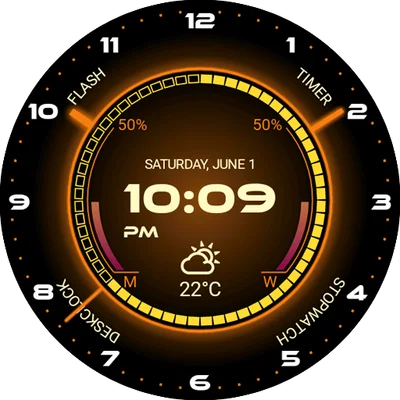
コア・ウォッチフェイスは高いカスタマイズ可能な対話型の時計の顔であります
Wear OS 用 Core ウォッチフェイス!
★ Core ウォッチフェイスの特徴 ★
- デザインカラーの選択
- 曜日と月
- ウォッチバッテリー
- モバイルバッテリー(スマートフォンアプリが必要です)
- 天気(スマートフォンアプリが必要です)
ウォッチフェイスの設定は、お使いのモバイル端末の「Wear OS」アプリで行えます。
ウォッチフェイスのプレビュー画面で歯車アイコンをタップすると、設定画面が表示されます!
★ 設定 ★
🔸Wear OS 2.X / 3.X / 4.X
- 時計とモバイルのデザインカラーを選択
- 心拍数の更新頻度を定義
- 天気の更新頻度を定義
- 天気の単位
- 12時間/24時間モード
- インタラクティブモードの継続時間を定義
- アンビエントモードの白黒とエコの輝度を選択
- 時間の先頭にゼロを表示するかどうかを選択
- エコ/シンプル白黒/フルアンビエントモードを切り替え
- データ:
+ 表示するインジケーターを変更
+ 最大8つのインジケーターを選択(1日の歩数、心拍数、Gmailの未読メールなど)
+ コンプリケーション(Wear OS 2.0 & 3.0)
- インタラクティブ機能
+ ウィジェットをタッチして詳細データにアクセス
+ ウィジェットをタッチして表示データを切り替え
+ 4つの位置で実行するショートカットを変更
+ 時計にインストールされているすべてのアプリケーションからショートカットを選択!
+ インタラクティブエリアの表示方法を選択
🔸Wear OS 6.X
- デザインカラーを選択
- 日付形式を選択
- ショートカットの表示/非表示
- 時計/モバイルバッテリーインジケーターの表示/非表示
- コンプリケーションデータ:
+ ウィジェットに表示するデータを設定します
+ ウィジェットをタッチすると、データアクティビティ(利用可能な場合)を開始します
- インタラクティブ性
+ ウィジェットをタッチして詳細データにアクセス
+ ショートカットを変更:時計にインストールされているすべてのアプリからショートカットを選択できます!
- その他
★ スマートフォンでの追加設定 ★
- 新しいデザインの通知
- サポートへのアクセス
- その他
★ インストール ★
🔸Wear OS 2.X / 3.X / 4.X
モバイル端末へのインストール後すぐに、時計に通知が表示されます。それをタップするだけで、ウォッチフェイスのインストールプロセスが開始されます。
何らかの理由で通知が表示されない場合は、お使いのウォッチに搭載されているGoogle Playストアからウォッチフェイスをインストールできます。ウォッチフェイス名で検索してください。
🔸Wear OS 6.X
ウォッチフェイスを管理するには、ウォッチアプリをインストールしてください。無料版が自動的にインストールされます。その後、ウォッチフェイスの右上にあるショートカットの「管理」ボタンを使用して、ウォッチフェイスを更新/アップグレードしてください。
★ その他のウォッチフェイス ★
PlayストアのWear OS用ウォッチフェイスコレクション(https://goo.gl/CRzXbS)をご覧ください。
** 問題やご質問がございましたら、悪い評価をする前に、お気軽にメール(英語またはフランス語)でご連絡ください。ありがとうございます!
ウェブサイト:https://www.themaapps.com/
YouTube:https://youtube.com/ThomasHemetri
Twitter:https://x.com/ThomasHemetri
Instagram:https://www.instagram.com/thema_watchfaces
原文を表示
Core Watch Face for Wear OS!
★ Features of Core Watch Face ★
- Choose design colors
- Day & Month
- Watch battery
- Mobile battery (requires phone app)
- Weather (requires phone app)
The settings of the watch face are located in the "Wear OS" app of your mobile.
Just hit the gear icon over the watch face preview and the settings screen will show up!
★ Settings ★
🔸Wear OS 2.X / 3.X / 4.X
- Choose design colors on watch & mobile
- Define heartbeat frequency refresh rate
- Define weather refresh rate
- Weather unit
- 12 / 24 hours mode
- Define interactive mode duration
- Choose the ambient mode b&w and eco luminosity
- Choose to display a leading zero on hours
- Switch between éco / simple b&w / full ambient mode
- Data:
+ Change the indicator to display
+ Choose between up to 8 indicators (Daily step count, Heartbeat frequency, Unread Email from Gmail, etc...)
+ Complication (wear 2.0 & 3.0)
- Interactivity
+ Access to detailed data by touching a widget
+ Switch the displayed data by touching a widget
+ Change the shortcut to execute on the 4 positions
+ Choose your shortcut among all applications installed on your watch!
+ Choose to display the interactive areas
🔸Wear OS 6.X
- Choose design colors
- Choose date format
- Display shortcuts or not
- Display watch / mobile battery indicators or not
- Complication data:
+ Set the data you want on the widgets
+ Touch the widgets to start the data activity if available
- Interactivity
+ Access to detailed data by touching a widget
+ Modify the shortcuts: choose your shortcut among all applications installed on your watch!
- ... and more
★ Additional settings on phone ★
- Notifications for new designs
- Access to support
- ... and more
★ Installation ★
🔸Wear OS 2.X / 3.X / 4.X
A notification will be displayed on your watch, right after your mobile installation. You just have to hit it to start the installation process of the watch face.
If the notification did not display for some reason, you can still install the watch face by using the Google Play Store available on your watch: just search the watch face by its name.
🔸Wear OS 6.X
Install the watch app to manage the watchface: the free version is automatically installed. Then use the "MANAGE" button in the top right shortcut of the watchface to update/upgrade your watch face.
★ More watch faces ★
Visit my watch faces collection for Wear OS on the Play Store at https://goo.gl/CRzXbS
** If you have any issues or questions, feel free to contact me by email (English or French language) before giving a bad rating. Thanks!
Website: https://www.themaapps.com/
Youtube: https://youtube.com/ThomasHemetri
Twitter: https://x.com/ThomasHemetri
Instagram: https://www.instagram.com/thema_watchfaces
データ セーフティ
このアプリが収集・共有するデータについて、themaがGoogle Playで申告している内容です。
- 第三者と共有されるデータはありません詳しくは、デベロッパーが共有を申告する方法についての説明をご覧ください
- このアプリは以下の種類のデータを収集することがありますアプリのアクティビティ、アプリの情報、パフォーマンス
- データは送信中に暗号化されます
- データを削除できません
新機能
2026/9/5
2.26.09.0521
- Fix startup crash
- Bump wear compatibility target to 35
- Bump mobile compatibility target to 36
- Fix wear app install status
- Bump library versions
Requires app update on both Watch & Mobile.
If you have any issue, please let me know by email at thema.apps@gmail.com
開発元の連絡先
- ウェブサイトthemaapps.com
- メールthema.apps@gmail.com
- プライバシーポリシーthemaapps.com
- 住所7 Rue Alfred Sisley 78370 Plaisir France
情報
- 提供元
- thema
- カテゴリ
- カスタマイズ
- 更新日
- 2026/9/5
- リリース
- 2015/9/11
- 対象年齢
- 3 歳以上
- 価格
- ¥190
- アプリ内課金
- ¥190~¥1,900/アイテム
- パッケージ名
- fr.thema.wear.watch.core