CV03 Split Focus Watch Face
Clear Vision Watch Faces- 3 歳以上対象年齢
- カスタマイズカテゴリ
- 2026/8/24更新日
- ¥220価格
com.clearvision.watchfaces.CV02SplitFocusのGoogle Play公式ページにリンクしています。最終確認:2026/11/13。
このアプリについて
Googleによるポーランド語 (ポーランド)からの自動翻訳です。
読みやすいWear OSダイヤル、大きな時表示、編集可能な3つのコンプリケーション。
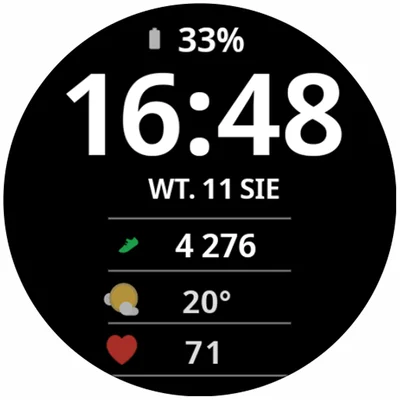
CV03 Split Focusは、Wear OSウォッチ向けのクリアなデジタルウォッチフェイスで、重要な情報に素早くアクセスできるよう設計されています。
大きな時表示、高コントラスト、そして編集可能な3つの広々としたコンプリケーションにより、一目で情報がはっきりと確認できます。シンプルなレイアウトは煩雑さを軽減し、最も重要な情報に集中できるようにします。
主な機能
• 大きなデジタル時表示
• 見やすい24時間表示
• 日付
• バッテリー残量
• 編集可能な3つの大きなWear OSコンプリケーション
• 時刻、日付、バッテリー残量の色を変更可能
• 常時表示(AOD)
• ブラックAMOLEDバックライト
• 高コントラスト
• ミニマルデザイン
• 低消費電力
編集可能な3つのコンプリケーション
ウォッチフェイス下部の3つのフィールドは、編集可能なWear OSコンプリケーションです。コンプリケーションは、時計とインストール済みのアプリで共有されるデータに割り当てることができます。例えば、以下のようなデータです。
• 歩数、
• 心拍数、
• 天気、
• 日の出または日の入り、
• 次のイベント、
• アラーム、
• バッテリー残量、
• アプリのショートカット、
• その他の互換性のあるデータ。
コンプリケーションの利用可否は、時計のモデル、Wear OSのバージョン、およびインストールされているアプリによって異なります。
コンプリケーションの編集方法
1. ウォッチフェイスを長押しします。
2. 「カスタマイズ」または「編集」を選択します。
3. 「コンプリケーション」セクションに移動します。
4. 目的の項目をタップします。
5. リストから指標またはショートカットを選択します。
6. 設定を確認します。
オプション名は、時計のメーカーによって異なる場合があります。
色のカスタマイズ
時刻、日付、バッテリー残量の色を変更できます。
色を選択するには:
1. ウォッチフェイスを長押しします。2. 「カスタマイズ」を選択します。
3. スタイルまたはカラー設定に移動します。
4. バリエーションを選択し、設定を確定します。
常時表示ディスプレイ
常時表示ディスプレイは、視認性と低消費電力を考慮して簡素化および最適化されています。常時表示ディスプレイの明るさと表示は、ウォッチモデルとシステム設定によって異なる場合があります。
コンプリケーションに関する重要なお知らせ
コンプリケーションの表示、利用可能性、および機能は、プロバイダー、ウォッチメーカー、およびWear OSのバージョンによって異なります。
一部のアプリでは、以下の動作が見られる場合があります。
• データの表示形式が異なる、
• 略称を使用する、
• すべてのフィールドタイプをサポートしていない、
• カラーアイコンを提供しない、
• データが利用できない場合、フィールドが空白になる。
これはWear OSまたはコンプリケーションプロバイダーの機能であり、CV03 Split Focusウォッチフェイスのバグではありません。
互換性
このウォッチフェイスは、Wear OSを搭載した円形スマートウォッチ(Samsung Galaxy Watch、Google Pixel Watch、OnePlus Watch、Xiaomi Watch、OPPO Watch、TicWatchなど)向けに設計されています。
Tizenを搭載したSamsung製スマートウォッチ、またはその他のOSを搭載したデバイスには対応していません。
トラブルシューティング
インストール後、ウォッチフェイスが表示されない場合
ウォッチフェイスが正しくインストールされているか確認してください。ウォッチフェイス一覧を開き、「新しいウォッチフェイスを追加」を選択して、「CV03 Split Focus」を探してください。必要に応じてウォッチを再起動してください。
コンプリケーションが利用できない、または表示されない場合
適切なアプリがウォッチにインストールされ、必要な権限が付与されているか確認してください。プロバイダーが該当項目をサポートしていない場合は、別のコンプリケーションを選択してください。
天気が表示されない場合
インターネット接続、位置情報、天気アプリの権限を確認してください。別の天気プロバイダーを選択することもできます。
心拍数や歩数が更新されない場合
ヘルスケアアプリの権限と、適切なコンプリケーションプロバイダーが利用可能かどうかを確認してください。
スマートフォンのバッテリー残量やその他のコンプリケーションをウォッチフェイスに追加したい場合は、スマートフォンとWear OSウォッチに「Phone Battery Complication」アプリをインストールしてください。その後、ウォッチフェイスの設定で、アプリからコンプリケーションフィールドとデータを選択します。
アプリのダウンロードはこちら:
https://play.google.com/store/apps/details?id=com.weartools.phonebattcomp
Clear Visionについて
Clear Vision Watch Facesは、視認性を最大限に高め、大きな数字、高コントラスト、そして日常使いの快適さを追求してデザインされたWear OSウォッチフェイスのコレクションです。
詳細情報
https://arturteam.github.io/clearvision/
原文を表示
CV03 Split Focus is a clean, high-contrast digital watch face for Wear OS, designed for maximum readability and quick access to essential information.
The large 24-hour clock, clear date and focused layout make the watch face easy to read at a glance. Three editable complications let you personalize the lower section with useful data and shortcuts.
KEY FEATURES
• Large digital 24-hour clock
• Clear date display
• Battery level
• 3 editable Wear OS complications
• Customizable color of the clock, date and battery value
• Always-On Display
• High-contrast design
• Clean and focused layout
• Optimized for round Wear OS watches
EDITABLE COMPLICATIONS
The three fields below the date are fully editable Wear OS complications.
Depending on your watch and installed applications, they can display:
• Steps
• Heart rate
• Weather
• Sunrise or sunset time
• Calendar events
• Alarm
• Battery information
• Health and fitness data
• Application shortcuts
• Other compatible Wear OS data
HOW TO EDIT COMPLICATIONS
1. Touch and hold the watch face.
2. Select Customize.
3. Open the Complications section.
4. Select one of the three editable fields.
5. Choose the information or shortcut you want to display.
6. Confirm your selection.
Available complications depend on the watch manufacturer, Wear OS version and applications installed on your watch.
COLOR CUSTOMIZATION
You can change the color of:
• The digital clock
• The date
• The battery percentage value
To change the color:
1. Touch and hold the watch face.
2. Select Customize.
3. Open the Colors or Styles section.
4. Choose your preferred color theme.
The names of customization options may vary between watch models.
TIME FORMAT
CV03 Split Focus uses the 24-hour time format. A 12-hour AM/PM format is not currently available.
ALWAYS-ON DISPLAY
Always-On Display provides a simplified view while keeping the time clear and easy to read when the watch is inactive.
Its appearance and availability may depend on your watch model and system settings.
IMPORTANT INFORMATION
The appearance and behavior of complications are controlled by Wear OS and their data providers.
Some applications may:
• Display shortened names
• Present information differently
• Not support every complication type
• Leave a field empty when compatible data is unavailable
This is a limitation of Wear OS or the selected provider, not the CV03 Split Focus watch face.
COMPATIBILITY
Compatible with Wear OS smartwatches supporting Watch Face Format, including:
• Samsung Galaxy Watch
• Google Pixel Watch
• OnePlus Watch
• Xiaomi Watch 2 and Watch 2 Pro
• OPPO Watch
• TicWatch
• Other compatible Wear OS watches
Not compatible with Samsung watches using the older Tizen operating system.
TROUBLESHOOTING
A complication field is empty:
Select a different complication provider. The chosen application may not provide compatible data.
Weather is not displayed:
Check your internet connection, location permissions and weather application settings.
Heart rate is not updating:
Make sure your health application has the required permissions and heart-rate measurement is enabled.
The color does not change:
Open the watch face customization menu and select a different color style.
Want to show your phone’s battery level and other extra complications on your watch face? Install Phone Battery Complication on both your phone and Wear OS watch. Then customize the watch face, select a complication slot, and choose data from the app.
Get the app:
https://play.google.com/store/apps/details?id=com.weartools.phonebattcomp
ABOUT CLEAR VISION
Clear Vision Watch Faces is a collection of minimalist Wear OS watch faces created for maximum readability, strong contrast and comfortable everyday use.
Our goal is to present essential information in a clear and practical way — without unnecessary visual clutter.
MORE INFORMATION
https://arturteam.github.io/clearvision/
データ セーフティ
このアプリが収集・共有するデータについて、Clear Vision Watch FacesがGoogle Playで申告している内容です。
- 第三者と共有されるデータはありません詳しくは、デベロッパーが共有を申告する方法についての説明をご覧ください
- データは収集されません詳しくは、デベロッパーが収集を申告する方法についての説明をご覧ください
新機能
2026/8/24
First production release of Clear Vision CV03 Split Focus. A readable digital Wear OS watch face with large time, high contrast, complications, and AOD.
開発元の連絡先
- ウェブサイトarturteam.github.io
- メールarturteam1@gmail.com
- プライバシーポリシーarturteam.github.io
- 住所Dmowskiego 6/42 95-070 Aleksandrów Łódzki Poland
情報
- 提供元
- Clear Vision Watch Faces
- カテゴリ
- カスタマイズ
- 更新日
- 2026/8/24
- リリース
- 2026/8/24
- 対象年齢
- 3 歳以上
- 価格
- ¥220
- パッケージ名
- com.clearvision.watchfaces.CV02SplitFocus