Day Progress Elegant WatchFace
Open Sourcerer- 3 歳以上対象年齢
- カスタマイズカテゴリ
- 2026/10/30更新日
- ¥170価格
com.opensourcerer.watchface.premium.dayprogresselegantのGoogle Play公式ページにリンクしています。最終確認:2026/11/14。
このアプリについて
Googleによる英語 (イギリス)からの自動翻訳です。
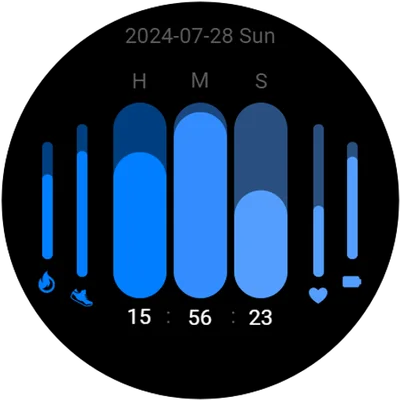
さまざまな特徴であなたの一日の進歩を示すユニークな文字盤!
時間と日々の進捗状況を表示する、ユニークでモダンなウォッチフェイスで、周りの人とは一味違うスタイルを演出しましょう!
機能:
- 8種類のカラフルなテーマ
- 2つのカスタマイズ可能なコンプリケーションスロット
- バッテリー残量、1日の歩数目標、1日の消費カロリー目標、心拍数、経過時間(時、分、秒)の進捗状況表示
- デジタル時刻表示
- スマートフォンの時刻表示設定に準拠した12時間/24時間表示
- 充電中/バッテリー残量低下表示
- 高心拍数表示
- 見やすく効率的な常時表示ディスプレイ
- ほぼすべてのWear OSスマートウォッチに対応
表示情報:
- 時刻(経過時間表示付き)(12時間/24時間表示)
- 日付
- 曜日
- バッテリー残量(充電中/バッテリー残量低下表示付き)
- 1日の歩数目標の進捗状況
- 心拍数(高心拍数表示付き)
- 1日の消費カロリー目標の進捗状況
- 2つのカスタマイズ可能なコンプリケーションスロット
Wear OS搭載スマートウォッチに対応。
スマートフォンでも
このウォッチフェイスは専用アプリでご利用いただけます。すべてのスタイルを実物大で確認でき、カメラや写真を通して自分の手首に装着したイメージもご覧いただけます。ウォッチの設定を変更する前に、各設定の機能を確認したり、壁紙を設定したり、ウォッチのPlayストアでワンタップでウォッチフェイスを開くこともできます。インストール、カスタマイズ、設定ミスなど、手順を追ったガイドで簡単にサポートします。Open Sourcererの全コレクションをご覧になり、新しいウォッチフェイスの情報もチェックしてください。
原文を表示
Stand out from the crowd with a unique and modern watch face that shows time and your daily progress!
Features:
- 8 colorful themes
- 2 customizable complication slots
- Progress indicators for battery, daily step goal count, daily burned calories goal, heart rate, hours, minutes and seconds passed
- Digital time display
- 12H/24H time formats respecting smartphone time format settings
- Charging / low battery indicator
- High heart rate indicator
- Clean and efficient Always On Display
- Compatible with almost all Wear OS smartwatches
Displayed information:
- Time (with elapsed time progress) (12H/24H formats)
- Date
- Weekday
- Battery level progress (with additional charging and low battery indicators)
- Daily step goal count progress
- Heart rate progress (with high heart rate indicator)
- Daily burned calories goal progress
- 2 customizable complication slots
For smartwatches with Wear OS operating system.
On your phone, too
This watch face comes with a phone app. See it in every style, at its true size, and on your own wrist through the camera or a photo. Find out what each setting does before you change it on the watch, set the matching wallpapers, and open the face in your watch’s Play Store in a tap. Step-by-step guides help you install it, customise it and put things right. Browse the whole Open Sourcerer collection, and hear about new faces.
データ セーフティ
このアプリが収集・共有するデータについて、Open SourcererがGoogle Playで申告している内容です。
- 第三者と共有されるデータはありません詳しくは、デベロッパーが共有を申告する方法についての説明をご覧ください
- データは収集されません詳しくは、デベロッパーが収集を申告する方法についての説明をご覧ください
- Play ファミリー ポリシーの遵守に努めています
新機能
2026/10/30
This watch face now has a phone app. See it in every style, at its true size and on your own wrist through the camera. Find out what each setting does, set the matching wallpapers, and open the face in your watch’s Play Store in a tap. Browse the whole Open Sourcerer collection, and hear about new faces.
開発元の連絡先
- メールOpenSourcerer.help@gmail.com
- プライバシーポリシーsites.google.com
- 住所Brolių g. 10 02152 Vilnius Lithuania
情報
- 提供元
- Open Sourcerer
- カテゴリ
- カスタマイズ
- 更新日
- 2026/10/30
- リリース
- 2024/7/16
- 対象年齢
- 3 歳以上
- 価格
- ¥170
- パッケージ名
- com.opensourcerer.watchface.premium.dayprogresselegant