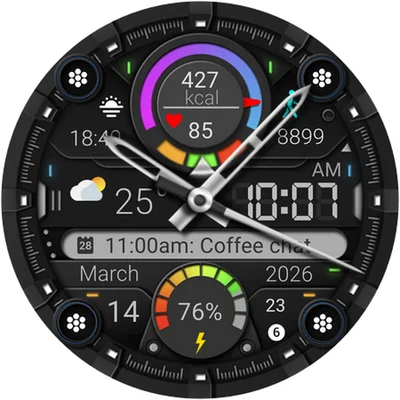
DB064 Midnight Black
DB Watch Face- 3 歳以上対象年齢
- カスタマイズカテゴリ
- 2026/8/15更新日
- ¥260価格
com.watchfacestudio.db064midnightblackのGoogle Play公式ページにリンクしています。最終確認:2026/11/21。
このアプリについて
Googleによる英語 (アメリカ合衆国)からの自動翻訳です。
Wear OSを搭載したスマートウォッチ専用に設計されています。
DB064 ミッドナイトブラック ウォッチフェイスは、Wear OSレベル34以上またはWear OS 5以上を搭載したすべてのWear OSデバイス(Samsung Galaxy Watch 4、5、6、7など)に対応しています。
機能:
- デジタルおよびアナログ時計
- 曜日、日付、月、年
- 12時間/24時間表示
- 歩数と歩数進捗状況
- 心拍数と心拍数インジケーター
- 消費カロリー情報
- バッテリー残量
- 編集可能なコンプリケーション2種類
- 編集可能なアプリショートカット4種類
- 複数の背景とテーマ
- アナログ針6本
- AODモード
カスタマイズ方法:
1. ウォッチ画面を長押しします。
2. [カスタマイズ]ボタンをタップします。
3. [カスタマイズ]ボタンが表示されるまで右にスワイプします。
4. [カスタマイズ]ボタンをタップすると、利用可能なデータを使ってコンプリケーションをカスタマイズできます。
インストール後、ウォッチフェイスがウォッチ画面に自動的に適用されない場合は、ウォッチから手動で適用する必要があります。
原文を表示
DB064 Midnight Black Watch Face compatible with all Wear OS devices with Level 34+ or Wear OS 5+ ( Samsung Galaxy Watch 4, 5, 6, 7 and others).
Features :
- Digital and Analog Clock
- Day, Date, Month and Year
- 12H/24H Format
- Step Count and Step Progress
- Heart Rate and heart indicator
- Calories info
- Battery Status
- 2 Editable Complications
- 4 Editable Apps Shortcut
- Different background & themes
- 6 analog hand
- AOD Mode
To customize :
1. Press and hold the watch display
2. Tap the Customize button
3. swipe to the right until you find customize button
3. Tap the customize buton and you can customize the complications with any available data to suit your needs.
If the watch face doesn’t automatically apply to your watch screen after installation, you need to apply it manually from your watch.
データ セーフティ
このアプリが収集・共有するデータについて、DB Watch FaceがGoogle Playで申告している内容です。
- 第三者と共有されるデータはありません詳しくは、デベロッパーが共有を申告する方法についての説明をご覧ください
- データは収集されません詳しくは、デベロッパーが収集を申告する方法についての説明をご覧ください
開発元の連絡先
- メールdbwatchface@gmail.com
- プライバシーポリシーdbwatchface.wordpress.com
- 住所Komp. Velodrom Kav. 19 RT 004 RW 021 Kel. Padasuka Kec. Cimahi Tengah Cimahi Jawa Barat 40526 Indonesia
情報
- 提供元
- DB Watch Face
- カテゴリ
- カスタマイズ
- 更新日
- 2026/8/15
- リリース
- 2026/3/14
- 対象年齢
- 3 歳以上
- 価格
- ¥260
- パッケージ名
- com.watchfacestudio.db064midnightblack