Digest Watch Face
amoledwatchfaces™- 3 歳以上対象年齢
- 仕事効率化カテゴリ
- 2026/8/4更新日
- ¥160価格
com.amoledwatchfaces.digestのGoogle Play公式ページにリンクしています。最終確認:2026/11/12。
このアプリについて
Googleによる英語 (アメリカ合衆国)からの自動翻訳です。
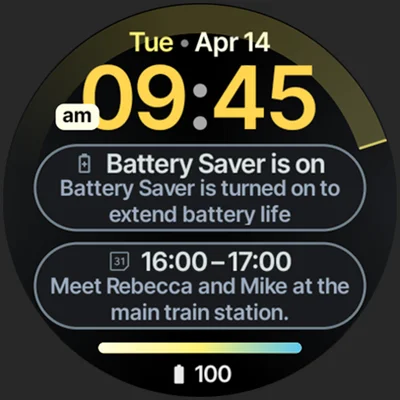
一目で最大限の情報を確認できる、2つの大型カスタムコンプリケーションスロット。
Wear OS 4+ デバイス専用
ウォッチフェイスフォーマット4対応
amoledwatchfaces.com
1つ購入するともう1つ無料
amoledwatchfaces.com/bogo
カスタムコンプリケーションアプリ
amoledwatchfaces.com/apps
機能
• ウォッチフェイスフォーマット4
• 最大3行のテキストを表示できるLONG_TEXTコンプリケーションスロット×2
• ウォッチフェイスのバリエーション(Wear OS 5以降)
• カスタムコンプリケーションスロット×5
• 対応コンプリケーションタイプ:SHORT_TEXT、LONG_TEXT、RANGED_VALUE、GOAL_PROGRESS、MONOCHROMATIC_ICON
• 電話通知コンプリケーション対応*
• 高度に最適化
• 電話とウォッチのバッテリーコンプリケーション両方に対応*
• オプションの秒表示
• 多言語対応
• 真の黒背景
• 3種類の常時表示スタイル
• バッテリーに優しい
• Android Studioで開発
• アニメーションAODトランジション(Wear OS 6以降)
• コンプリケーションのテキストサイズ自動調整
* 電話バッテリーコンプリケーションが必要ですアプリ
https://play.google.com/store/apps/details?id=com.weartools.phonebattcomp
ユーザー設定
• プライマリーテーマ (60種類以上)
• セカンダリーテーマ (60種類以上)
• ターシャリテーマ (60種類以上)
• センターチップアウトライン (2種類)
• デジタル時計フォント (2種類)
• デジタル時計の色合い (5種類) *Wear OS 6以降
• バッジ右側 (3種類)
• AOD (3種類)
• カスタムコンプリケーション (8種類)
• 秒表示 (オン/オフ)
• グロー (オン/オフ)
• 午前/午後バッジ (オン/オフ)
• 先頭ゼロ (オン/オフ)
インストールとトラブルシューティングガイド
amoledwatchfaces.com/guide
問題報告やサポート依頼は、サポートアドレスまでお送りください。
support@amoledwatchfaces.com
ライブサポートやディスカッションには、Telegramグループにご参加ください。
t.me/amoledwatchfaces
ニュースレター
amoledwatchfaces.com/contact#newsletter
amoledwatchfaces™ - Awf
原文を表示
Only for Wear OS 4+ devices
Powered by Watch Face Format 4
amoledwatchfaces.com
BUY ONE GET ONE OFFER
amoledwatchfaces.com/bogo
CUSTOM COMPLICATION APPS
amoledwatchfaces.com/apps
FEATURES
• Watch Face Format 4
• 2x LONG_TEXT complication slot with up to 3 lines of text
• watch face flavors (Wear OS 5+)
• 5 custom complication slots
• supported complication types - SHORT_TEXT, LONG_TEXT, RANGED_VALUE, GOAL_PROGRESS, MONOCHROMATIC_ICON
• phone notifications complication support*
• highly optimized
• dual phone & watch battery complication support*
• optional seconds indicator
• multilanguage
• true black background
• three always-on display styles
• battery friendly
• created in Android Studio
• animated AOD transition (Wear OS 6+)
• adaptive complication text size
* requires Phone Battery Complication app
https://play.google.com/store/apps/details?id=com.weartools.phonebattcomp
USER CONFIGURATIONS
• Primary Theme (60+)
• Secondary Theme (60+)
• Tertiary Theme (60+)
• Center Chip Outline (2x)
• Digital Clock Font (2x)
• Digital Clock Tint (5x) *Wear OS 6+
• Badge Right (3x)
• AOD (3x)
• Custom Complications (8x)
• Seconds Indicator (Toggle)
• Glow (Toggle)
• Am-Pm Badge (Toggle)
• Leading Zero (Toggle)
Installation and troubleshooting guide
amoledwatchfaces.com/guide
Please send any issues reports or help requests to our support address
support@amoledwatchfaces.com
Join our Telegram group for live support and discussion
t.me/amoledwatchfaces
Newsletter
amoledwatchfaces.com/contact#newsletter
amoledwatchfaces™ - Awf
データ セーフティ
このアプリが収集・共有するデータについて、amoledwatchfaces™がGoogle Playで申告している内容です。
- 第三者と共有されるデータはありません詳しくは、デベロッパーが共有を申告する方法についての説明をご覧ください
- データは収集されません詳しくは、デベロッパーが収集を申告する方法についての説明をご覧ください
新機能
2026/8/4
v1.0.3
• complication slot adjustments
v1.0.2
• replaced seconds badge with 'Badge Right' customization (seconds, unread notifications count)
• text + image layout improved
v1.0.1
• initial release
開発元の連絡先
- ウェブサイトamoledwatchfaces.com
- メールsupport@amoledwatchfaces.com
- プライバシーポリシーamoledwatchfaces.com
- 住所51 Nižný Kručov 09301 Nižný Kručov Slovakia
情報
- 提供元
- amoledwatchfaces™
- カテゴリ
- 仕事効率化
- 更新日
- 2026/8/4
- リリース
- 2026/4/14
- 対象年齢
- 3 歳以上
- 価格
- ¥160
- パッケージ名
- com.amoledwatchfaces.digest