Digital Basic 4 Wear OS 5+
OQ Watchfaces- 3 歳以上対象年齢
- カスタマイズカテゴリ
- 2026/7/28更新日
- ¥190価格
com.watchfacestudio.Digitalbasic4のGoogle Play公式ページにリンクしています。最終確認:2026/11/13。
このアプリについて
Googleによる英語 (アメリカ合衆国)からの自動翻訳です。
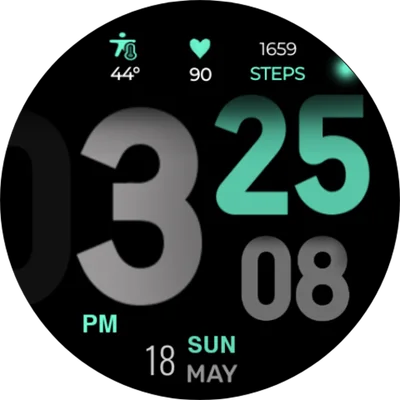
大きくて読みやすい文字を備えたデジタルウォッチフェイス。 12/24H両方対応
=============================================================
このWEAR OS 5+用ウォッチフェイスは、12時間制/24時間制の両方に対応しています。24時間制では、時間の先頭の0が網掛けで表示されます。12時間制または24時間制を選択するには、接続されたスマートフォンの設定メニューの日付と時刻から変更するだけで、同期されます。
お知らせ:望ましくない状況を避けるため、ウォッチフェイスをダウンロードする前後に必ずこの内容をお読みください。アウトラインフォントは、バッテリー節約のため、AODディスプレイでのみ表示されます。メインディスプレイでは使用できず、メインディスプレイで選択することもできません。
=============================================================
このWEAR OS用ウォッチフェイスは、現在も開発中の最新リリースのSamsung Galaxy Watch Face Studio V 1.9.5で作成されており、Samsung Watch Ultra、Samsung Watch 4 Classic、Samsung Watch 5 Pro、Tic Watch 5 Proでテスト済みです。その他すべてのWear OS 5以降のデバイスにも対応しています。他のウォッチでは一部の機能の動作が若干異なる場合があります。
b. Watch Playストアで二重支払いをしないでください。購入内容が同期されるまでお待ちください。同期を待ちたくない場合は、ヘルパーアプリを使用せずにウォッチに直接インストールする方法を選択できます。インストールボタンのドロップダウンメニューで、接続されたウォッチを選択してください。ウェアラブルデバイスが表示されます。スマートフォンのPlayストアアプリから接続されたウォッチにインストールする際は、必ずこの方法を選択してください。
以下の機能が利用可能です:
1. 月のテキストをタップすると、時計のアラーム設定メニューが開きます。
2. 日付のテキストをタップすると、時計のカレンダーアプリが開きます。
3. 日付のテキストをタップすると、カレンダーアプリが開きます。
4. ハートアイコンまたはテキストをタップすると、Samsung Healthアプリで時計の心拍数モニターカウンターが開きます。
5. カスタマイズメニューから、時計のメイン画面にカスタマイズ可能なコンプリケーションが2つあります。
6. カスタマイズメニューから、時計のメイン画面にカスタマイズ可能な非表示のコンプリケーションが3つあります。
原文を表示
=======================================================
This watch face for WEAR OS 5+ supports 12/24H Both Versions. Leading Zero of Hours is Shaded in 24H. To select 12 or 24 H mode just simple change it on your connected phone from date and Time in settings menu of your phone and it will sync same
NOTICE: READ THIS ALWAYS BEFORE AND AFTER DOWNLOADING OUR WATCH FACE TO AVOID ANY SITUATION YOU DON'T LIKE. THE OUTLINE FONT IS ONLY ON AOD DISPLAY TO SAVE BATTERY. IT IS NOT FOR MAIN DISPLAY AND IS NOT SELECT-ABLE FOR MAIN DISPLAY.
=======================================================
This watch face for WEAR OS has been made in latest released Samsung Galaxy Watch face studio V 1.9.5 which is still evolving and has been tested on Samsung Watch Ultra ,Samsung Watch 4 Classic , Samsung Watch 5 Pro, and Tic watch 5 Pro. It also supports all other wear OS 5+ devices. Some feature experience can be slightly different on other watches.
b. DO NOT PAY TWICE FROM WATCH PLAY STORE . Wait for your purchases to be synced or if you do not want to wait you can always select direct install to watch method without even helper app.Just ensure that you select your connected watch in install button drop down menu where your wearable device will be shown.Just simply ensure that when you install from phone play store app to your connected watch.
Following features are available:-
1. Tap on Month text to open watch alarm settings menu.
2. Tap on Date Text will open Calendar app on watch.
3. Tapping Date text will open calendar app.
4. Tap Heart icon or text reading to open watch Heart Rate Monitor counter in Samsung Health App.
5. 2x Customizable Complications for main Display of watch face available via customization menu.
6. 3x Invisible Customizable Complications for main Display of watch face via customization menu.
データ セーフティ
このアプリが収集・共有するデータについて、OQ WatchfacesがGoogle Playで申告している内容です。
- 第三者と共有されるデータはありません詳しくは、デベロッパーが共有を申告する方法についての説明をご覧ください
- データは収集されません詳しくは、デベロッパーが収集を申告する方法についての説明をご覧ください
新機能
2026/7/28
V1.1.3 Change Log:-
1.Watch face bundle updated to Target min SDK 34 as required by Google with latest Samsung Watch face Studio Version 1.9.5 Sep 2025 Release.
2.Watch face Companion App updated with latest Google Android Studio Narwhal 2025.3.1 as required by Google.
3. Shadows alignments on always on display corrected.
開発元の連絡先
- メールosmanqadir78@gmail.com
- プライバシーポリシーsites.google.com
- 住所House no 307 Sector C Street 12 Askari X Lahore Cantt, 54810 Pakistan
情報
- 提供元
- OQ Watchfaces
- カテゴリ
- カスタマイズ
- 更新日
- 2026/7/28
- リリース
- 2021/11/12
- 対象年齢
- 3 歳以上
- 価格
- ¥190
- パッケージ名
- com.watchfacestudio.Digitalbasic4