Digital Calculator
MW Design- 3 歳以上対象年齢
- ツールカテゴリ
- 2026/10/14更新日
- ¥460価格
com.mwdesign.digitalcalculatorのGoogle Play公式ページにリンクしています。最終確認:2026/11/23。
このアプリについて
Googleによる英語 (イギリス)からの自動翻訳です。
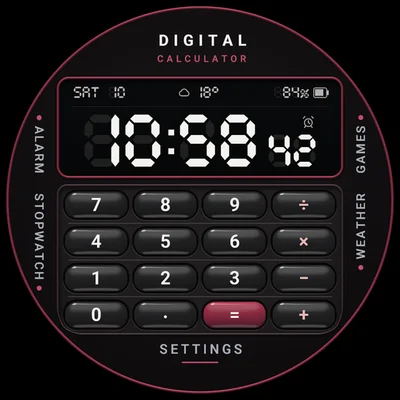
Wear OS対応の電卓付きスマートウォッチ:電卓、アラーム、ストップウォッチ、天気予報、ゲーム機能を搭載。
デジタル電卓機能を使えば、Wear OSウォッチがクラシックな電卓ウォッチに早変わり。
ウォッチの機能
• 電卓:10桁の数字を入力できる本格的なキーパッド。画面をダブルタップするとリセットできます。
• アラーム:繰り返し設定可能なアラーム(音と振動機能付き)。
• ストップウォッチ:100分の1秒単位まで計測可能、ラップタイムも計測できます。
• 時報。
• 天気:現在、今後5日間、そして今後24時間の天気予報。
• アーケード:レトロスタイルのミニゲーム6種類。スネーク、ナンバースライド2048、タワースタック、ブロックドロップ、エイリアンアサルト、メテオフィールド。ハイスコアはウォッチに保存されます。
• 5種類のカラーバリエーション:バーガンディヘリテージ、ミッドナイトチタン、シャンパンゴールド、レトロシルバー、クラシックLCD。
• コンプリケーション:アラーム(設定した時刻)または時報(オン/オフ)を、コンプリケーション対応のウォッチフェイスに追加できます。タップするとアプリが開きます。
電卓、アラーム、ストップウォッチ、チャイム、ゲームは、スマートフォンなしで時計単体で動作します。天気予報にはインターネット接続と現在地情報が必要です。
スマートフォンアプリ
スマートフォンアプリはコンパニオンアプリです。時計を検出し、各ゴール地点を表示し、選択したゴール地点を時計に送信し、よくある質問に回答します。時計アプリを使用するためにスマートフォンアプリは必須ではありません。
ウォッチフェイス
専用のウォッチフェイスは別売りです。「デジタル電卓ウォッチフェイス」をダウンロードしてください。キーパッド上部の大型LCDに時刻が表示され、アプリで選択したゴール地点が表示されます。ウォッチフェイスのキーをタップすると、そのキーが押された状態で電卓が開きます。アプリは「デジタル電卓ウォッチフェイスリンク」コンプリケーションを通じて、アラーム時刻とゴール地点をウォッチフェイスに送信します。
Wear OS 3以降が必要です。ウォッチフェイスはWear OS 5以降が必要です。
原文を表示
Digital Calculator turns your Wear OS watch into a classic calculator watch.
ON YOUR WATCH
• Calculator: ten digits on a proper keypad. Double-tap the display to clear.
• Alarm: one alarm with repeat days, sound and vibration.
• Stopwatch: to a hundredth of a second, with laps.
• Hourly chime.
• Weather: conditions now, the next five days and the next 24 hours.
• Arcade: six small games in a retro style. Snake, Number Slide 2048, Tower Stack, Block Drop, Alien Assault and Meteor Field, with your best scores kept on the watch.
• Five finishes: Burgundy Heritage, Midnight Titanium, Champagne Gold, Retro Silver and Classic LCD.
• Complications: add Alarm (the time your alarm is set for) or Hourly chime (on or off) to any watch face that supports complications. Tap one to open the app.
The calculator, alarm, stopwatch, chime and games work on the watch alone, without your phone. Weather needs a connection and your approximate location.
ON YOUR PHONE
The phone app is a companion. It finds your watch, shows each finish, sends the one you pick to the watch and answers common questions. It is not needed to use the watch app.
THE WATCH FACE
The matching watch face is a separate download: Digital Calculator Watch Face. It shows the time on a large LCD above the keypad, and follows the finish you choose in the app. Tapping a key on the face opens the calculator with that key pressed. The app passes your alarm time and finish to the face through its "Digital Calculator face link" complication.
Needs Wear OS 3 or later. The watch face needs Wear OS 5 or later.
データ セーフティ
このアプリが収集・共有するデータについて、MW DesignがGoogle Playで申告している内容です。
- このアプリはサードパーティと以下の種類のデータを共有することがありますユーザー ID
- このアプリは以下の種類のデータを収集することがありますユーザー ID
- データは送信中に暗号化されます
- データを削除できません
新機能
バージョン 1.0.1 · 2026/10/14
Fixes a crash that stopped the app from opening.
開発元の連絡先
- メールmwdesignhelp@gmail.com
- プライバシーポリシーsites.google.com
- 住所33 Huntspill Street LONDON SW17 0AA United Kingdom
情報
- 提供元
- MW Design
- カテゴリ
- ツール
- バージョン
- 1.0.1
- 更新日
- 2026/10/14
- リリース
- 2026/10/10
- 対象年齢
- 3 歳以上
- 価格
- ¥460
- パッケージ名
- com.mwdesign.digitalcalculator