Digital Pilot Watch Face
CMDN Studio- 3 歳以上対象年齢
- カスタマイズカテゴリ
- 2026/10/28更新日
- ¥350価格
gil.cmdnstudio.pilot02のGoogle Play公式ページにリンクしています。最終確認:2026/11/13。
このアプリについて
Googleによる英語 (アメリカ合衆国)からの自動翻訳です。
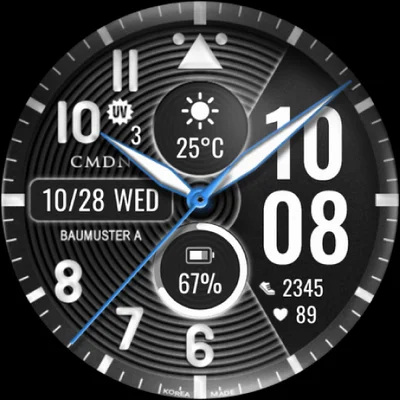
リアルな高級感あふれるデジタルパイロットウォッチの文字盤:針と大きな数字。
リアルなパイロットダイヤルは、針で時を表す形状と、大きな数字で正確な時刻を同時に読み取ることができます。
12時位置の三角形と2つのドットは、パイロットダイヤルの定番マーカーで、
ダイヤル上部の位置を一目で把握できるようになっています。アラビア数字が繊細なミニッツトラックを囲み、
針は同心円状のカットが施されたダイヤル上を滑らかに動きます。時と分は右側に大きな数字で表示されています。
12時位置に天気予報、
6時位置にバッテリー残量表示、そして日付は1つの窓に表示されています。
12種類のプリセット
- ブラックダイヤル、ライムグリーンの数字、ブルーの縁取り針
- ブラックダイヤル、イエローの数字、シルバーの針
- ブラックダイヤル、グリーンの数字、サンドカラーの針
- カーキダイヤル、グリーンの数字、サンドカラーの針
- サンドカラーダイヤル、サンドカラーの数字、ブラックの針
- ブラックダイヤル、オレンジの数字、ブルーの縁取り針
- ブラックダイヤル、ブルーの数字、ブルーの縁取り針
- ネイビーダイヤル、ブルーの数字、シルバーの針
- サンドカラーダイヤル、ピンクの数字、ブラックの針
- ブラックダイヤル、ホワイトの数字、ブルーの縁取り針
- ブラックダイヤル、ホワイトの数字とクリーム色の数字、ブルーの縁取り針
- ブラックダイヤル、サンドカラーの数字、ブラックの針、オレンジの秒針
自分だけのオリジナルデザインを作成
プリセットから始めて、ウォッチフェイスの設定で各パーツを個別に変更できます。
- 文字盤:ブラック、カーキ、サンド、ネイビー
- アウターリングとサブダイヤルのフレーム:ブラック、カーキ、サンド、ネイビー
- 数字、バッテリーリング、UVバッジのカラーセット。数字と蓄光塗料の色も合わせて13種類。
ライム、イエロー、グリーン、ピンク、サンド、オレンジ、
ブルー、シアン、ホワイト、クリーム、オールサンドバージョンもご用意。
- 時針と分針:ブルーエッジ、シルバー、サンド、ブラック
- 秒針:ブルー、シルバー、サンド、ブラック、ブルー(オレンジ)、ブラック(オレンジ)
機能
- 12時位置に三角形のマーカーが付いたパイロットダイヤル。「BAUMUSTER A」の刻印入り。
- アナログ針と大型デジタル表示を同じダイヤル上に配置。
- 時計の設定に応じて、12時間表示または24時間表示のデジタル時刻表示。
- 時計の設定に応じて、摂氏または華氏で温度と天気アイコンを表示。
- リングゲージでバッテリー残量を表示。
- 1日の歩数と心拍数を表示。
-月、日、曜日を表示する日付表示窓(曜日は常に英語表記)
- UVインデックス
- 日付表示窓、天気、デジタル時刻、バッテリーリングに4つの隠しアプリショートカット
- 手首を傾けると文字盤の質感が変化する
- 暗い場所では秒針が隠れるグリーンの蓄光表示
- スマートフォンアプリ:[時計にインストール]をタップして、時計でPlayストアを開きます
アプリショートカット
日付表示窓、天気、デジタル時刻、バッテリーリングに4つの隠しアプリショートカットがあります。
文字盤を長押しして[カスタマイズ]を開き、
コンプリケーションに移動して、各スロットにアプリを設定します。アプリを変更するには、
まずスロットをクリアしてから、再度アプリショートカットを選択してください。
- 広告なし
- アプリ内課金なし
- データ収集なし
韓国製(CMDN)
原文を表示
A realistic pilot dial that reads two ways at once — hands for the shape of the hour,
large digits for the exact time.
The triangle and twin dots at twelve are the classic pilot marker, there so
the top of the dial is found at a glance. Arabic numerals ring a fine minute
track, the hands sweep over a dial cut with concentric rings, and the hour
and minute stand in large figures on the right. Weather sits at twelve,
battery at six, and the date runs in a single window.
TWELVE PRESETS
- Black dial, lime digits, blue-edged hands
- Black dial, yellow digits, silver hands
- Black dial, green digits, sand hands
- Khaki dial, green digits, sand hands
- Sand dial, sand digits, black hands
- Black dial, orange digits, blue-edged hands
- Black dial, blue digits, blue-edged hands
- Navy dial, blue digits, silver hands
- Sand dial, pink digits, black hands
- Black dial, white digits, blue-edged hands
- Black dial, white digits and cream numerals, blue-edged hands
- Black dial, sand digits, black hands, orange seconds
BUILD YOUR OWN
Start from a preset, then change any part on its own in the watch face
settings.
- Dial: black, khaki, sand or navy
- Outer ring and subdial frames: black, khaki, sand or navy
- Colour set for the digits, battery ring and UV badge, with the numerals
and lume to match: thirteen sets — lime, yellow, green, pink, sand, orange,
blue, cyan and white, with cream and all-sand versions
- Hour and minute hands: blue-edged, silver, sand or black
- Seconds hand: blue, silver, sand, black, blue with orange, or black with
orange
FEATURES
- Pilot dial with the triangle marker at twelve, marked BAUMUSTER A
- Analog hands and a large digital readout on the same dial
- Digital time in 12- or 24-hour format, following your watch setting
- Temperature with a weather condition icon, in Celsius or Fahrenheit
following your watch setting
- Battery percentage with a ring gauge
- Daily step count and heart rate
- Date window showing month, day and weekday, with the weekday always in English
- UV index
- Four hidden app shortcuts on the date window, the weather, the digital time and the battery ring
- Dial texture that shifts as you tilt your wrist
- Green lume view for low light, with the seconds hand hidden
- Phone app: tap "Install on watch" to open the Play Store on your watch
APP SHORTCUTS
Four app shortcuts sit hidden on the date window, the weather, the digital
time and the battery ring. Touch and hold the watch face, open Customize and
go to the complications to set an app for each slot. To change an app, clear
the slot first, then choose an app shortcut again.
- No ads
- No in-app purchases
- No data collected
Made in Korea by CMDN.
データ セーフティ
このアプリが収集・共有するデータについて、CMDN StudioがGoogle Playで申告している内容です。
- 第三者と共有されるデータはありません詳しくは、デベロッパーが共有を申告する方法についての説明をご覧ください
- データは収集されません詳しくは、デベロッパーが収集を申告する方法についての説明をご覧ください
新機能
2026/10/28
Shortcuts to the Wearable and Watch apps now sit at the bottom of the screen, and the app tells you when a new version is ready. On the watch face, the temperature shows as a number with a degree sign, without °C or °F, and a dash when there is no weather.
開発元の連絡先
- ウェブサイトwatch.cmdn.pro
- メールcmdnstudio@naver.com
- プライバシーポリシーwatch.cmdn.pro
- 住所수색로 100 DMC 래미안 e편한세상, 103동 403호 서대문구, 서울특별시 03709 South Korea
情報
- 提供元
- CMDN Studio
- カテゴリ
- カスタマイズ
- 更新日
- 2026/10/28
- リリース
- 2026/9/30
- 対象年齢
- 3 歳以上
- 価格
- ¥350
- パッケージ名
- gil.cmdnstudio.pilot02