Digital watch face D28
VG Faces- 3 歳以上対象年齢
- カスタマイズカテゴリ
- 2026/8/10更新日
- ¥240価格
com.watchfacestudio.d28のGoogle Play公式ページにリンクしています。最終確認:2026/11/14。
このアプリについて
Googleによる英語 (アメリカ合衆国)からの自動翻訳です。
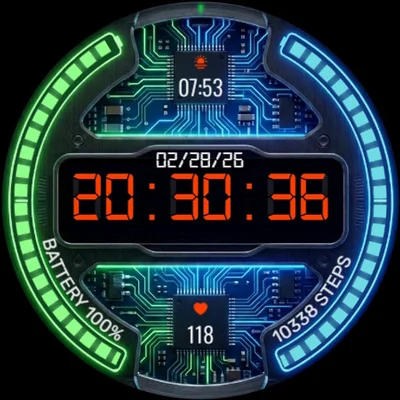
ハイテク Wear OS デジタル フェイス: 光る回路、色、カスタム ショートカット。
D28:ハイテクデジタルウォッチフェイス
Wear OS対応のD28デジタルウォッチフェイスで、未来へ踏み出しましょう。精巧に作られた回路基板デザインと光るLEDディスプレイを備えたこのウォッチフェイスは、テクノロジー愛好家、プログラマー、そして先進的なハードウェアの美しさを愛するすべての人に最適です。
主な機能:
• ハイテク回路デザイン: ユニークなマザーボードの背景と、秒針付きの鮮明なデジタル時計表示を組み合わせました。
• 光るカラーテーマ: 回路とデータを照らす、鮮やかなカラーの組み合わせからお選びいただけます。
• デュアルエッジインジケーター: バッテリー残量と歩数を示す、大きくダイナミックなアークバーで、毎日のアクティビティとデバイスの状態を簡単に確認できます。
• 2つのカスタマイズ可能なコンプリケーション: 上部と下部の「チップ」データスロットをカスタマイズして、必要な情報を表示します。
• ミニマリストAOD: 常時表示モードでは、背景を濃い黒に切り替えながら、重要なデジタル時刻をはっきりと見やすくすることで、バッテリー寿命を延ばします。
スマートショートカットシステム:
内蔵のタップゾーンで時計を素早く操作:
• 時刻をタップ: アラームを起動
• 日付をタップ: カレンダーを起動
インストール:
1. 時計がBluetooth接続されていることを確認します。
2. Google PlayストアからD28をダウンロードします。
3. 時計の画面を長押しし、画面の端までスクロールして「D28」を選択して適用します。
互換性:
以下のデバイスを含む Wear OS 5 以上 のデバイス専用に設計されています:
• Samsung Galaxy Watch 7 および Ultra 以降
• Google Pixel Watch 3、4 以降
• Wear OS 5 以降を搭載したその他の新しいデバイス。
原文を表示
D28: High-Tech Digital Watch Face
Step into the future with the D28 Digital Watch Face for Wear OS. Featuring a highly detailed circuit board design and glowing LED-style digits, this face is perfect for tech enthusiasts, programmers, and anyone who loves an advanced hardware aesthetic.
Key Features:
• High-Tech Circuit Design: A unique motherboard background paired with a crisp digital clock display that includes seconds.
• Glowing Color Themes: Customize your look! Choose from a variety of vibrant color combinations to illuminate the circuits and data.
• Dual Edge Indicators: Easily monitor your daily activity and device status with large, dynamic arc bars for your Battery percentage and Step count.
• 2 Customizable Complications: Personalize the top and bottom "chip" data slots to show the information you need most.
• Minimalist AOD: The Always-On Display mode preserves battery life by switching to a deep black background while keeping the essential digital time clearly visible.
Smart Shortcut System:
Navigate your watch faster with integrated tap zones:
• Tap Time: Opens Alarm
• Tap Date: Opens Calendar
Installation:
1. Ensure your watch is connected via Bluetooth.
2. Download D28 from the Google Play Store.
3. Long-press your watch screen, scroll to the end, and select "D28" to apply.
Compatibility:
Designed exclusively for Wear OS 5+ devices, including:
• Samsung Galaxy Watch 7 & Ultra or newer
• Google Pixel Watch 3, 4 or newer
• And other newer devices running Wear OS 5 or higher.
データ セーフティ
このアプリが収集・共有するデータについて、VG FacesがGoogle Playで申告している内容です。
- 第三者と共有されるデータはありません詳しくは、デベロッパーが共有を申告する方法についての説明をご覧ください
- データは収集されません詳しくは、デベロッパーが収集を申告する方法についての説明をご覧ください
- Play ファミリー ポリシーの遵守に努めています
新機能
2026/8/10
app-release
開発元の連絡先
- メールvolder83@gmail.com
- プライバシーポリシーsites.google.com
- 住所W.-I.-Lenin-Straße 51 19370 Parchim Germany
情報
- 提供元
- VG Faces
- カテゴリ
- カスタマイズ
- 更新日
- 2026/8/10
- リリース
- 2026/2/27
- 対象年齢
- 3 歳以上
- 価格
- ¥240
- パッケージ名
- com.watchfacestudio.d28