Digital Watch Face D36
VG Faces- 3 歳以上対象年齢
- カスタマイズカテゴリ
- 2026/9/28更新日
- ¥290価格
com.vgfaces.d36のGoogle Play公式ページにリンクしています。最終確認:2026/11/13。
このアプリについて
Googleによる英語 (アメリカ合衆国)からの自動翻訳です。
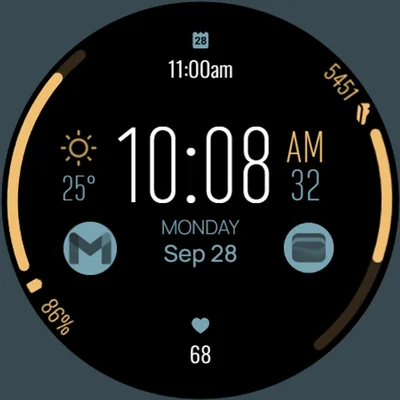
クリーンなWear OSデジタルフェイス:時刻、日付、天気、スマートショートカット、AOD
• プログレスバーの色が正しくない場合:ウォッチフェイスのカスタマイズ設定で、同じデータタイプ(例:歩数またはカロリー)を再度選択してください。(Fitbitを搭載したPixel Watchでよく発生します)
• 天気予報が更新されない/表示されない場合:別のウォッチフェイスに切り替えてから、元のウォッチフェイスに戻してください。
注:これらはGoogle/Wear OSのシステムバグであり、ウォッチフェイス開発者では修正できません。
Wear OS用D36デジタルウォッチフェイス
Wear OS用D36デジタルウォッチフェイスでスマートウォッチをアップグレードしましょう。この洗練されたモダンなデジタルデザインは、ミニマルな美しさと豊富なカスタマイズオプション、そして日常的に必要な機能を完璧にバランスよく兼ね備えた、すっきりとしたレイアウトを提供します。
主な機能:
• 高度な時刻表示: デジタル時計はスマートフォンの12時間/24時間表示設定と自動的に同期し、12時間表示モードではAM/PM表示、そして切り替え可能な先頭ゼロ(デフォルトで有効)を備えています。
• カスタマイズ可能な6つのコンプリケーション: 最も重視する情報を表示する専用の6つのスロット(スタイリッシュなプログレスバー2つを含む)で、ディスプレイを完全にコントロールできます。
• 詳細な天気: 文字盤に完璧に統合された直感的な昼夜天気アイコンで現在の状況を確認できます。
• 完全な日付: 曜日と月を含む完全な日付表示でスケジュールを管理できます。
• 豊富なカラーテーマ: 鮮やかなカラーテーマの豊富なセレクションから選択して、簡単にスタイルに合わせることができます。
• 常時表示: 洗練されたミニマルでバッテリー効率の良いAODモードでバッテリー寿命を管理できます。
インストール:
1. 時計がBluetoothで接続されていることを確認します。
2. Google Playストアからダウンロードします。
3. 時計の画面を長押しし、一番下までスクロールして、適用するウォッチフェイスを選択します。
互換性:
以下のデバイスを含む Wear OS 5+ デバイス専用に設計されています。
• Samsung Galaxy Watch 8 & Ultra
• Google Pixel Watch 4
• その他 Wear OS 5 以降を搭載した新しいデバイス。
原文を表示
• Incorrect progress bar color: Re-select the same data type (e.g., Steps or Calories) in the watch face customize settings. (Common on Pixel Watch with Fitbit)
• Weather not updating/showing: Switch to another watch face and then switch back.
Note: These are known Google/Wear OS system bugs that watch face developers cannot fix.
D36 Digital Watch Face for Wear OS
Upgrade your smartwatch with the D36 Digital Watch Face for Wear OS. This sleek, modern digital design offers a clean layout perfectly balancing minimalist aesthetics with extensive customization and essential everyday functionality.
Key Features:
• Advanced Time Display: The digital clock automatically syncs with your phone's 12/24-hour settings, featuring an AM/PM indicator for 12-hour mode and a toggleable leading zero (enabled by default).
• 6 Customizable Complications: Take full control of your display with six dedicated slots, including two stylish progress bars, for the information you value most.
• Detailed Weather: View current conditions with intuitive Day & Night weather icons perfectly integrated into the dial.
• Complete Date: Keep track of your schedule with a full date display that includes the day of the week and the month.
• Extensive Color Themes: Match your style effortlessly by choosing from a large selection of vibrant color themes.
• Always On Display: Manage your battery life with a sleek, minimalist, and battery-efficient AOD mode.
Installation:
1. Ensure your watch is connected via Bluetooth.
2. Download from the Google Play Store.
3. Long-press your watch screen, scroll to the end, and select the watch face to apply.
Compatibility:
Designed exclusively for Wear OS 5+ devices, including:
• Samsung Galaxy Watch 8 & Ultra
• Google Pixel Watch 4
• And other newer devices running Wear OS 5 or higher.
データ セーフティ
このアプリが収集・共有するデータについて、VG FacesがGoogle Playで申告している内容です。
- 第三者と共有されるデータはありません詳しくは、デベロッパーが共有を申告する方法についての説明をご覧ください
- データは収集されません詳しくは、デベロッパーが収集を申告する方法についての説明をご覧ください
- Play ファミリー ポリシーの遵守に努めています
新機能
2026/9/28
開発元の連絡先
- メールvolder83@gmail.com
- プライバシーポリシーsites.google.com
- 住所W.-I.-Lenin-Straße 51 19370 Parchim Germany
情報
- 提供元
- VG Faces
- カテゴリ
- カスタマイズ
- 更新日
- 2026/9/28
- リリース
- 2026/9/28
- 対象年齢
- 3 歳以上
- 価格
- ¥290
- パッケージ名
- com.vgfaces.d36