Digital Watchface D17
VG Faces- 3 歳以上対象年齢
- カスタマイズカテゴリ
- 2026/11/13更新日
- ¥260価格
com.watchfacestudio.d17のGoogle Play公式ページにリンクしています。最終確認:2026/11/22。
このアプリについて
Googleによる英語 (アメリカ合衆国)からの自動翻訳です。
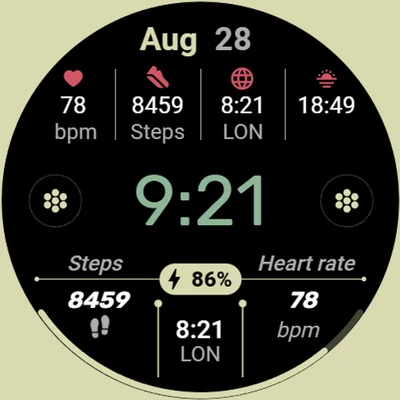
最新のWear OSデジタルフェイス:7つのコンプリケーション、カラーテーマ、2つのAODモード
D17 デジタルウォッチフェイス for Wear OS
Wear OS 用 D17 デジタルウォッチフェイスでスマートウォッチの可能性を最大限に引き出しましょう。パワーユーザー向けに設計されたこのモダンでデータ豊富なレイアウトは、スタイルや読みやすさを損なうことなく、一目で膨大な量の情報を提供します。
主な機能:
• 7 つのカスタマイズ可能なコンプリケーション: 7 つの専用スロットを使用して、最も重要な指標、アプリのショートカット、毎日の目標をすべて追跡し、ディスプレイを完全に制御できます。
• 包括的な毎日のデータ: 日と月、毎日の歩数カウンター、心拍数、現在のバッテリー状態が、鮮明なデジタルデザインに直接統合されて、すぐに確認できます。
• さまざまなカラーテーマ: データを際立たせる、さまざまな鮮やかなアクセントカラーから選択して、簡単にスタイルに合わせることができます。
• 2 つの常時表示モード: 2 つの異なる AOD オプションでバッテリー寿命を管理できます。情報表示付きの暗めのモードでは、コンプリケーションが保持されます。また、デジタル時刻のみを表示する最小限のモードもあります。
スマートショートカット システム:
直感的なクイック アクセス タップ ゾーンでスマートウォッチを簡単に操作できます。
• アラーム
• カレンダー
• バッテリー ステータス
インストール:
1. ウォッチが Bluetooth で接続されていることを確認します。
2. Google Play ストアからダウンロードします。
3. ウォッチの画面を長押しし、一番下までスクロールして、適用するウォッチ フェイスを選択します。
互換性:
Wear OS 5+デバイス専用に設計されています。対応デバイスには以下が含まれます。
• Samsung Galaxy Watch 8 & Ultra
• Google Pixel Watch 4
• その他、Wear OS 5以降を搭載した最新デバイス。
原文を表示
D17 Digital Watch Face for Wear OS
Maximize your smartwatch's potential with the D17 Digital Watch Face for Wear OS. Designed for power users, this modern, data-rich layout delivers an incredible amount of information at a single glance without sacrificing style or readability.
Key Features:
• 7 Customizable Complications: Take full control of your display with seven dedicated slots to track all your most important metrics, app shortcuts, and daily goals.
• Comprehensive Daily Data: Instantly view the Day and Month, your daily Steps Counter, Heart rate, and current Battery status integrated directly into the sharp digital design.
• Different Color Themes: Match your style effortlessly by choosing from a wide variety of vibrant accent colors that highlight your data.
• 2 Always On Display Modes: Manage your battery life with two distinct AOD options: an informative dimmed mode that retains your complications, and a minimal mode displaying only the digital time.
Smart Shortcut System:
Navigate your smartwatch effortlessly with intuitive quick access tap zones:
• Alarm
• Calendar
• Battery status
Installation:
1. Ensure your watch is connected via Bluetooth.
2. Download from the Google Play Store.
3. Long-press your watch screen, scroll to the end, and select the watch face to apply.
Compatibility:
Designed exclusively for Wear OS 5+ devices, including:
• Samsung Galaxy Watch 8 & Ultra
• Google Pixel Watch 4
• And other newer devices running Wear OS 5 or higher.
データ セーフティ
このアプリが収集・共有するデータについて、VG FacesがGoogle Playで申告している内容です。
- 第三者と共有されるデータはありません詳しくは、デベロッパーが共有を申告する方法についての説明をご覧ください
- データは収集されません詳しくは、デベロッパーが収集を申告する方法についての説明をご覧ください
- Play ファミリー ポリシーの遵守に努めています
新機能
2026/11/13
開発元の連絡先
- メールvolder83@gmail.com
- プライバシーポリシーsites.google.com
- 住所W.-I.-Lenin-Straße 51 19370 Parchim Germany
情報
- 提供元
- VG Faces
- カテゴリ
- カスタマイズ
- 更新日
- 2026/11/13
- リリース
- 2025/8/19
- 対象年齢
- 3 歳以上
- 価格
- ¥260
- パッケージ名
- com.watchfacestudio.d17