Digital Watchface D3
VG Faces- 3 歳以上対象年齢
- カスタマイズカテゴリ
- 2026/8/6更新日
- ¥210価格
com.watchfacestudio.vg_d3のGoogle Play公式ページにリンクしています。最終確認:2026/11/19。
このアプリについて
Googleによる英語 (アメリカ合衆国)からの自動翻訳です。
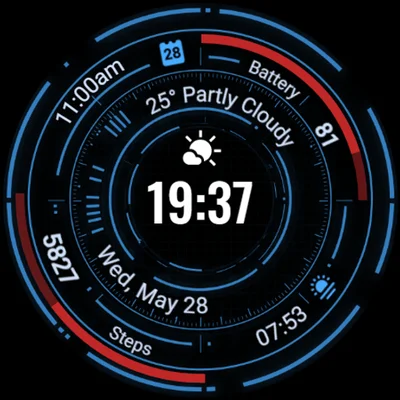
洗練されたモダンなWear OSデジタルフェイス:天気、2つのコンプリケーション、2つのAODモード
D3 デジタルウォッチフェイス for Wear OS
Wear OS 用の D3 デジタルウォッチフェイスでスマートウォッチをアップグレードしましょう。この洗練されたモダンなデザインは、独自の同心円状のレイアウトを採用し、中央のデジタル時刻をエレガントなデータリングで囲み、クリーンで高度な技術美学を実現しています。
主な機能:
• 同心円状のデジタルレイアウト: 美しく整理された軌道状のデータリングに囲まれた中央の時刻を簡単に読み取ることができます。
• 包括的な天気データ: 統合された昼夜アイコン、現在の気温、正確な天気状況で最新情報を入手できます。
• 健康とデバイス統計: 毎日の歩数と現在のバッテリーレベルをダイヤル上で直接追跡できます。
• 2 つのカスタマイズ可能なコンプリケーション: 最も重視する情報のための 2 つの専用スロットでディスプレイをパーソナライズできます。
• さまざまな色: 鮮やかなカラーテーマの幅広い選択肢から選んで、簡単にスタイルに合わせられます。
• 2 つの常時表示モード: データリングを保持する情報表示の暗いモードと、時間のみを表示する最小限のモードという 2 つの異なる AOD オプションで、バッテリー寿命を完全に制御できます。
インストール:
1. 時計が Bluetooth で接続されていることを確認します。
2. Google Play ストアからダウンロードします。
3. 時計の画面を長押しし、一番下までスクロールして、適用するウォッチフェイスを選択します。
互換性:
以下を含む Wear OS 5+ デバイス専用に設計されています。
• Samsung Galaxy Watch 8 & Ultra
• Google Pixel Watch 4
•また、Wear OS 5以降を搭載したその他の新しいデバイスにも対応しています。
原文を表示
D3 Digital Watch Face for Wear OS
Upgrade your smartwatch with the D3 Digital Watch Face for Wear OS. This strict and modern design features a unique concentric layout, framing your central digital time with elegant data rings for a clean, highly technical aesthetic.
Key Features:
• Concentric Digital Layout: Easily read the time at the center, surrounded by beautifully organized orbital data rings.
• Comprehensive Weather Data: Stay informed with integrated Day & Night icons, current temperature, and precise weather conditions.
• Health & Device Stats: Track your daily Steps and current Battery level directly on the dial.
• 2 Customizable Complications: Personalize your display with two dedicated slots for the information you value most.
• Different Colors: Match your style effortlessly by choosing from a wide variety of vibrant color themes.
• 2 Always On Display Modes: Take full control of your battery life with two distinct AOD options: an informative dimmed mode that retains your data rings, and a minimal mode displaying only the time.
Installation:
1. Ensure your watch is connected via Bluetooth.
2. Download from the Google Play Store.
3. Long-press your watch screen, scroll to the end, and select the watch face to apply.
Compatibility:
Designed exclusively for Wear OS 5+ devices, including:
• Samsung Galaxy Watch 8 & Ultra
• Google Pixel Watch 4
• And other newer devices running Wear OS 5 or higher.
データ セーフティ
このアプリが収集・共有するデータについて、VG FacesがGoogle Playで申告している内容です。
- 第三者と共有されるデータはありません詳しくは、デベロッパーが共有を申告する方法についての説明をご覧ください
- データは収集されません詳しくは、デベロッパーが収集を申告する方法についての説明をご覧ください
- Play ファミリー ポリシーの遵守に努めています
新機能
2026/8/6
開発元の連絡先
- メールvolder83@gmail.com
- プライバシーポリシーsites.google.com
- 住所W.-I.-Lenin-Straße 51 19370 Parchim Germany
情報
- 提供元
- VG Faces
- カテゴリ
- カスタマイズ
- 更新日
- 2026/8/6
- リリース
- 2025/5/13
- 対象年齢
- 3 歳以上
- 価格
- ¥210
- パッケージ名
- com.watchfacestudio.vg_d3