Digital Watchface D6
VG Faces- 3 歳以上対象年齢
- カスタマイズカテゴリ
- 2026/8/6更新日
- ¥160価格
com.watchfacestudio.d6のGoogle Play公式ページにリンクしています。最終確認:2026/11/13。
このアプリについて
Googleによる英語 (アメリカ合衆国)からの自動翻訳です。
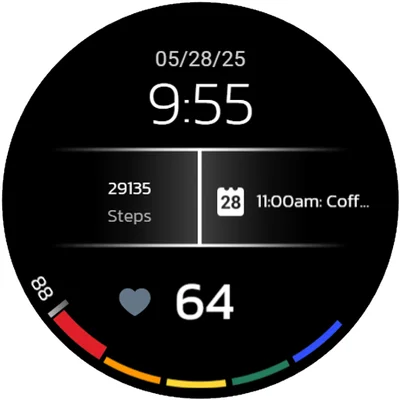
ミニマルなWear OSデジタルフェイス:洗練されたデザイン、3つのコンプリケーション、2つのAODモード
D6 デジタルウォッチフェイス for Wear OS
Wear OS 用の D6 デジタルウォッチフェイスでスマートウォッチをアップグレードしましょう。この洗練されたミニマルなデザインは、完璧なバランスのデジタルレイアウトを提供し、優れた視認性と、日常のニーズに合わせたモダンで厳格な美学を実現します。
主な機能:
• クリーンなデジタルレイアウト: 鮮明でモダンなタイポグラフィと高度に整理されたインターフェースにより、時刻と日付を簡単に読み取ることができます。
• 3 つのカスタマイズ可能なコンプリケーション: 重要なデータ用の 3 つの専用スロットでディスプレイをパーソナライズし、一目で確認できるように完璧に中央に配置されます。
• バッテリーアークインジケーター: 下端に沿ってスタイリッシュなカラーコード付きのプログレスバーでスマートウォッチの電力を追跡します。
• さまざまな色: 分割線とバッテリーアークを強調するさまざまな鮮やかなアクセントカラーテーマから選択して、簡単にスタイルに合わせることができます。
• 2 つの常時表示モード: 2 つの異なる AOD オプションでバッテリー寿命を管理します。情報を提供する薄暗いモードでは、コンプリケーションが保持され、最小限のモードではデジタル時間のみが表示されます。
インストール:
1. 時計が Bluetooth で接続されていることを確認します。
2. Google Play ストアからダウンロードします。
3. 時計の画面を長押しし、一番下までスクロールして、適用するウォッチフェイスを選択します。
互換性:
Wear OS 5+ デバイス専用に設計されています。以下が含まれます。
• Samsung Galaxy Watch 8 & Ultra
• Google Pixel Watch 4
•また、Wear OS 5以降を搭載したその他の新しいデバイスにも対応しています。
原文を表示
D6 Digital Watch Face for Wear OS
Upgrade your smartwatch with the D6 Digital Watch Face for Wear OS. This sleek, minimalist design offers a perfectly balanced digital layout, providing excellent readability and a modern, strict aesthetic for your daily needs.
Key Features:
• Clean Digital Layout: Easily read the Time and Date with crisp, modern typography and a highly organized interface.
• 3 Customizable Complications: Personalize your display with three dedicated slots for essential data, perfectly centered for quick glances.
• Battery Arc Indicator: Keep track of your smartwatch's power with a stylish, color-coded progress bar along the bottom edge.
• Different Colors: Match your style effortlessly by choosing from a variety of vibrant accent color themes that highlight the dividing lines and battery arc.
• 2 Always On Display Modes: Manage your battery life with two distinct AOD options: an informative dimmed mode that retains your complications, and a minimal mode displaying only the digital time.
Installation:
1. Ensure your watch is connected via Bluetooth.
2. Download from the Google Play Store.
3. Long-press your watch screen, scroll to the end, and select the watch face to apply.
Compatibility:
Designed exclusively for Wear OS 5+ devices, including:
• Samsung Galaxy Watch 8 & Ultra
• Google Pixel Watch 4
• And other newer devices running Wear OS 5 oder higher.
データ セーフティ
このアプリが収集・共有するデータについて、VG FacesがGoogle Playで申告している内容です。
- 第三者と共有されるデータはありません詳しくは、デベロッパーが共有を申告する方法についての説明をご覧ください
- データは収集されません詳しくは、デベロッパーが収集を申告する方法についての説明をご覧ください
- Play ファミリー ポリシーの遵守に努めています
新機能
2026/8/6
開発元の連絡先
- メールvolder83@gmail.com
- プライバシーポリシーsites.google.com
- 住所W.-I.-Lenin-Straße 51 19370 Parchim Germany
情報
- 提供元
- VG Faces
- カテゴリ
- カスタマイズ
- 更新日
- 2026/8/6
- リリース
- 2025/5/27
- 対象年齢
- 3 歳以上
- 価格
- ¥160
- パッケージ名
- com.watchfacestudio.d6