Easter Bunny
StarWatchfaces- 3 歳以上対象年齢
- カスタマイズカテゴリ
- 2026/8/21更新日
- ¥350価格
com.starwatchfaces.easterbunnyのGoogle Play公式ページにリンクしています。最終確認:2026/11/24。
このアプリについて
Googleによる英語 (アメリカ合衆国)からの自動翻訳です。
素晴らしいアニメーションの風景、10 のかわいい背景画像、その他多数!
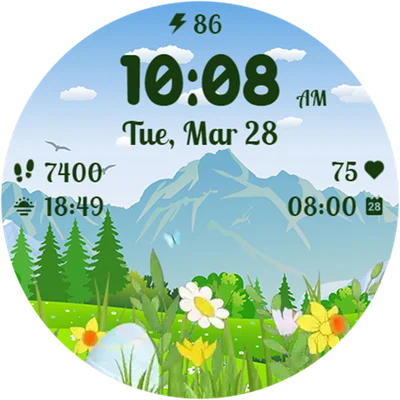
Wear OS 用の Easter Bunny ウォッチフェイスをご紹介します。スマートウォッチのリニューアルと新たな始まりの季節を祝うのに最適な方法です。美しくデザインされたアニメーションの風景で、イースターの喜びと興奮をあなたの手首にもたらします。
当社の文字盤には、風に吹かれる花や羽ばたく蝶の中に隠れるかわいいウサギが描かれており、楽しく魅惑的な雰囲気を作り出しています。 10 種類の背景から選択できるので、気分やスタイルに合わせてウォッチフェイスをカスタマイズできます。
さらに、ウォッチフェイスには 2 つのカスタマイズ可能なコンプリケーションが付属しており、重要な情報に一目でアクセスできます。心拍数、歩数、デジタル時刻、日付をすべて手首に付けて簡単に追跡できます。
当社の Easter Bunny ウォッチフェイスは、品質と細部への配慮を念頭に置いて設計されており、完璧でシームレスなユーザー エクスペリエンスを保証します。イースターエッグ探しに出かけるときも、ただ春の気候を楽しむときも、当社の文字盤は完璧な相棒です。
今すぐ Easter Bunny ウォッチフェイスをダウンロードして、イースターの喜びと興奮をあなたの手首にもたらしてください。
ウォッチフェイスをカスタマイズするには:
1. ディスプレイを長押しします。
2. [カスタマイズ] ボタンをタップして、背景画像、時間の色、アニメーション、日付と統計、表示するコンプリケーションのデータ、およびカスタム ショートカットで起動するアプリを変更します。
ウォッチフェイスを好みに合わせてカスタマイズします。最も好きな背景を選択し、時間、日付、統計情報に最適なカラーテーマを選択し、2 つのカスタマイズ可能なコンプリケーションに必要なデータを選択し、2 つのカスタマイズ可能なショートカットを使用して起動する希望のアプリを選択し、ウォッチフェイスの使用をお楽しみください。ストアの掲載情報のスクリーンショットを確認して、ショートカットがどこに配置されているかをよく理解してください。
希望のショートカットを表示するには、ディスプレイを長押しし、カスタマイズ ボタンを押して、2 つのカスタマイズ可能なショートカット スロットから希望のショートカットを選択します。
BOGO プロモーション - 1 つ購入すると 1 つプレゼント
ウォッチフェイスをご購入いただき、購入レシートを bogo@starwatchfaces.com までお送りいただき、コレクションから受け取りたいウォッチフェイスの名前をお知らせください。最大72時間以内に無料クーポンコードを受け取ります。
忘れないでください。携帯電話のコンパニオン アプリを使用して、当社が作成した他の素晴らしいウォッチフェイスを見つけてください。
その他のウォッチフェイスについては、Play ストアの開発者ページをご覧ください。
楽しむ!
原文を表示
Introducing the Easter Bunny watchface for Wear OS - the perfect way to celebrate the season of renewal and new beginnings on your smartwatch! With our beautifully designed and animated scenery, you can bring the joy and excitement of Easter to your wrist.
Our watchface features a cute bunny, hiding around amidst windblown flowers and fluttering butterflies, creating a delightful and enchanting ambiance. With 10 different backgrounds to choose from, you can customize your watchface to suit your mood and style.
In addition, our watchface comes with two customizable complications, allowing you to access important information at a glance. Keep track of your heart rate, steps, digital time, and date - all conveniently located on your wrist.
Our Easter Bunny watchface is designed with quality and attention to detail in mind, ensuring that you have a flawless and seamless user experience. Whether you're heading out for an Easter egg hunt or just enjoying the spring weather, our watchface is the perfect companion.
Download the Easter Bunny watchface today and bring the joy and excitement of Easter to your wrist!
To customize the watchface:
1. Press and hold on the display
2. Tap the Customize button to change the background image, the colors for time, the animation, date and stats, data for complications to display and the apps to launch with the custom shortcuts.
Customize the watchface as you wish: choose the background you like the most, choose the best looking color theme for time, date and stats, select the data you want for the 2 customizable complications, select your desired apps to launch using the 2 customizable shortcuts and enjoy using the watchface! Check the screenshots from the store listing to better understand where the shortcuts are placed.
To display the shortcut you want, tap and hold on the display, then press the Customize button and choose the shortcut you want for the 2 customizable shortcut slots.
BOGO promotion - Buy One Get One
Purchase the watchface, then send us the purchase receipt to bogo@starwatchfaces.com and tell us the name of the watchface you wish to receive from our collection. You will receive a FREE coupon code in 72 hours maximum.
Don't forget: use the companion app on your phone to discover other amazing watchfaces made by us!
For more watchfaces, visit our developer page on Play Store!
Enjoy!
データ セーフティ
このアプリが収集・共有するデータについて、StarWatchfacesがGoogle Playで申告している内容です。
- 第三者と共有されるデータはありません詳しくは、デベロッパーが共有を申告する方法についての説明をご覧ください
- このアプリは以下の種類のデータを収集することがあります個人情報、アプリのアクティビティ、他 2 件
- データは送信中に暗号化されます
- データを削除できません
開発元の連絡先
- ウェブサイトstarwatchfaces.com
- メールWearOS@StarWatchfaces.com
- プライバシーポリシーstarwatchfaces.com
- 住所Strada Carol Davila 8 bloc 118A sc A et 1 ap 5 100462 Ploiești Romania
情報
- 提供元
- StarWatchfaces
- カテゴリ
- カスタマイズ
- バージョン
- 1.0.0
- 更新日
- 2026/8/21
- リリース
- 2023/3/10
- 対象年齢
- 3 歳以上
- 価格
- ¥350
- パッケージ名
- com.starwatchfaces.easterbunny