Endurance Watch Face
Time Studios- 3 歳以上対象年齢
- ツールカテゴリ
- 2025/8/2更新日
- ¥170価格
com.watch.timestudios.endurancefaceのGoogle Play公式ページにリンクしています。最終確認:2026/11/19。
このアプリについて
Googleによる英語 (アメリカ合衆国)からの自動翻訳です。
歩数、心拍数、日付、バッテリー情報を表示するデジタルスタイルの Wear OS ウォッチフェイス
耐久性を重視した設計。動きに合わせてデザイン。
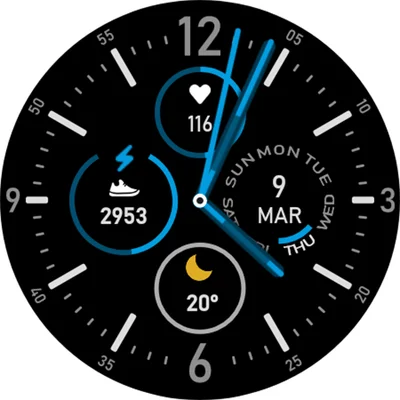
Enduranceウォッチフェイスは、Wear OSスマートウォッチ向けの洗練されたアナログスタイルのウォッチフェイスです。歩数、心拍数、日付、バッテリー残量など、日々の重要な指標を一目で確認できる、パフォーマンス重視のすっきりとしたデザインです。
ジムに行く時も、仕事に向かう時も、Enduranceはクラシックなウォッチフェイスの美しさと最新のスマートトラッキングツールを融合させ、バッテリーを消耗したり画面を乱雑にしたりすることなく、快適にお使いいただけます。
主な機能:
- アナログウォッチデザイン – エレガントで見やすいアナログ文字盤とプレミアムレイアウト
- 一目でわかるフィットネストラッキング – リアルタイムの歩数計、心拍数モニター、バッテリー残量表示
- カスタマイズ可能なコンプリケーション – 天気、アプリのショートカット、その他のWear OSデータなどの要素を追加または置き換え可能
- 曜日と日付表示 – 今日の日付と曜日を常に画面中央に表示
- Wear OS向けに設計 – Galaxy Watch、Pixel Watch、Fossil、Mobvoiなどの主要スマートウォッチに最適化
Enduranceウォッチフェイスを選ぶ理由:
- バッテリー効率 – 一日中快適に使えるミニマルデザインで、過剰な電力消費を抑えます
- 素早い設定 – ウォッチを数回タップするだけでコンプリケーションをカスタマイズできます
- 高い互換性 – 主要なWear OSスマートウォッチ(Samsung、Pixel、Fossil、TicWatch、Suunto、Tag Heuer、Montblanc、Casioなど)に対応
設定方法:
- PlayからEnduranceウォッチフェイスをインストールストア
- スマートウォッチで現在のウォッチフェイスを長押しします
- 歯車アイコンをタップして設定を開きます
- 「カスタマイズ」を選択し、「コンプリケーション」を選択します
- ご希望のデータ(歩数、心拍数、バッテリーなど)を空いているスロットに割り当てます
- サイドボタンを押して起動すれば設定完了です
対象ユーザー
- 歩数と心拍数を一目で確認したいフィットネス重視のユーザー
- 主要な健康統計情報を備えたプレミアムなアナログディスプレイを求めるプロフェッショナル
- Wear OSデバイスで、機能的なパフォーマンスとすっきりとしたデザインを好む方
Time Studiosのその他のスマートウォッチフェイス
ミニマルでフィットネスに最適な、カスタマイズ可能なウォッチフェイスの幅広いコレクションをご覧ください:
https://play.google.com/store/apps/dev?id=5891507527460766967
ご質問やご意見がございましたら、timestudios77@gmail.comまでお問い合わせください。
皆様からのご提案は、Wear OSコミュニティにとってより良く、より便利なウォッチフェイスの開発に役立ちます。
原文を表示
Built to last. Designed to move.
Endurance Watch Face is a sleek analog-style watch face for Wear OS smartwatches, offering a clean, performance-focused design with essential daily metrics — including steps, heart rate, date, and battery level — all in one glance.
Whether you're hitting the gym or heading to work, Endurance blends classic watch face aesthetics with modern smart tracking tools — without draining your battery or cluttering your screen.
Key Features:
- Analog Watch Design – Elegant, easy-to-read analog dial with premium layout
- Fitness Tracking at a Glance – Live step counter, heart rate monitor, and battery level
- Customizable Complications – Add or replace elements like weather, app shortcuts, or other Wear OS data
- Day & Date Display – Stay updated with today’s date and day, front and center
- Built for Wear OS – Optimized for top smartwatches including Galaxy Watch, Pixel Watch, Fossil, Mobvoi, and more
Why Choose Endurance Watch Face:
- Battery Efficient – Minimalist design that performs all day without excessive power use
- Fast Setup – Customize your complications with just a few taps on your watch
- Highly Compatible – Works with all major Wear OS smartwatches (Samsung, Pixel, Fossil, TicWatch, Suunto, Tag Heuer, Montblanc, Casio, and others)
How to Set It Up:
- Install Endurance Watch Face from the Play Store
- Long-tap your current watch face on the smartwatch
- Tap the gear icon to open settings
- Choose Customize, then select Complications
- Assign your preferred data (steps, heart rate, battery, etc.) to available slots
- Press the side button to activate — and you're set
Who It's For
- Fitness-focused users wanting steps and heart rate at a glance
- Professionals looking for a premium analog display with core health stats
- Anyone who prefers clean design with functional performance on their Wear OS device
More Smartwatch Faces from Time Studios
Explore a wide collection of minimal, fitness-ready, and customizable watch faces:
https://play.google.com/store/apps/dev?id=5891507527460766967
Have questions or feedback? Contact us at timestudios77@gmail.com
Your suggestions help us create better, more useful watch faces for the Wear OS community.
データ セーフティ
このアプリが収集・共有するデータについて、Time StudiosがGoogle Playで申告している内容です。
- 第三者と共有されるデータはありません詳しくは、デベロッパーが共有を申告する方法についての説明をご覧ください
- データは収集されません詳しくは、デベロッパーが収集を申告する方法についての説明をご覧ください
- Play ファミリー ポリシーの遵守に努めています
新機能
2025/8/2
- Speed improvements for seamless user interaction.
- Fresh UI customization tools for a personalized touch.
- Stronger security with intelligent alerts.
- Stability updates and critical bug resolutions.
開発元の連絡先
- ウェブサイトsites.google.com
- メールtimestudios77@gmail.com
- プライバシーポリシーsites.google.com
- 住所H.No. 13448, Dholewal Ludhiana, Punjab 141003 India
情報
- 提供元
- Time Studios
- カテゴリ
- ツール
- 更新日
- 2025/8/2
- リリース
- 2023/2/15
- 対象年齢
- 3 歳以上
- 価格
- ¥170
- パッケージ名
- com.watch.timestudios.enduranceface