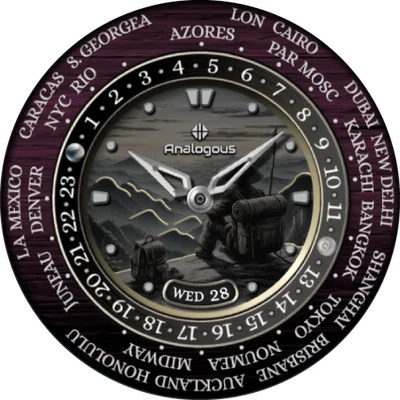
Explorer World Time Watch Face
Time Canvas- 3 歳以上対象年齢
- カスタマイズカテゴリ
- 2026/10/6更新日
- ¥250価格
com.analogousa07explorerのGoogle Play公式ページにリンクしています。最終確認:2026/11/27。
このアプリについて
Googleによる英語 (アメリカ合衆国)からの自動翻訳です。
Analog Explorer: ワールドタイム、カスタム スタイルなどを備えた豪華な文字盤。
アナログエクスプローラーワールドタイムウォッチフェイスで、Wear OSエクスペリエンスを一新しましょう。このウォッチフェイスは、高級感あふれる伝統的なデザインと先進的な機能を融合させ、真のワールドタイマーを搭載し、タイムゾーンを超えた接続を実現します。文字盤、針、その他のウォッチフェイス要素、そして追加のコンプリケーションを自由にカスタマイズして、洗練されたスタイルを完璧に反映した時計を作り上げましょう。
主な特徴:
超リアルなトラディショナルアナログダイヤルデザインと24時間ワールドタイマー
3種類のタイムゾーンスタイル(それぞれ30色からカスタマイズ可能)
3種類のカスタムコンプリケーション(ユーザー定義データ用)
お気に入りの機能にアクセスするための4つのカスタムショートカット
3種類のカスタムウォッチ針
3種類のカスタムインデックススタイル
3種類のカスタマイズ可能なレイアウトを備えた常時表示ディスプレイ
表示:
12時間アナログ現地時間、24時間ワールドタイム、曜日と日付
健康状態とバッテリー情報を表示する3つのカスタマイズ可能なコンプリケーション
カスタマイズ:
画面を長押しし、「カスタマイズ」(またはお使いのウォッチブランドの設定/編集アイコン)をタップします。
左にスワイプしてオプションを選択し、上下にスワイプしてスタイルを選択します。
心拍数の測定
心拍数は自動的に測定されます。Samsung ウォッチでは、ヘルスケア設定で測定間隔を変更できます。調整するには、ウォッチ > 設定 > ヘルスケアに移動します。
互換性:
このウォッチフェイスは、Wear OS API 34 以降で動作する Wear OS デバイス向けに設計されています。これには、Samsung Galaxy Watch 4、5、6、7、8 に加え、その他のサポートされている Samsung Wear OS ウォッチ、Pixel Watch、およびさまざまなブランドの他の Wear OS 対応モデルが含まれます。
注:スマートフォンアプリは、Wear OS ウォッチへのウォッチフェイスのインストールと検索を容易にするためのコンパニオンアプリとして機能します。インストールドロップダウンメニューからウォッチデバイスを選択し、ウォッチに直接インストールできます。
インストールで問題が発生した場合は、コンパニオンアプリの詳細な手順をお読みいただくか、support@timecanvaswatches.com までお問い合わせください。
このデザインが気に入った場合は、他の作品もぜひご覧ください。 Wear OSには、近日中にさらに多くのデザインが登場予定です。すぐにご連絡いただくには、メールアドレスをご利用ください。Playストアでは、気に入っていただいた点、気に入っていただけなかった点、改善のためのご提案など、あらゆるフィードバックをお待ちしております。デザインに関するご提案がございましたら、ぜひお聞かせください。すべてのご意見を参考にできるよう努めてまいります。
原文を表示
Transform your Wear OS experience with the Analogous Explorer World Time Watch Face. This watch face blends a luxurious traditional design with advanced functionality, offering a true world timer that keeps you connected across time zones. Enjoy the freedom to Customize the dial, hands, and other watch face elements, including additional complications, to create a timepiece that perfectly reflects your sophisticated style.
Highlights:
Hyper Realistic Traditional Analog Dial Design with 24 Hour World Timer
3 different time zone styles, each available in 30 customizable colors
3 custom complications (for user-defined data).
4 custom shortcuts to access your favorite functions
3 custom watch hands
3 custom Index Styles
Always-On Display with three customizable layouts
Displays:
12 hour analog local time, 24 hour World Time, Day and Date,
3 Customizable complications for health and battery information
Customizations:
Touch and hold the screen, then tap Customize (or the settings/edit icon specific to your watch brand).
Continue swiping left to choose options, and swipe up or down to select styles.
Measuring Heart Rate
Heart rate is measured automatically. On Samsung watches, you can change the measurement interval in the Health settings. To adjust this, navigate to your watch > Settings > Health.
Compatibility:
This watch face is designed for Wear OS devices running on Wear OS API 34+, including the Samsung Galaxy Watch 4, 5, 6, 7 and 8 as well as other supported Samsung Wear OS watches, Pixel Watches, and other Wear OS-compatible models from various brands.
Note: The phone app serves as a companion to make it easier to install and find the watch face on your Wear OS watch. You can select your watch device from the install drop-down menu and install it directly on your watch.
If you encounter any installation issues, please read the detailed instructions on the companion app or contact us at support@timecanvaswatches.com.
If you appreciate this design, be sure to check out our other creations. More designs will be coming to Wear OS soon. For quick contact, please use our email. We welcome and value all feedback in the Play Store—whether it's what you love, what you don't, or any suggestions for improvement. If you have any design suggestions, we'd love to hear them. We strive to consider all input.
データ セーフティ
このアプリが収集・共有するデータについて、Time CanvasがGoogle Playで申告している内容です。
- 第三者と共有されるデータはありません詳しくは、デベロッパーが共有を申告する方法についての説明をご覧ください
- データは収集されません詳しくは、デベロッパーが収集を申告する方法についての説明をご覧ください
開発元の連絡先
- メールtimecanvasapps@gmail.com
- プライバシーポリシーtimecanvaswatches.com
- 住所Plot No.16, Khasra No. 1858, Para, Alamnagar Lucknow, Uttar Pradesh 226017 India
情報
- 提供元
- Time Canvas
- カテゴリ
- カスタマイズ
- 更新日
- 2026/10/6
- リリース
- 2024/9/1
- 対象年齢
- 3 歳以上
- 価格
- ¥250
- パッケージ名
- com.analogousa07explorer