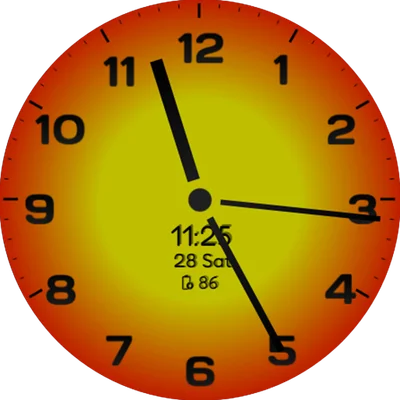
Fall Numbers Watch Face
RADU GHEORGHE TURCU- 3 歳以上対象年齢
- カスタマイズカテゴリ
- 2024/12/27更新日
- ¥160価格
com.turcuradu.fallnumberswatchfaceのGoogle Play公式ページにリンクしています。最終確認:2026/11/28。
このアプリについて
Googleによる英語 (アメリカ合衆国)からの自動翻訳です。
クールな動きのフォールナンバー
📉 落ちる数字の時計 - 見事な 3D アナログ時計ウィジェット! 🕰️✨
画面を魅惑的なビジュアル体験に変えましょう。画面がオンになっているときはいつでも、魅惑的な 3D 効果で数字がリアルタイムで下がっていく様子をご覧ください。 📱🤩 実際の動作をビデオで確認してください。 🎥
主な機能: ✔️ リアルな動きを備えたダイナミックに落ちる数字 ✨
✔️ ハイブリッド時計: アナログ時間とデジタル時間を組み合わせた 🕒
✔️バッテリーインジケーター🔋
✔️日付表示📅
✔️ カスタマイズ可能な背景色 🌈 – あなたの雰囲気に合ったスタイルをお選びください!
🌟 このスタイリッシュで機能的、インタラクティブな時計で、携帯電話にユニークなタッチを加えましょう。実用性と革新性を愛する人に最適です。
-------------------------------------------------- -------------------------------------------------- ----
スマートウォッチでのウォッチフェイスのインストールに関する注意事項:
電話アプリは、Wear OS ウォッチに文字盤を簡単にインストールして見つけられるようにするためのプレースホルダーとしてのみ機能します。インストールドロップダウンメニューからウォッチデバイスを選択する必要があります。
電話機でヘルパーを直接ダウンロードする場合は、アプリケーションを開いてディスプレイまたはダウンロード ボタンをタッチする必要があります。 -> 時計へのインストールが開始されます。
Wear OS ウォッチを接続する必要があります。
この方法で動作しない場合は、そのリンクを携帯電話の Chrome ブラウザにコピーし、右から下矢印をクリックして、インストールするウォッチフェイスを選択します。
...................................................................
インストール後、そのウォッチフェイスを画面に設定する必要があります。Wear OS アプリからダウンロードしたウォッチフェイスに移動すると、それが見つかります。
問題がある場合は、raduturcu03@gmail.com までご連絡ください。
私のGoogleプロフィールで他のデザインを見てみてください。
原文を表示
📉 Falling Numbers Clock - Stunning 3D Analog Clock Widget! 🕰️✨
Transform your screen into a mesmerizing visual experience! Watch as the numbers fall down in real-time with a captivating 3D effect whenever your screen is on. 📱🤩 Check out the video to see it in action! 🎥
Key Features: ✔️ Dynamic Falling Numbers with realistic motion ✨
✔️ Hybrid Clock: Analog and digital time combined 🕒
✔️ Battery Indicator 🔋
✔️ Date Display 📅
✔️ Customizable Background Colors 🌈 – Choose the style that fits your vibe!
🌟 Add a unique touch to your phone with this stylish, functional, and interactive clock. Perfect for those who love innovation with utility!
--------------------------------------------------------------------------------------------------------
Watch face installation notes on smart watch:
Phone app serves only as a placeholder to make it easier to install & find the watch face on your Wear OS watch. You have to select your watch device from the install dropdown menu.
If you download the helper directly with the phone , you need to open application and touch on the display or the download button. -> will start to install on the watch.
A wear os watch need to be connected.
If not working in that way , you can copy that link into your phone chrome browser and click on arrow down from right , and you choose the watch face to install.
..............................................
After installation you need to set that watch face to your screen , from wear OS app , go down at downloaded watch faces and you will find it.
If you have problems , please contact me on raduturcu03@gmail.com
Try to see others designs in my google profile.
データ セーフティ
このアプリが収集・共有するデータについて、RADU GHEORGHE TURCUがGoogle Playで申告している内容です。
- 第三者と共有されるデータはありません詳しくは、デベロッパーが共有を申告する方法についての説明をご覧ください
- データは収集されません詳しくは、デベロッパーが収集を申告する方法についての説明をご覧ください
開発元の連絡先
- メールraduturcu03@gmail.com
- プライバシーポリシーe-droid.net
- 住所Str. Eduard Albert Bielz, Nr. 89d, Bl. b1, Sc. f, et.1, Ap. 60 550031 Sibiu Romania
情報
- 提供元
- RADU GHEORGHE TURCU
- カテゴリ
- カスタマイズ
- 更新日
- 2024/12/27
- リリース
- 2024/12/27
- 対象年齢
- 3 歳以上
- 価格
- ¥160
- パッケージ名
- com.turcuradu.fallnumberswatchface