Flip Clock 3D Watch Face
Tempus Arcanum- 3 歳以上対象年齢
- カスタマイズカテゴリ
- 2026/10/22更新日
- ¥170価格
com.tempusarcanum.flipclockのGoogle Play公式ページにリンクしています。最終確認:2026/11/24。
このアプリについて
Googleによる英語 (アメリカ合衆国)からの自動翻訳です。
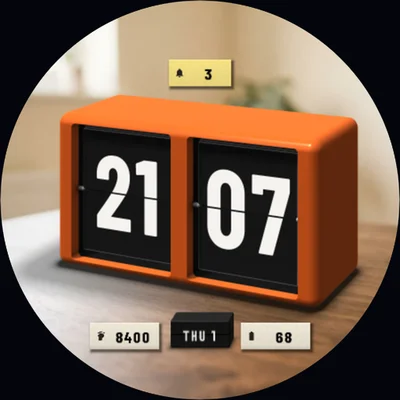
アニメーション付き3Dレトロフリップクロックウォッチフェイス:デジタルカードが毎分めくる
Wear OS向けのアニメーション3Dフリップクロックウォッチフェイス:温かみのあるウォールナット材のデスクの上に、レトロなフリップ式の卓上時計が置かれています。背後にはぼんやりとぼかされた部屋が広がり、毎分ごとにカードがめくられ、新しい時刻が表示されます。少し上と横から見ると、光沢のあるプラスチック製の筐体、上部と側面、前面の2つの深い窓、そしてそれぞれの窓にヒンジ軸で吊り下げられた黒いカードの束が見えます。カードの裏側は薄い層状の縁として見えます。
主な機能
• 時刻は黒いカードに大きな白い数字で表示され、実際の時計のように中央で分割されています。
• 毎分、分カードの上半分が軸に沿って前に倒れ、その後ろにある次のカードが現れます。毎正時には時カードもめくられます。
• ウォッチフェイスをタップすると、両方のカードが数桁の数字をめくり、時刻に戻ります。
• 歩数とバッテリー残量はデスク上の小さな印刷された紙ラベルに表示され、未読通知は時計の上の付箋に貼られています。
• 日付は前面の小さなフリップカードに印刷されています。
• バッテリー消費を抑えます:分表示の間は何も動きません。フリップは1分に1回、タップ時のみフリックします。
カスタマイズ
• ケースカラー:オレンジ、ホワイト、ブラック。
• 時刻表示:12時間表示または24時間表示(時計の設定による)。
• 3つのコンプリケーション:歩数、バッテリー残量、未読通知(デフォルト)。ウォッチフェイスエディターで、それぞれのコンプリケーションに表示するデータを選択できます。他のアプリのコンプリケーションには、そのアプリのアイコン、またはアイコンがない場合はアプリ名が表示されます。
常時表示
常時表示では、時刻、日付、時計の細いアウトラインが黒地に薄暗く表示されます。
互換性
Wear OS 6以降(One UI 8にアップデートされたGalaxy WatchやPixel Watchなど)に対応しています。ウォッチフェイス形式:権限の取得やデータ収集は一切行いません。
インストール方法
1. 時計のGoogle Playからインストールするか、スマートフォンアプリで「マイウォッチにインストール」をタップしてください。
2. ウォッチフェイスを長押しし、「フリップクロック」までスワイプしてタップします。カスタマイズするには、長押ししてから「カスタマイズ」をタップします。
その他のウォッチフェイス:このウォッチフェイスは、Wear OS向けの200種類以上のアニメーションウォッチフェイスを収録したアプリ「Tempus Arcanum」に含まれています。アプリは無料でダウンロードできます。Google Playで「Tempus Arcanum」を検索し、スマートフォンでコレクション全体を閲覧して、ワンタップでウォッチフェイスを送信できます。
原文を表示
An animated 3D flip clock watch face for Wear OS: a retro split-flap desk clock stands on a warm walnut desk, a softly blurred room behind it, and every minute its cards flip to the new time. Seen from a little above and to the side, it shows its glossy plastic housing with its top and side wall, the two deep windows in its front, and in each a stack of black cards hanging on a hinge axle, the cards behind showing as thin layered edges.
KEY FEATURES
• The time in big white figures on black cards, split across the middle like the real thing.
• Every minute the top half of the minutes card falls forward on its axle and reveals the next card behind it. On the hour the hours card flips too.
• Tap the watch face and both cards flick through a few numbers and settle back on the time.
• Steps and battery sit on small printed paper labels on the desk, unread notifications on a sticky note above the clock.
• The date is printed on a little flip card in front.
• Easy on the battery: nothing moves between the minutes; the flips play once a minute, and the flick only on a tap.
MAKE IT YOURS
• Housing: orange, white or black.
• Time: 12- or 24-hour, as your watch is set.
• Three complications: steps, battery and unread notifications by default. Choose other data for any of them in the watch face editor. Another app's complication shows that app's icon, or its title where it sends no icon.
ALWAYS-ON DISPLAY
Always-on shows only the time, the date and a fine outline of the clock, dim on black.
COMPATIBILITY
Works on Wear OS 6 or later, such as Galaxy Watch models updated to One UI 8 Watch and Pixel Watch. Made in Watch Face Format: no permissions, no data collected.
HOW TO INSTALL
1. Install it from Google Play on your watch, or tap Install on my watch in the phone app.
2. Touch and hold your watch face, swipe to The Flip Clock and tap it. To customize, touch and hold it, then tap Customize.
More watch faces: this face is part of Tempus Arcanum, an app with 200+ animated watch faces for Wear OS, free to download. Search for "Tempus Arcanum" on Google Play, browse the whole collection on your phone and send any face to your watch with one tap.
データ セーフティ
このアプリが収集・共有するデータについて、Tempus ArcanumがGoogle Playで申告している内容です。
- 第三者と共有されるデータはありません詳しくは、デベロッパーが共有を申告する方法についての説明をご覧ください
- データは収集されません詳しくは、デベロッパーが収集を申告する方法についての説明をご覧ください
新機能
2026/10/22
Refreshed with the new Tempus Arcanum icon. Small fixes and improvements.
開発元の連絡先
- ウェブサイトtempusarcanum.com
- メールsupport@tempusarcanum.com
- プライバシーポリシーtelegra.ph
- 住所вулиця Будівельників, будинок 7 30 Помічна Кіровоградська область Ukraine 27030
情報
- 提供元
- Tempus Arcanum
- カテゴリ
- カスタマイズ
- 更新日
- 2026/10/22
- リリース
- 2026/10/16
- 対象年齢
- 3 歳以上
- 価格
- ¥170
- パッケージ名
- com.tempusarcanum.flipclock