Flora01
StarWatchfaces- 3 歳以上対象年齢
- カスタマイズカテゴリ
- 2026/8/20更新日
- ¥350価格
com.starwatchfaces.flora01のGoogle Play公式ページにリンクしています。最終確認:2026/11/19。
このアプリについて
Googleによる英語 (アメリカ合衆国)からの自動翻訳です。
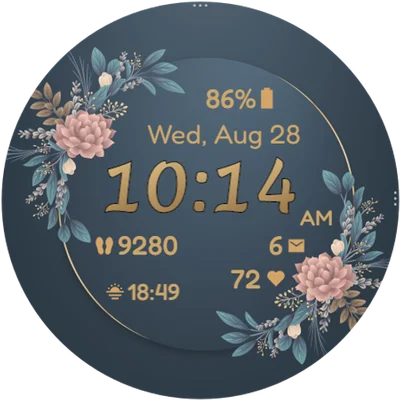
WearOS搭載のスマートウォッチに花をテーマにしたウォッチフェイス
Wear OS の花をテーマにしたウォッチフェイスを、時間のみを表示するミニマリスト ビューと、時間、日付、すべての統計情報を表示する通常ビュー、20 種類の統計色、カスタマイズ可能なコンプリケーションと 2 つのカスタマイズ可能なショートカット、デジタル時計の 2 つの異なるビューでお楽しみください。 12 または 24 時間形式、デバイス言語の日付、およびカスタム設計の AOD。
ウォッチフェイスをカスタマイズするには:
1. ディスプレイを長押しします。
2. [カスタマイズ] ボタンをタップし、左または右にスワイプして、表示モード、統計の色、追加機能のデータ、およびカスタム ショートカットで起動するアプリを選択します。
コンプリケーションが表示できる統計情報とショートカットから起動できるアプリはデバイスに依存し、すべての時計で利用できるわけではない、または時計ごとに異なる可能性があることに注意してください。
その他のウォッチフェイスについては、当社の Web サイトをご覧ください。
楽しむ!
原文を表示
Enjoy a flower themed watchface for Wear OS, with 2 different views, a minimalist view with only time and a normal view with time, date and all the stats, 20 different colors for stats, a customizable complication and 2 customizable shortcuts, digital clock in 12 or 24H format, date in device language and custom designed AOD.
To customize the watchface:
1. Press and hold on the display
2. Tap the Customize button and swipe left or right to select the view mode, color for stats, data for complication and the apps to launch with the custom shortcuts.
Please keep in mind that the stats that the complication can display and the apps that can be launched from the shortcuts are device dependent and might not be available on all watches or they might vary from watch to watch.
For more watchfaces, visit our website.
Enjoy!
データ セーフティ
このアプリが収集・共有するデータについて、StarWatchfacesがGoogle Playで申告している内容です。
- 第三者と共有されるデータはありません詳しくは、デベロッパーが共有を申告する方法についての説明をご覧ください
- データは収集されません詳しくは、デベロッパーが収集を申告する方法についての説明をご覧ください
開発元の連絡先
- ウェブサイトstarwatchfaces.com
- メールwearossupport@starwatchfaces.com
- プライバシーポリシーstarwatchfaces.com
- 住所Strada Carol Davila 8 bloc 118A sc A et 1 ap 5 100462 Ploiești Romania
情報
- 提供元
- StarWatchfaces
- カテゴリ
- カスタマイズ
- バージョン
- 1.0.0
- 更新日
- 2026/8/20
- リリース
- 2022/2/5
- 対象年齢
- 3 歳以上
- 価格
- ¥350
- パッケージ名
- com.starwatchfaces.flora01