Flower Steps Watch Face
Filmmotion Studio- 3 歳以上対象年齢
- カスタマイズカテゴリ
- 2026/7/25更新日
- ¥60価格
com.watchface.wearos.flowerstepsのGoogle Play公式ページにリンクしています。最終確認:2026/11/23。
このアプリについて
Googleによる英語 (アメリカ合衆国)からの自動翻訳です。
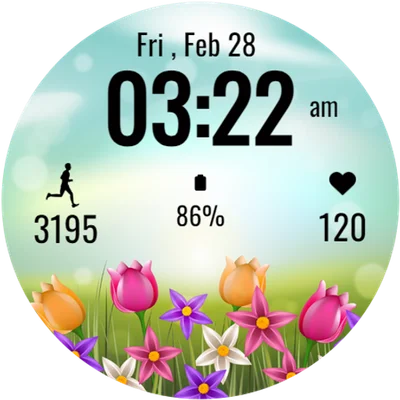
Wear OS で歩数とフィットネスを追跡できる、鮮やかな花をテーマにしたデジタル ウォッチ
Wear OS デバイスの Flower Steps ウォッチフェイスで自然の美しさを満喫してください。時間とともに変化する爽やかな背景に、咲き誇る花々をあしらった楽しいデザインの文字盤です。見た目の美しさに加えて、この文字盤はフィットネス愛好家向けにデザインされており、時間と日付とともに歩数、心拍数、バッテリーの割合が表示されます。
一目見るたびに春の喜びを思い出し、アクティブに過ごして一日を楽しむモチベーションが高まります。自然をイメージしたカラフルなデザインが好きで、健康指標を追跡するための機能的な文字盤を求める人に最適です。
主な特徴:
* 新鮮な自然をイメージした背景を持つ、カラフルな花をテーマにしたデザイン。
* 見やすいデジタル時間表示。
* 歩数、心拍数、バッテリー残量、日付を一目で追跡できます。
* 高品質のグラフィックスを備えた円形の Wear OS デバイス向けに最適化されています。
* アンビエント モードと常時オン ディスプレイ (AOD) をサポートします。
🌸 フィットネス フォーカス: 美しくデザインされた文字盤を楽しみながら、毎日の歩数を記録します。
インストール手順:
1)携帯電話でコンパニオン アプリを開きます。
2)「Watchにインストール」をタップします。
3) ウォッチで、設定またはウォッチフェイス ギャラリーから Flower Steps ウォッチフェイスを選択します。
互換性:
✅ Wear OS デバイス API 30+ と互換性があります (例: Google Pixel Watch、Samsung Galaxy Watch)。
❌ 角型時計には対応しておりません。
Flower Steps ウォッチフェイスで歩数を記録しながら、一日に自然のタッチを加えましょう。 Wear OS デバイスの美しさと機能性の組み合わせを楽しむ人に最適です。
原文を表示
Embrace the beauty of nature with the Flower Steps Watch Face on your Wear OS device! This watch face features a delightful design filled with blooming flowers, set against a fresh background that changes with the time of day. In addition to its aesthetic appeal, the watch face is designed for fitness enthusiasts, displaying step count, heart rate, and battery percentage alongside the time and date.
With every glance, you’ll be reminded of the joys of spring, motivating you to stay active and enjoy your day. Ideal for anyone who loves colorful, nature-inspired designs and wants a functional watch face to track their health metrics.
Key Features:
* Colorful flower-themed design with a fresh, nature-inspired background.
* Digital time display for easy viewing.
* Track your steps, heart rate, battery level, and date at a glance.
* Optimized for round Wear OS devices with high-quality graphics.
* Supports Ambient Mode and Always-On Display (AOD).
🌸 Fitness Focus: Keep track of your daily step while enjoying a beautifully designed watch face.
Installation Instructions:
1)Open the Companion App on your phone.
2)Tap "Install on Watch."
3) On your watch, select Flower Steps Watch Face from your settings or watch face gallery.
Compatibility:
✅ Compatible with Wear OS devices API 30+ (e.g., Google Pixel Watch, Samsung Galaxy Watch).
❌ Not compatible with rectangular watches.
Add a touch of nature to your day while keeping track of your steps with the Flower Steps Watch Face. Perfect for anyone who enjoys a mix of beauty and functionality on their Wear OS device.
データ セーフティ
このアプリが収集・共有するデータについて、Filmmotion StudioがGoogle Playで申告している内容です。
- 第三者と共有されるデータはありません詳しくは、デベロッパーが共有を申告する方法についての説明をご覧ください
- データは収集されません詳しくは、デベロッパーが収集を申告する方法についての説明をご覧ください
開発元の連絡先
- ウェブサイトfilmmotionstudiophoto.blogspot.com
- メールhelpfilmmotionstudio@gmail.com
- プライバシーポリシーfilmmotionstudio.wordpress.com
- 住所18 VITTHALNAGAR SOC NR BAPASITARAM CHOWK KATARGAM SURAT CITY SURAT, Gujarat 395005 India
情報
- 提供元
- Filmmotion Studio
- カテゴリ
- カスタマイズ
- 更新日
- 2026/7/25
- リリース
- 2025/2/24
- 対象年齢
- 3 歳以上
- 価格
- ¥60
- パッケージ名
- com.watchface.wearos.flowersteps