GRBL Bars Watchface
Grubel- 3 歳以上対象年齢
- カスタマイズカテゴリ
- 2026/10/6更新日
- ¥100価格
com.grbl.barsのGoogle Play公式ページにリンクしています。最終確認:2026/11/28。
このアプリについて
Googleによる英語 (アメリカ合衆国)からの自動翻訳です。
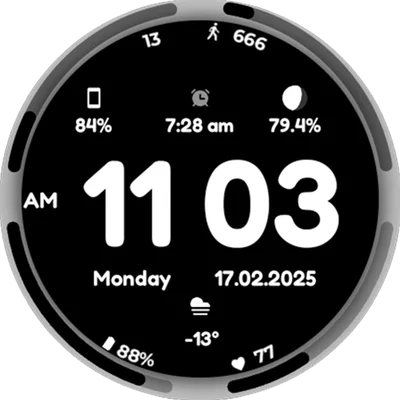
ステータスバーを備えたモダンなウォッチフェイスWear OS 向けに設計
機能:
Wear OS 向けに設計
1. AM/PMおよび12H/24Hフォーマットをサポート
2. 4つのカスタムコンプリケーション
3. 4つのステータスバー
4. 日付 (ユーザーのロケールに基づいて形式が変更されます)
5.AODr
6. 7つのテーマ
問題が発生した場合は、grubel.watchfaces@gmail.com までご連絡ください。ウォッチフェイスのインストールに役立つスクリーンショットと詳しい手順を喜んで提供いたします。
ウォッチフェイスはインストール後に自動的に変更されません。設定するには、ホーム画面に戻り、長押しして最後までスワイプし、「+」をタップしてウォッチフェイスを追加します。ベゼルを使用して見つけてください。
Samsung 開発者は、Wear OS ウォッチフェイスをインストールする複数の方法を示す役立つビデオを提供しています。
https://youtu.be/vMM4Q2-rqoM
コンパニオン アプリはウォッチに Watchface をインストールしないことに注意してください。以下の説明をお読みください。
この watchaface を WearOS デバイスにインストールするには 2 つの方法があります。
PLAYストアアプリから:
1. ドロップダウン メニューを使用してターゲットを選択します
PLAY STORE アプリ上のデバイス:
数分後に文字盤が転送されます
時計。
2- ウォッチフェイスをアクティブ化します:
インストールしたら、ウォッチフェイスをアクティブにする必要があります。
画面を長押しし、左にスワイプして「ウォッチを追加」をタップします
FACE」を押して有効にします。
PLAYストアウェブサイトより:
1 - Web ブラウザからウォッチフェイスのリンクに移動します。
Chrome、SafariなどのPC/Mac。検索できます
Play ストアのウォッチフェイス名。
「その他のデバイスにインストール」をクリックし、ターゲットを選択します
デバイス:
数分後に文字盤が転送されます
時計。
2- ウォッチフェイスをアクティブ化します:
インストールしたら、ウォッチフェイスをアクティブにする必要があります。
画面を長押しし、左にスワイプして「ウォッチを追加」をタップします
FACE」を押して有効にします。
API 30+の場合
覚えておいてください。時計に携帯電話のバッテリー状態を表示したい場合は、携帯電話バッテリー コンプリケーション アプリをインストールする必要があります。
免責事項:
各デバイスは異なるカスタム コンプリケーションを提供しており、選択内容はサードパーティ アプリによって異なります。ストアのスクリーンショットに表示されているカスタム コンプリケーションは、サードパーティ アプリ - Phone Battery Complication からのものです。
原文を表示
Features:
Designed for Wear OS
1. Supports AM/PM and 12H/24H format
2. 4 custom complications
3. 4 staus bars
4. Date (format change based on user's locale)
5. AOD r
6. 7 themes
If you face any problem, please reach out to us at grubel.watchfaces@gmail.com. We’ll gladly provide screenshots and step-by-step instructions to help you install the watch face.
Watch faces do not change automatically after installation. To set it up, return to the home display, tap and hold, swipe to the end, and tap ‘+’ to add the watch face. Use the bezel to find it.
Samsung Developers offer a helpful video showing multiple ways to install a Wear OS watch face:
https://youtu.be/vMM4Q2-rqoM
PLEASE KEEP IN MIND THAT THE COMPANION APP DOESN'T INSTALL WATCHFACE ON THE WATCH. PLEASE READ INSTRUCTIONS BELOW.
There are two ways to install this watchaface to your WearOS device:
From PLAY STORE APP:
1. Use the drop-down menu and select the target
device on the PLAY STORE APP:
after a few minutes the watch face will transferred on
watch.
2- ACTIVATE WATCH FACE:
Once installed, you need to activate the watch face.
Long press screen, swipe left and tap "ADD WATCH
FACE" to activate it.
From PLAY STORE WEBSITE:
1 - Go to the watch face link through a Web Browser on
PC / Mac such as Chrome, Safari (etc.). You can search
the watch face name on Play Store.
Click on "Install on more devices" and select the target
device:
after a few minutes the watch face will transferred on
watch.
2- ACTIVATE WATCH FACE:
Once installed, you need to activate the watch face.
Long press screen, swipe left and tap "ADD WATCH
FACE" to activate it.
for API 30+
Remember , if you want your watch to show phone's battery status, you should install Phone Battery Complication app
Disclaimer:
Each device offers different custom complications, and selection varies by third-party apps. Custom complications shown in store screenshots come from third-party app - Phone Battery Complication
データ セーフティ
このアプリが収集・共有するデータについて、GrubelがGoogle Playで申告している内容です。
- 第三者と共有されるデータはありません詳しくは、デベロッパーが共有を申告する方法についての説明をご覧ください
- データは収集されません詳しくは、デベロッパーが収集を申告する方法についての説明をご覧ください
開発元の連絡先
- メールgrubel.watchfaces@gmail.com
- プライバシーポリシーsites.google.com
- 住所Juliana Tuwima 20/8a 90-002 Łódź Poland
情報
- 提供元
- Grubel
- カテゴリ
- カスタマイズ
- 更新日
- 2026/10/6
- リリース
- 2025/2/19
- 対象年齢
- 3 歳以上
- 価格
- ¥100
- パッケージ名
- com.grbl.bars