h2002 Performance Dashboard
Happy Watch Faces- 3 歳以上対象年齢
- カスタマイズカテゴリ
- 2026/10/23更新日
- ¥680価格
com.AAA.h2002のGoogle Play公式ページにリンクしています。最終確認:2026/11/13。
このアプリについて
Googleによる英語 (アメリカ合衆国)からの自動翻訳です。
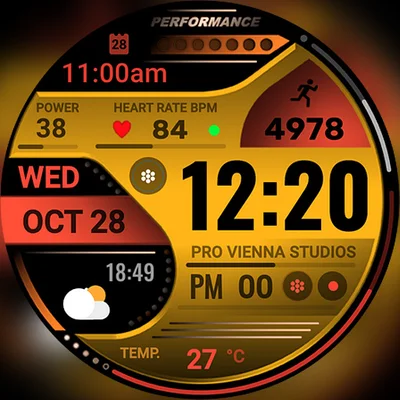
歩数、心拍数、温度表示、25色以上のカラーバリエーションを備えたデジタルWear OSウォッチフェイス
⌚ h2002 – パフォーマンスダッシュボード
Wear OS向けのスポーティなデジタルウォッチフェイス。大きく見やすい時刻表示に加え、歩数、心拍数、バッテリー残量、温度など、主要なデータをすべて1つの文字盤に表示します。オーストリアのVienna Studiosがデザイン・製造しました。
⌚ 機能
• 秒表示付きの大きなデジタル時刻表示
• 12時間/24時間表示(スマートフォンの設定に連動)、AM/PM表示
• 曜日、月、日
• 歩数と目標歩数の進捗状況表示
• 心拍数(BPM)アニメーション表示(オン/オフ切り替え可能)
• バッテリー残量表示
• 現在の温度と今日の最低/最高温度表示
• 摂氏と華氏に対応
• 常時表示モード
🧩 コンプリケーションとアプリショートカット
• 2つのテキストコンプリケーション – デフォルト:次のカレンダーイベントと日の出/日の入り時刻
• 2つのアプリショートカット – ウォッチフェイスからお気に入りのアプリを直接起動できます
表示可能なデータ例:次のイベント、日の出/日の入り時刻、日付、世界時計、その他の対応データ。利用可能なオプションは、お使いの時計のモデル、ソフトウェアバージョン、インストールされているアプリによって異なります。
🎨 カスタマイズ
• 25種類以上のカラーテーマ(例:シアン、ブルー、イエロー、ライム、オレンジ、レッド、ピンク、マゼンタ、グリーン、ホワイト、シルバー)
• ハートアニメーションのオン/オフ
ウォッチフェイスを長押しし、「カスタマイズ」をタップしてください。
🌦️ 気温が表示されない場合
• スマートフォンと時計の位置情報サービスをオンにしてください。
• 時計の天気アプリを開いてデータを更新してください。
• 別のウォッチフェイスに数秒間切り替えてから、元のウォッチフェイスに戻してください。
• 初回同期まで数分お待ちください。
❤️ 心拍数が表示されない場合
• ウォッチフェイスにセンサー/身体センサーのアクセス許可を与えてください。
• ヘルスケアアプリで心拍数測定が有効になっていることを確認してください。
📅 カレンダーイベントが表示されない場合
• スマートウォッチと同期するカレンダーアプリを使用してください。
• カレンダーへのアクセス許可を求められたら許可してください。
📲 インストール方法
1. スマートウォッチがスマートフォンに接続されていることを確認してください。
2. 「インストール」をタップし、デバイスとしてスマートウォッチを選択してください。
3. スマートウォッチで、現在表示されているウォッチフェイスを長押ししてください。
4. 「h2002」までスワイプし、タップして適用してください。
ヒント:インストールには数分かかる場合があります。
⌚ 対応デバイス
Wear OS 5以降(API 34以上)に対応。例:Galaxy Watch 4、5、6、7、8(ClassicおよびUltraを含む)、Pixel Watch 1~4、その他Wear OS 5以降を搭載したスマートウォッチ。Tizen搭載スマートウォッチ(Galaxy Watch 3以前)およびApple Watchには対応していません。
💬 サポート
何か問題やご意見がありましたら、レビューを投稿する前にご連絡ください。喜んでお手伝いいたします。
luxury.watch.face@gmail.com
www.viennastudios.com
💛 Vienna StudiosのHappy Watch Facesをお選びいただき、ありがとうございます!
原文を表示
⌚ h2002 – Performance Dashboard
A sporty digital watch face for Wear OS with big, easy-to-read time and all your key data on one dial: steps, heart rate, battery and temperature. Designed and made in Austria by Vienna Studios.
⌚ Features
• Large digital time with seconds
• 12h/24h format (follows your phone settings), AM/PM indicator
• Day of week, month and date
• Step count with step goal progress
• Heart rate (BPM) with animated heart – can be switched on or off
• Battery level
• Current temperature with today's min/max temperature
• Celsius and Fahrenheit supported
• Always-on display mode
🧩 Complications & app shortcuts
• 2 text complications – defaults: next calendar event and sunrise/sunset
• 2 app shortcuts – open your favourite apps directly from the watch face
Possible data e.g. next event, sunrise/sunset, date, world clock or other compatible data. Available options depend on your watch model, software version and installed apps.
🎨 Customization
• 25+ color themes, e.g. cyan, blue, yellow, lime, orange, red, pink, magenta, green, white and silver
• Heart animation on/off
Touch and hold the watch face, then tap Customize.
🌦️ Temperature not showing?
• Turn on location on your phone and watch
• Open the Weather app on your watch to refresh the data
• Switch to another watch face for a few seconds and back
• Wait a few minutes for the first sync
❤️ Heart rate not showing?
• Allow the Sensors / Body sensors permission for the watch face
• Make sure heart rate measuring is enabled in your health app
📅 Calendar event not showing?
• Use a calendar app that syncs to your watch
• Allow calendar permission when asked
📲 How to install
1. Make sure your watch is connected to your phone
2. Tap Install and choose your watch as the device
3. On your watch, touch and hold the current watch face
4. Swipe to h2002 and tap it to apply
Tip: the installation can take a few minutes.
⌚ Supported devices
Wear OS 5 or newer (API 34+), e.g. Galaxy Watch 4, 5, 6, 7, 8 (incl. Classic and Ultra), Pixel Watch 1–4 and other Wear OS 5+ watches. Not compatible with Tizen watches (Galaxy Watch 3 or older) or Apple Watch.
💬 Support
Any problem or idea? Please write to us before leaving a review – we are happy to help.
luxury.watch.face@gmail.com
www.viennastudios.com
💛 Thank you for choosing Happy Watch Faces by Vienna Studios!
データ セーフティ
このアプリが収集・共有するデータについて、Happy Watch FacesがGoogle Playで申告している内容です。
- 第三者と共有されるデータはありません詳しくは、デベロッパーが共有を申告する方法についての説明をご覧ください
- データは収集されません詳しくは、デベロッパーが収集を申告する方法についての説明をご覧ください
開発元の連絡先
- ウェブサイトviennastudios.com
- メールluxury.watch.face@gmail.com
- プライバシーポリシーviennastudios.com
- 住所Pierlstraße 1/4 9020 Klagenfurt am Wörthersee Austria
情報
- 提供元
- Happy Watch Faces
- カテゴリ
- カスタマイズ
- 更新日
- 2026/10/23
- リリース
- 2026/10/23
- 対象年齢
- 3 歳以上
- 価格
- ¥680
- パッケージ名
- com.AAA.h2002