Interactive AI Chat Watch Face
Time As Art Watch Faces- 3 歳以上対象年齢
- カスタマイズカテゴリ
- 2026/11/8更新日
- ¥150価格
com.watchfacestudio.ai_chat_botのGoogle Play公式ページにリンクしています。最終確認:2026/11/25。
このアプリについて
Googleによる英語 (アメリカ合衆国)からの自動翻訳です。
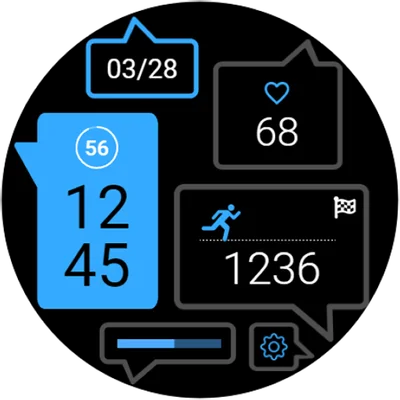
革新的なハイライトを備えた、インタラクティブでクリエイティブかつカスタマイズ可能な文字盤。
楽しく、インタラクティブで創造的でカスタマイズ可能なデータドリブンのインターフェイスには、多くのハイライト機能やアクションが含まれており、ウォッチフェイスが「チャット」してユーザーとコミュニケーションできるようにするとともに、多数のカスタマイズ可能なアプリのショートカットによりウォッチのすべての機能をワンタップで実行できます。
Wear OS ウォッチフェイスの機能:
時間
- デジタル時計
- 時/分
- 秒 (数値/進行状況バー)
- 12/24時間対応
- 月/日 (12 時間 > 月/日、または 24 時間 = 日付/月)
「監視」ステータスの「ステップ」の吹き出しで、時間に基づいて交互に異なる挨拶が表示されます。
健康情報
> 心拍数
- 脈動するハートアイコンとダイナミックな吹き出しによる心拍数 (<=55 および >=185)。
> 歩数
- 歩数目標(フラグ)に向かって進む動的な「ランナー」表示による歩数カウント。
- 読み取りを容易にするための追加のパーセント読み取り (85 ~ 100%)。
- 'わーい!'テキスト表示、「ランナー」アイコンの変更、および吹き出しが 100% で強調表示される旗アニメーション (アニメーション期間の延長: ステップ目標 + 100 ステップ)。
スマートバッテリー情報
- バッテリーレベルに応じた視覚的なフィードバックを備えたバッテリーゲージ。
- <=20% の動的吹き出しハイライトと追加の数値読み上げ。
- 脈動する数値読み上げによる 10% 以下の動的な吹き出しハイライト。
- 吹き出しの強調表示と数値の読み上げを備えた充電インジケーター。
日付
「日付」の吹き出しは午前 12 時から午前 1 時まで動的に強調表示され、新しい 1 日の始まりを示し/強調表示されます。
未読の通知数
未読通知の数値インジケーター。カウンタは、新しい通知がある場合にのみ「日付」の吹き出しに表示されます。
4 つの完全にカスタマイズ可能なアプリのショートカット (エリア定義)
- 「時刻」の吹き出し – 2エリア(秒エリア[上]、時分エリア[下])
- 「ハート」の吹き出し
- 「ステップ」の吹き出し
ヒント: 「時間」の吹き出しの上部または下部のタップ領域に「最近使用したアプリ」を設定すると、実行中のアプリに簡単にアクセスできるだけでなく、バックグラウンドで実行されているすべてのアプリをすぐに閉じてバッテリー効率を最大化することができます。
他のものは次のとおりです。
「時間」の吹き出し > 時/分エリア: 世界時計、目覚まし時計アプリ、タイマー アプリ、またはリマインダー アプリ。
「心拍数」の吹き出し > 心拍数の詳細ページまたはその他の健康関連アクティビティ。
「歩数」の吹き出し > 歩数の詳細ページまたはその他の健康関連アクティビティ。
ヒント: ウォッチフェイスを長押しして、ウォッチフェイスセレクターの「カスタマイズ」をタップして、カスタマイズ可能なアプリのショートカットをカスタマイズすると、ほとんどのアプリのオプション/選択肢が得られます。
3 つの固定プリセットアプリショートカット
- バッテリー情報
- 設定
- 日付
その他の機能
- バッテリー節約AOD画面
- エネルギー効率の高いディスプレイ
権限:
ウォッチフェイスが意図したとおりに機能するためには、センサーの許可 (心拍数と歩数の場合) とアプリの起動の許可 (カスタム ショートカットの場合) を必ず許可してください。
もっとエキサイティングな「Time As Art」ウォッチフェイスの作品を見るには
https://play.google.com/store/apps/dev?id=6844562474688703926 にアクセスしてください。
ご質問がありますか、サポートが必要ですか?
https://timeasart.com/support にアクセスするか、design@timeasart.com まで電子メールでお問い合わせください。
原文を表示
A fun, interactive, creative and customizable data-driven interface with many highlighting features and actions that lets the watch face ‘chat’ and communicate with the user while a multitude of customizable app shortcuts puts every function on your watch one tap away.
Wear OS watch face features:
TIME
- Digital Clock
- Hour/Minute
- Seconds (Numeric/Progress Bar)
- 12/24 Hour compatible
- Month/Date (12hr > Month/Date or 24hr = Date/Month)
Time-based alternating distinct greetings in 'Steps' speech bubble at 'watch-on' status.
HEALTH INFO
> HEART RATE
- Heart Rate with pulsating heart icon and dynamic speech bubble highlighting (<=55 and >=185).
> STEP COUNT
- Step Count with dynamic ‘Runner’ display going towards step goal (flag).
- Additional percentage read-out (from 85-100%) for easier read-out.
- ‘Yay!' Text display, ‘Runner’ icon change and flag animation with speech bubble highlighting at 100% (extended animation duration: step goal + 100 steps).
SMART BATTERY INFO
- Battery gauge with visual feedback depending on battery level.
- <=20% dynamic speech bubble highlighting with additional numeric read-out.
- <=10% dynamic speech bubble highlighting with pulsating numeric read-out.
- Charging indicator with speech bubble highlighting and numeric read-out.
DATE
‘Date’ speech bubble is dynamically highlighted from 12:00am -1:00am to indicate/highlight start of new day.
UNREAD NOTIFICATIONS COUNT
Numerical indicator for unread notifications. The counter only displays in the 'Date' speech bubble when there are new notifications.
4 FULLY CUSTOMIZABLE APP SHORTCUTS (area-defined)
- 'Time' speech bubble – 2 areas (seconds area [upper] and hour/minute area [lower])
- 'Heart' speech bubble
- 'Steps' speech bubble
TIP: if you set ‘Recent Apps’ for the upper or lower tap area in the 'Time' speech bubble you can easily access any running app as well as quickly close all apps that run in the background to maximize battery efficiency.
The others could be:
‘Time’ speech bubble > Hour/Minute area: World Clock, Alarm Clock app, Timer app or Reminder app.
‘Heart Rate’ speech bubble > Heart rate details page or other health related activity.
‘Steps’ speech bubble > Steps detail page or other health related activity.
TIP: Customizing the customizable app shortcuts by long pressing on the watch face and then tapping on ‘Customize’ in the watch face selector on the watch gives you the most app options/choices.
3 FIXED, PRE-SET APP SHORTCUTS
- Battery Info
- Settings
- Date
MISC FEATURES
- Battery saving AOD screen
- Energy Efficient Display
Permissions:
For the watch face to work as intended please make sure to allow the sensor permission (for heart rate and step count) and also the app launch permission (for the custom shortcuts).
To see more exciting 'Time As Art' watch face creations
please visit https://play.google.com/store/apps/dev?id=6844562474688703926.
Have questions or need support?
Please visit https://timeasart.com/support or email us at design@timeasart.com.
データ セーフティ
このアプリが収集・共有するデータについて、Time As Art Watch FacesがGoogle Playで申告している内容です。
- 第三者と共有されるデータはありません詳しくは、デベロッパーが共有を申告する方法についての説明をご覧ください
- データは収集されません詳しくは、デベロッパーが収集を申告する方法についての説明をご覧ください
開発元の連絡先
- ウェブサイトtimeasart.com
- メールdesign@timeasart.com
- プライバシーポリシーtimeasart.com
- 住所929 Notre Dame Ave Concord, CA 94518-2531 United States
情報
- 提供元
- Time As Art Watch Faces
- カテゴリ
- カスタマイズ
- 更新日
- 2026/11/8
- リリース
- 2024/3/18
- 対象年齢
- 3 歳以上
- 価格
- ¥150
- パッケージ名
- com.watchfacestudio.ai_chat_bot