IronSync - Digital Watch Face
Interactive Awesome Apps- 3 歳以上対象年齢
- カスタマイズカテゴリ
- 2026/10/12更新日
- ¥140価格
com.watchfacestudio.ironsyncwfのGoogle Play公式ページにリンクしています。最終確認:2026/11/14。
このアプリについて
Googleによる英語 (アメリカ合衆国)からの自動翻訳です。
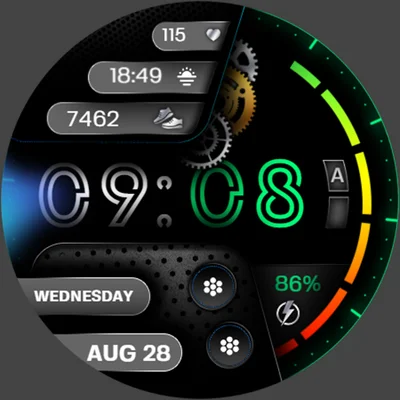
IronSync - Wear OS デジタル ウォッチフェイス
Interactive Awesome Apps は、デジタルでカスタマイズ可能なもう 1 つの文字盤、IronSync を誇りを持って発表します。
IronSync の機能:
- 8つのテーマカラー[時計上で編集可能]
- 8 つのカスタマイズ可能な分カラー
注: 上記の機能はウォッチ上でのみ編集できます (ウォッチフェイスをタップして押し続け、カスタマイズをタップして変更します)。
- デジタル時計 - 12 時間モードと 24 時間モードの両方をサポート
(デバイスの時計設定によって異なります)
- アイコン + 進行状況バー + バッテリー % を備えたバッテリー インジケーター
- 日付インジケーター
- 曜日インジケーター
- 毎日の歩数 + アイコン付きの歩数インジケーター
- すべてのインジケーターを表示する AOD (アクティブ ピクセルの平均が 10% 未満)
- バックグラウンドで 2 番目にローテーション [カスタマイズ可能]
- 午前/午後インジケーター
- カスタムコンプリケーション x1
- カスタム アプリのショートカット x2
注意 - このアプリはWear OSデバイス専用に作られています。
「インストール」ドロップダウン メニューからウォッチ デバイスのみを選択します。
あるいは、提供されている電話コンパニオン アプリを使用して、ウォッチフェイスをウォッチに直接インストールすることもできます。
Galaxy Watch 4/5/6 ユーザー: スマートフォンの Galaxy Wearable アプリの「ダウンロード」カテゴリからウォッチフェイスを見つけて適用します。
注記:
利用可能なすべての機能とアプリのショートカットの詳細については、提供されているビジュアルを参照してください。
このウォッチフェイスはほとんどの Wear OS デバイスと互換性がありますが、最新の Wear OS ソフトウェア バージョンを搭載した新しいデバイスで最適かつスムーズに動作することに注意してください。
当社のすべての文字盤は Samsung Galaxy Watch 4 デバイスでテストされ、問題なく動作することが確認されています。
すべてのインジケーターを完全に機能させるには、インストール後にすべてのセンサーの権限を有効にしてください。ありがとうございます。
接触:
qasimghumang@gmail.com
ご質問、問題、一般的なフィードバックがございましたら、電子メールでお問い合わせください。いつでもお待ちしております。
顧客満足度が当社の最優先事項であり、すべてのコメント、提案、苦情を非常に真剣に受け止め、各電子メールには 24 時間以内に必ず返信します。
インタラクティブな素晴らしいアプリの詳細:
https://play.google.com/store/apps/dev?id=8552910097760453185
当社のウェブサイトを訪問:
https://www.hayattech.com
ピンタレスト:
https://pin.it/5b5DJQBNU
私たちのウォッチフェイスをご利用いただきありがとうございます。素晴らしい一日をお過ごしください。
原文を表示
Interactive Awesome Apps is proud to present another digital & customizable watch face, the IronSync!
IronSync features:
- 8 Theme Color [can be edited on watch]
- 8 customizable minutes colors
NOTE: the features provided above can be only edited on watch ( tap and hold on the watch face and then tap on customizations to change them).
- Digital clock - supports both 12h and 24h mode
(depending on your device's clock settings)
- Battery indicator with icon + progress bar + battery %
- Date indicator
- Day indicator
- Steps indicator with daily steps +icon
- AOD showing all indicators, averaging less then 10% active pixels
- Rotating second in the background [ customizable ]
- AM/PM Indicator
- x1 custom complication
- x2 custom app shortcuts
NOTE - This app is made only for Wear OS devices.
Select only your watch device from the "INSTALL" drop-down menu.
Alternatively, use our provided phone companion app to help you install the watch face directly on your watch.
Galaxy Watch 4/5/6 users: Find and apply the watch face from the "Downloads" category in the Galaxy Wearable app on your phone.
NOTE:
Please see the provided visuals for detailed info on all available features and app shortcuts!
This watch face is compatible with most Wear OS devices, but keep in mind that it will run best and smoothest on newer devices with latest Wear OS software versions.
All our watch faces are tested on Samsung Galaxy Watch 4 devices, where they are confirmed to work without any issues.
For full functionality of all indicators enable all Sensors permissions after installation, thank you!
CONTACT:
qasimghumang@gmail.com
E-mail us for any questions, issues or general feedback - we're here for you!
Customer satisfaction is our main priority, and we take every comment, suggestion and complaint very seriously, making sure to respond to each e-mail within 24 hours.
More from Interactive Awesome Apps:
https://play.google.com/store/apps/dev?id=8552910097760453185
Visit our Website:
https://www.hayattech.com
Pinterest:
https://pin.it/5b5DJQBNU
Thank you for using our watch faces, have a great day!
データ セーフティ
このアプリが収集・共有するデータについて、Interactive Awesome AppsがGoogle Playで申告している内容です。
- 第三者と共有されるデータはありません詳しくは、デベロッパーが共有を申告する方法についての説明をご覧ください
- データは収集されません詳しくは、デベロッパーが収集を申告する方法についての説明をご覧ください
新機能
バージョン 1.0.0 · 2026/10/12
IronSync - Wear OS Digital Watch Face
開発元の連絡先
- メールqasimghumang@gmail.com
- プライバシーポリシーprojects.hayattech.com
- 住所House 39, Liaqat Avenue Jinnah Gardens, Phase 1 Islamabad, 44000 Pakistan
情報
- 提供元
- Interactive Awesome Apps
- カテゴリ
- カスタマイズ
- バージョン
- 1.0.0
- 更新日
- 2026/10/12
- リリース
- 2024/8/5
- 対象年齢
- 3 歳以上
- 価格
- ¥140
- パッケージ名
- com.watchfacestudio.ironsyncwf