JND0115
JacoNaudeDesign- 3 歳以上対象年齢
- ライフスタイルカテゴリ
- 2026/10/29更新日
- ¥200価格
com.watchfacestudio.jnd0115のGoogle Play公式ページにリンクしています。最終確認:2026/11/23。
このアプリについて
Googleによる英語 (イギリス)からの自動翻訳です。
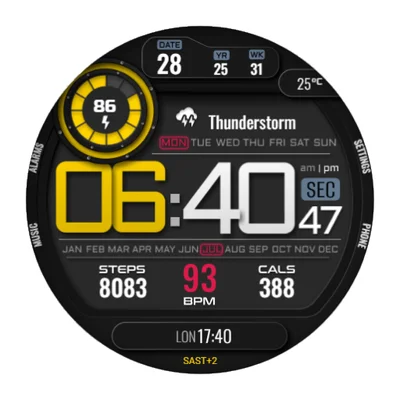
JND0115 は、Wear OS 用のモダンで詳細なデジタル ウォッチ フェイスです。
このウォッチフェイスは、Samsung Galaxy Watch 5、6、7、Ultra、Pixel Watchなど、APIレベル34以上のWear OS 5以降のデバイスと互換性があります。
JND0115は、豊富なカスタマイズオプションと精巧なOLEDディスプレイを採用したスタイリッシュなデザインを備えた、高品質でモダンなデジタルウォッチフェイスです。5種類のテーマオプション、6種類のショートカット、カスタマイズ可能なコンプリケーション、バッテリー、日付、天気、現在の気温、カロリー、歩数、心拍数などの機能を備えています。
ダークカラーの常時表示ディスプレイは、優れたスタイルとバッテリー寿命を実現します。
一部の機能はすべてのウォッチでご利用いただけない場合があります。また、この文字盤はスクエア型または長方形型のウォッチには適していません。カロリーと距離は歩数のみに基づいて計算されます。
機能
- 12/24時間表示:スマートフォンの設定と同期します。
- 摂氏と華氏:スマートフォンの位置情報設定と同期します。
- カロリー
- 日付
- バッテリー情報- 歩数と心拍数のモニタリング
- 天気タイプ
- 現在の気温
- 5種類のカラーオプション
- カスタムコンプリケーション 1種類
- 常時表示モード
- 6種類のプリセットアプリショートカット:
カレンダー
バッテリー情報
音楽プレーヤー
アラーム
設定
スマートフォン
インストール時の注意事項:
1 - ウォッチとスマートフォンが正しく接続されていることを確認してください。
2 - Playストアのドロップダウンから対象デバイスを選択し、ウォッチとスマートフォンの両方を選択してください。
3. スマートフォンでコンパニオンアプリを開き、指示に従ってください。
数分後、ウォッチフェイスがウォッチに転送されます。スマートフォンのウェアラブルアプリによってインストールされたウォッチフェイスをご確認ください。
重要事項:
設定 > アプリケーションですべての権限が有効になっていることを確認してください。また、ウォッチフェイスのインストール後、およびコンプリケーションをカスタマイズするために長押ししたときにも、権限が有効になっていることを確認してください。
心拍数に関する情報:
初めてフェイスを使用する際、またはウォッチを装着する際に、心拍数が測定されます。最初の測定後、ウォッチフェイスは10分ごとに自動的に心拍数を測定します。
ご不明な点がございましたら、support@jaconaudedesign.com までお問い合わせください。
アイデアやプロモーション、新製品情報については、他のチャンネルでもお問い合わせいただけます。
ウェブサイト:www.jaconaudedesign.com
Instagram:https://www.instagram.com/jaconaude2020/
ありがとうございました。お楽しみください。
原文を表示
This watch face is compatible with Wear OS 5+ devices with API Level 34+, including Samsung Galaxy Watch 5, 6, 7, Ultra, Pixel Watch, and others.
The JND0115 is a high quality modern digital watch face with a lot of customization options and a detailed OLED friendly stylish design. Features include, 5x Theme Options, 6x Shortcuts, 1x Customizable complication, Battery, Date, Weather Type, Current Temperature, Calories, Steps & Heart rate.
A dark always on display ensures great style and battery life.
Some features may not be available on all watches and this dial is not suitable for square or rectangular watches. Calories and Distance are calculated on steps taken only.
FEATURES
- 12/24hr Format: Syncs with your phone settings.
- Celsius and Fahrenheit Syncs with your phone location settings.
- Calories.
- Date.
- Battery Information.
- Steps and Heart Rate Monitoring.
- Weather Type.
- Current Temperature.
- 5x Different Color Options.
- 1x Custom Complication.
- Similar Always On Display Mode.
- 6x Preset App Shortcuts:
Calendar
Battery Info
Music Player
Alarms
Settings
Phone
INSTALLATION NOTES:
1 - Make sure the watch and phone is properly connected.
2 - Select target device from drop down in Play Store and select both Watch and Phone.
3. On your phone you can open up the Companion App and follow the instructions.
After a few minutes the watch face will transferred on watch : check the watch faces installed by the Wearable app on the phone.
IMPORTANT NOTE:
Please Make sure you have enabled all permissions from settings > applications. And also when prompted after installing face and when long pressing to customize complication.
INFORMATION ON HEART RATE:
The first time you use the face or put on the watch the heart rate is measured. After the first measurement, the watch face will automatically measure your heart rate every 10 minutes.
For any assistance please reach out to us at support@jaconaudedesign.com
Reach out to me on my other channels for ideas and promotions plus new releases.
WEB: www.jaconaudedesign.com
INSTAGRAM: https://www.instagram.com/jaconaude2020/
Thank you and enjoy.
データ セーフティ
このアプリが収集・共有するデータについて、JacoNaudeDesignがGoogle Playで申告している内容です。
- 第三者と共有されるデータはありません詳しくは、デベロッパーが共有を申告する方法についての説明をご覧ください
- データは収集されません詳しくは、デベロッパーが収集を申告する方法についての説明をご覧ください
開発元の連絡先
- ウェブサイトjaconaudedesign.com
- メールjaco1301@gmail.com
- プライバシーポリシーjaconaudedesign.com
- 住所Serenade Rd, BARVALLEN 7 Villa Heunis PRIMROSE EAST Johannesburg 1401 South Africa
情報
- 提供元
- JacoNaudeDesign
- カテゴリ
- ライフスタイル
- 更新日
- 2026/10/29
- リリース
- 2025/7/9
- 対象年齢
- 3 歳以上
- 価格
- ¥200
- パッケージ名
- com.watchfacestudio.jnd0115