KZY014
Kzy Watchfaces- 3 歳以上対象年齢
- カスタマイズカテゴリ
- 2025/9/8更新日
- ¥150価格
com.watchfacestudio.kzy014のGoogle Play公式ページにリンクしています。最終確認:2026/11/24。
このアプリについて
Googleによる英語 (アメリカ合衆国)からの自動翻訳です。
KZY014 は、Wear OS スマートウォッチ用に設計された優れたウォッチフェイスの選択肢です。
KZY014 は、Wear OS スマートウォッチ用に設計された優れたウォッチフェイスの選択肢です。
スマートウォッチでのウォッチフェイスのセットアップに関する注意事項: 電話アプリは、Wear OS ウォッチでのウォッチフェイスのセットアップと検索を容易にするプレースホルダーとして機能するだけです。セットアップドロップダウンメニューから追跡デバイスを選択する必要があります
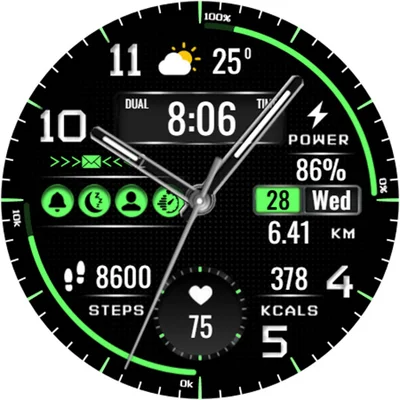
ダイヤル機能:天気-Km-歩数-脈拍-Kcals-電源-デュアルタイム-メッセージ-アラーム-スリープフォン-タイマー-アナログ時計-日付-AOD
ウォッチフェイスのカスタマイズ:1- 画面を長押しします2- [カスタマイズ] をタップします
一部の時計では一部の機能が利用できない場合があります。この文字盤は、Samsung Galaxy Watch 4、5、6、Pixel Watch などに適しています。 と互換性があります。 API レベル 30 以上のすべての Wear OS デバイスをサポート
設置マニュアル ↴
公式の Google Play Android アプリからウォッチフェイスをインストールしようとすると、さまざまな問題が発生する可能性があります。
ウォッチフェイスが携帯電話にはインストールされているがウォッチにはインストールされていない場合、開発者は Play ストアでの視認性を向上させるヘルパー アプリを追加しました。携帯電話からヘルパー アプリをアンインストールし、Play ストア アプリ (https://i.imgur.com/OqWHNYf.png) の [インストール] ボタンの横にある三角形のアイコンを探します。この記号は、ウォッチをインストール先として選択できるドロップダウン メニューを示します。
あるいは、ラップトップ、Mac、または PC の Web ブラウザで Play ストアを開いてみることもできます。これにより、インストールする正しいデバイスを視覚的に選択できるようになります (https://i.imgur.com/Rq6NGAC.png)。
[上記の手順に従ってもウォッチフェイスが表示されない場合は、Galaxy ウェアラブル アプリを開きます。アプリの [ダウンロード] セクションに移動すると、そこにウォッチフェイスが見つかります (https://i.imgur.com/mmNusLy.png)。クリックするだけでインストールが開始されます。
原文を表示
KZY014 is an excellent watch face choice designed for Wear OS Smartwatches
Watch face setup notes on smartwatch: The Phone app just acts as a placeholder to make it easier to set up and find the watch face on your Wear OS watch. You must select your tracking device from the setup drop-down menu
Dial Features:Weather-Km-Steps-Pulse-Kcals-Power-Dual Tıme-Message-Alarm-Sleep-Phone-Tımer-Analog clock-Date-Aod
Watch face customization:1- Touch and hold the screen2- Tap Customize
Some features may not be available on some watches. This watch face is suitable for Samsung Galaxy Watch 4,5,6, Pixel Watch etc. It is compatible with . Supports all Wear OS devices with API level 30+
INSTALLATION MANUAL ↴
You may encounter various problems when trying to install a watch face from the official Google Play Android app.
In cases where the watch face is installed on your phone but not on your watch, the developer has added a helper app to improve visibility in the Play Store. You can uninstall the helper app from your phone and look for a triangular icon next to the Install button in the Play Store app (https://i.imgur.com/OqWHNYf.png). This symbol indicates a drop-down menu where you can select your watch as the installation destination.
Alternatively, you can try opening the Play Store in a web browser on your laptop, Mac or PC. This will allow you to visually select the correct device for installation (https://i.imgur.com/Rq6NGAC.png).
[If you have followed the instructions mentioned above and the watch face still does not appear on your watch, open the Galaxy Wearable app. Go to the Downloads section of the app and you will find the watch face there (https://i.imgur.com/mmNusLy.png). Simply click on it to start the installation.
データ セーフティ
このアプリが収集・共有するデータについて、Kzy WatchfacesがGoogle Playで申告している内容です。
- 第三者と共有されるデータはありません詳しくは、デベロッパーが共有を申告する方法についての説明をご覧ください
- データは収集されません詳しくは、デベロッパーが収集を申告する方法についての説明をご覧ください
新機能
2025/9/8
KZY014 is an excellent watch face choice designed for Wear OS Smartwatches
開発元の連絡先
- メールsadik_yalcinkaya@hotmail.com
- プライバシーポリシーfreeprivacypolicy.com
- 住所barbaros mahallesi 180 sokak no:32/3 Bağcılar/İstanbul 34203 Türkiye/İstanbul Türkiye
情報
- 提供元
- Kzy Watchfaces
- カテゴリ
- カスタマイズ
- 更新日
- 2025/9/8
- リリース
- 2024/2/25
- 対象年齢
- 3 歳以上
- 価格
- ¥150
- パッケージ名
- com.watchfacestudio.kzy014