Mark One Watch Face
SkyMax Watch Faces- 3 歳以上対象年齢
- カスタマイズカテゴリ
- 2026/9/6更新日
- ¥150価格
com.skymax.watchface.mark.oneのGoogle Play公式ページにリンクしています。最終確認:2026/11/24。
このアプリについて
Googleによる英語 (アメリカ合衆国)からの自動翻訳です。
カスタマイズ可能な最新のエクスペリエンス Wear OS ウォッチ
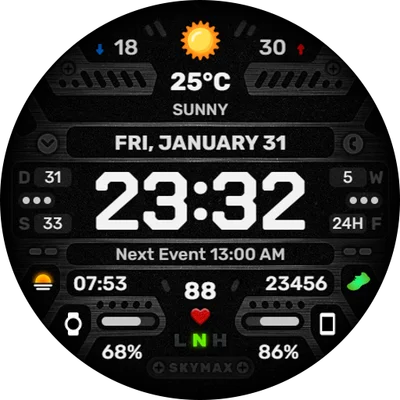
SkyMax «Mark One» ウォッチフェイス — これは、Wear OS スマートウォッチ用のデジタルウォッチフェイスです。色や背景、各種インジケーターなどをカスタマイズできるので、自分にぴったりのレイアウトが作れます!
Wear OS 5.0 API 34+ 以降を実行しているデバイスと互換性があります。
このアプリは、ほとんどの Wear OS デバイス向けに設計されています。
** インストール > [インストール] ドロップダウン メニューから時計のみを選択します。 「お使いのデバイスには互換性がありません」というメッセージが表示される場合、またはその他のインストールの問題がある場合は、コンパニオン アプリを使用してスマートウォッチにアプリをインストールしてみてください。最後の手段として、ブラウザで Play ストアにアクセスしてインストールしてください。
機能:
› 携帯電話の設定 + 秒に応じて 12 時間または 24 時間の時間形式
› 多言語でのデート
› 心拍数カウンター、心拍数レベル // 測定インジケーター付き (インジケーターレベルは 120 心拍数/分に設定)
› 天気予報インジケーター
› Always On Display (AOD) をサポート
› 2 つのプリインストールされたアプリケーションのショートカット
パーソナライゼーション:
** すべての機能を使用するには、ショートカットと追加機能に必要な権限を有効にしてください。
› 30 色のオプション
› 好みの 4 つのカスタム コンプリケーション (アドオン) - 天気、バッテリー、カレンダーなど
› 2 つの AOD 画面スタイル
› 6 つの AOD 画面輝度オプション
注:
** 文字盤の更新やシステムの更新などを行った後、歩数計などのインジケーターが「0」を表示する場合は、以下をお試しください。時計のディスプレイを長押しして時計の文字盤選択メニューに移動し、他の利用可能な文字盤を選択します。その後、時計の文字盤選択メニュー (時計からではなく) から時計の文字盤を削除し、スマートフォンを使用して、最近インストールした文字盤の選択メニューから時計に再インストールします。
** 心拍数などの指標も「0」の場合は、設定の権限を確認してください。 「設定」→「アプリケーション」→「権限」で、このウォッチフェイスを見つけて必要な権限を設定します。また、心拍数を測定するときは、時計の画面がオンになっていて、手首に正しく装着されていることを確認してください。
追加のアプリケーション:
** 時計の画面に「スマートフォンのバッテリー残量」や時計にはないその他の追加機能 (コンプリケーション) を表示したい場合は、これらのアプリケーションの開発者である amoledwatchfaces™ から追加のアプリケーションをインストールしてください (すべてのクレジットは元のアプリケーションの作成者に帰属します)
• 電話機のバッテリーの複雑化
https://play.google.com/store/apps/details?id=com.weartools.phonebattcomp
• コンプリケーションスイート - Wear OS
https://play.google.com/store/apps/details?id=com.weartools.weekdayutccomp
• 心拍数の合併症
https://play.google.com/store/apps/details?id=com.weartools.heartratecomp
• 医療サービスの合併症
https://play.google.com/store/apps/details?id=com.weartools.hscomplications
ライブサポートやディスカッションにご参加ください:
電報 https://t.me/skymaxwatchfaces
インスタグラム https://www.instagram.com/skymaxwatchfaces
原文を表示
SkyMax «Mark One» Watch Face — This is a digital watch face for Wear OS smartwatch. Colors, background and various indicators can be customized, allowing you to create the perfect layout for you!
Compatible with devices running Wear OS 5.0 API 34+ and later.
This app is designed for most Wear OS devices.
** Install > Select only the clock from the Install drop-down menu. If you see a "Your devices are not compatible" message or have any other installation issues, try using our companion app to install the app on your smartwatch. As a last resort, go to the Play Store in your browser to install.
FUNCTIONS:
› 12 or 24 hour time format depending on your phone settings + seconds
› Date with multiple languages
› Heart rate counter, beats per minute level // with measurement indicator (indicator level set to 120 beats per minute)
› Weather forecast indicator
› Always On Display (AOD) supported
› 2 preinstalled application shortcuts
PERSONALIZATION:
** For full functionality, please enable required permissions for shortcuts and complications!
› 30 color options
› 4 custom complications (add-ons) of your choice - weather, battery, calendar and others
› 2 AOD screen styles
› 6 AOD screen brightness options
NOTES:
** If after updating the watch face, updating the system or other situations, the step counter or other indicators show “0”, try the following. Touch and hold the watch display to get to the watch face selection menu → select any other available watch face → then remove our watch face from the watch face selection menu (not from the watch) and reinstall it on your watch using your smartphone, from the recently installed watch faces selection menu.
** If the heart rate or other indicators are also “0”, check the permissions in the settings. “Settings” → “Applications” → “Permissions”, find this watch face and configure the necessary permissions. Also make sure that the watch screen is on and that it is worn correctly on your wrist when measuring your heart rate.
ADDITIONAL APPLICATIONS:
** If you want to see on the screen of your watch “the remaining battery charge of your smartphone” and other additions (complications) that are not on your watch, install additional applications from the developer of these applications - amoledwatchfaces™ (all credits belong to the creator of the original application)
• Phone Battery Complication
https://play.google.com/store/apps/details?id=com.weartools.phonebattcomp
• Complications Suite - Wear OS
https://play.google.com/store/apps/details?id=com.weartools.weekdayutccomp
• Heart Rate Complication
https://play.google.com/store/apps/details?id=com.weartools.heartratecomp
• Health Services Complications
https://play.google.com/store/apps/details?id=com.weartools.hscomplications
Join us for live support and discussion:
Telegram https://t.me/skymaxwatchfaces
Instagram https://www.instagram.com/skymaxwatchfaces
データ セーフティ
このアプリが収集・共有するデータについて、SkyMax Watch FacesがGoogle Playで申告している内容です。
- 第三者と共有されるデータはありません詳しくは、デベロッパーが共有を申告する方法についての説明をご覧ください
- データは収集されません詳しくは、デベロッパーが収集を申告する方法についての説明をご覧ください
開発元の連絡先
- メールskymax.watchfaces@gmail.com
- プライバシーポリシーsites.google.com
- 住所ул. Карла Маркса, дом 10, кв. 43 Хойники Гомельская область 247622 Belarus
情報
- 提供元
- SkyMax Watch Faces
- カテゴリ
- カスタマイズ
- 更新日
- 2026/9/6
- リリース
- 2025/5/11
- 対象年齢
- 3 歳以上
- 価格
- ¥150
- パッケージ名
- com.skymax.watchface.mark.one