MAX DIGITAL Info
JK Creative Studio- 3 歳以上対象年齢
- カスタマイズカテゴリ
- 2026/11/5更新日
- ¥320価格
com.max.digital.infoのGoogle Play公式ページにリンクしています。最終確認:2026/11/13。
このアプリについて
Googleによる英語 (アメリカ合衆国)からの自動翻訳です。
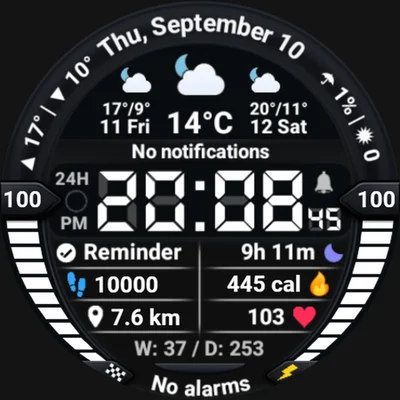
天気予報、8種類のカラーテーマ、コンプリケーション、AOD(常時表示)機能を備えたデジタルウォッチフェイス。
MAX DIGITAL Infoは、洗練されたデジタルデザインと滑らかな3Dディテール、スマートなフルAOD(常時表示ディスプレイ)、そして見やすく配置されたコンプリケーションを融合させています。太字のデジタル表示と目立つサイドプログレスバーにより、時刻、歩数目標の進捗状況、バッテリー残量を一目で確認できます。
通常モードとフルAODは、天気予報を補完する2つの表示方法で提供するために綿密に設計されています。通常モードでは2日間の天気予報が表示され、今後の計画を立てるのに役立ちます。フルAODでは、6時間後と12時間後の予報も表示され、より詳細な天気予報を確認できます。それぞれのモードは明確な目的を持ち、手首にさらに多くの便利な情報をもたらします。
主な機能
✔️ 洗練されたデジタルデザインと滑らかな3D要素
✔️ 秒を含む、大きくて見やすいデジタル時刻表示
✔️ 12時間表示モード(AM/PM表示付き)
✔️ 12時間表示モード(先頭のゼロなし) – 例:09:05ではなく9:05と表示
✔️ ウォッチフェイスをカスタマイズできる豊富なカラーバリエーション
✔️ 歩数目標とバッテリー残量を表示する、目立つ2つのサイドプログレスバー
✔️ 現在の天気と気温
✔️ デザインに調和する統一感のある天気アイコン
✔️ 今後2日間の天気予報(日ごとの最低気温と最高気温)
✔️ 本日の最低気温と最高気温、降水確率、紫外線指数
✔️ 月相表示
✔️ 日付、曜日、月
✔️ ウォッチの言語設定に基づいた多言語対応の日付と曜日表示
✔️ 週番号(W)と通算日数(D)
✔️ 歩数、距離、消費カロリー、心拍数
✔️ 気温(℃/℉)と距離表示単位:km/mi
✔️ 8つのインタラクティブエリア:カスタマイズ可能なコンプリケーション4つと設定可能なタップショートカット4つ
✔️ 6時間後と12時間後の時間別天気予報を表示する、洗練されたデザインのフルAOD(常時表示ディスプレイ)
✔️ 2つのAODモード:フルモードと省電力ECOモード
スマートフルAOD – 天気を別の角度から確認
このウォッチフェイスには、洗練されたデザインのフル常時表示ディスプレイが搭載されています。単なる時刻表示ではなく、ウォッチフェイスの特徴的なスタイルと見やすいレイアウトを損なうことなく、通常モードの便利な補助機能として機能します。
• 通常モードでは、数日間の予定を立てることができます。現在の天気と、明日と明後日の天気予報が表示されます。
• フルAODでは、数時間先の天気を確認できます。現在の天気と、6時間後と12時間後の時間別天気予報が表示されます。
AODが起動すると、両サイドの天気予報は自動的に日別予報から時間別予報に切り替わります。1つのウォッチフェイスで、数日先の天気と数時間先の天気という2つの便利な視点を提供します。
カスタマイズ可能な4つのコンプリケーション
4つのエリアに表示される情報を選択できます。
• 中央の2つのコンプリケーション(左右)
• 長文テキストエリア
• 下部の曲線テキストエリア
表示される情報は、コンプリケーションプロバイダーとウォッチにインストールされているアプリケーションによって異なります。
設定可能な4つのタップショートカット
各エリアに、対応するアプリケーションまたは機能を割り当てることができます。例:
• メインの天気アイコン → 天気アプリ
• カレンダーエリア → カレンダーアプリ
• ベルアイコン → アラームアプリまたはアラーム設定
• 下部の歩数、消費カロリー、距離、心拍数エリア → ヘルスケアまたはフィットネスアプリ
下部エリアは、1つのショートカットが共有されます。これらの割り当ては例です。利用可能なオプションは、ウォッチとインストールされているアプリケーションによって異なります。
重要な天気情報
午前0時から午前7時頃までの間、システムの天気データソースの都合上、今後2日間の天気予報の更新が一時的に停止する場合があります。現在の天気と気温は引き続き更新されます。この期間中も、フルAOD(常時表示ディスプレイ)の+6時間および+12時間ごとの時間別予報は引き続き表示されます。
インストール後に天気情報が表示されない場合は、別のウォッチフェイスに切り替えてから、MAX DIGITAL Infoに戻してみてください。
互換性
Samsung Galaxy Watchおよびその他の互換性のあるWear OSウォッチ向けに設計されています。個々の機能、コンプリケーション、ショートカットは、ウォッチのモデル、システムバージョン、インストールされているアプリケーションによって異なる場合があります。
サポート
インストールやウォッチフェイスの機能で問題が発生した場合は、ご連絡ください。喜んでお手伝いいたします。
メールアドレス:redskins-war4all@centrum.cz
開発者:JK Creative Studio
原文を表示
MAX DIGITAL Info combines a refined digital design with smooth 3D details, a smart Full AOD and clearly arranged complications. Bold digital time and prominent side progress bars make it easy to check the time, your step goal progress and battery level at a glance.
Normal mode and Full AOD are thoughtfully designed to offer two complementary views of the weather. Use the two-day forecast in normal mode to plan ahead. Full AOD adds a closer look at the hours ahead, with forecasts for +6 h and +12 h. Each mode serves a distinct purpose, bringing more useful information to your wrist.
Key features
✔️ Refined digital design with smooth 3D elements
✔️ Large, easy-to-read digital time, including seconds
✔️ 12/24-hour time format with AM/PM in 12-hour mode
✔️ 12-hour time without a leading zero – for example, 9:05 instead of 09:05
✔️ Wide selection of colors to personalize the watch face
✔️ 2 prominent side progress bars for your step goal and battery level
✔️ Current weather and temperature
✔️ Consistent weather icons designed to complement the style
✔️ Forecast for the next 2 days with daily low and high temperatures
✔️ Today's low and high temperatures, rain probability and UV index
✔️ Moon phase display
✔️ Date, day of the week and month
✔️ Multilingual date and weekday display based on your watch's language
✔️ Week number (W) and day of the year (D)
✔️ Steps, distance, calories and heart rate
✔️ Temperature in °C/°F and distance in km/mi
✔️ 8 interactive areas: 4 customizable complications and 4 configurable tap shortcuts
✔️ One carefully designed Full AOD with +6 h and +12 h hourly forecasts
✔️ 2 AOD modes – Full and power-saving ECO
Smart Full AOD – another view of the weather
The watch face includes one carefully designed Full Always On Display. More than a dimmed time display, it is a practical companion to normal mode, preserving the watch face's distinctive style and clear layout.
• Normal mode for planning the next few days: current weather and forecasts for tomorrow and the following day.
• Full AOD for the hours ahead: current weather and +6 h and +12 h hourly forecasts.
When AOD activates, the two side forecasts automatically switch from daily to hourly forecasts. Two useful perspectives in one watch face: the days ahead and the upcoming hours.
4 customizable complications
Choose the information displayed in four areas:
• 2 middle complications – left and right.
• 1 Long Text area.
• 1 lower Curved Text area.
Available information depends on the complication providers and applications installed on your watch.
4 configurable tap shortcuts
Assign a supported application or function to each area, for example:
• Main weather icon → Weather app.
• Calendar area → Calendar app.
• Bell icon → Alarm app or alarm settings.
• Lower steps, calories, distance and heart rate area → health or fitness app.
The lower area is one shared shortcut. These assignments are examples; available options depend on your watch and installed applications.
Important weather information
Between midnight and approximately 7:00 AM, the forecast for the next two days may temporarily stop updating due to the system weather data source. Current weather and temperature continue to update. The +6 h and +12 h hourly forecasts in Full AOD continue during this period.
If weather information does not appear after installation, try switching to another watch face and then back to MAX DIGITAL Info.
Compatibility
Designed for Samsung Galaxy Watch and other compatible Wear OS watches. Individual features, complications and shortcuts may depend on the watch model, system version and installed applications.
Support
Having trouble with installation or a watch face feature? Contact me and I will be happy to help.
Email: redskins-war4all@centrum.cz
Developer: JK Creative Studio
データ セーフティ
このアプリが収集・共有するデータについて、JK Creative StudioがGoogle Playで申告している内容です。
- 第三者と共有されるデータはありません詳しくは、デベロッパーが共有を申告する方法についての説明をご覧ください
- データは収集されません詳しくは、デベロッパーが収集を申告する方法についての説明をご覧ください
開発元の連絡先
- ウェブサイトjkcreativestudio.cz
- メールredskins-war4all@centrum.cz
- プライバシーポリシーsites.google.com
- 住所Linecká 3 382 41 Kaplice Czechia
情報
- 提供元
- JK Creative Studio
- カテゴリ
- カスタマイズ
- 更新日
- 2026/11/5
- リリース
- 2026/10/3
- 対象年齢
- 3 歳以上
- 価格
- ¥320
- パッケージ名
- com.max.digital.info