MNML Thin Watch face
amoledwatchfaces™- 3 歳以上対象年齢
- カスタマイズカテゴリ
- 2026/9/1更新日
- 無料価格
com.watchfacestudio.awfmnmlthinのGoogle Play公式ページにリンクしています。最終確認:2026/11/12。
このアプリについて
Googleによる英語 (アメリカ合衆国)からの自動翻訳です。
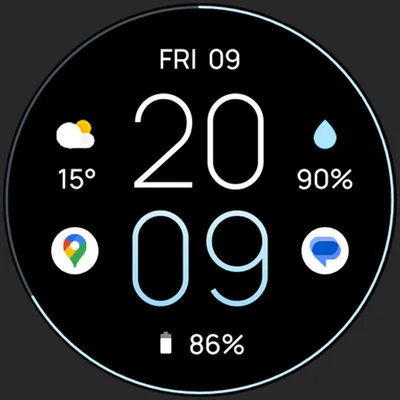
Wear OS 用の細くてモダンなフォントを使用した、シンプルでミニマルなデジタル ウォッチ フェイス。
Wear OS デバイス専用 - API 33 以上
// 長方形の腕時計には適していません
Watch Face Format を採用
amoledwatchfaces.com
インストール方法
amoledwatchfaces.com/guide
1つ買うともう1つが無料!
amoledwatchfaces.com/bogo
カスタムコンプリケーションアプリ
amoledwatchfaces.com/apps
機能
• ミニマルなデザイン
• トゥルーブラックの背景
• 細く読みやすいフォント
• 高解像度
• PNGQuant に最適化されたレイヤー > バッテリー消費を抑える
• 低 OPR、アダプティブカラー、2種類のスタイルを備えたアンビエントモード
• 多言語対応
• 12/24時間表示
• 6つのショートテキストコンプリケーション (API 33+)
• 2つのアイコンと小さい画像のコンプリケーション
• 新しいグラデーションカラー!
注:アプリケーションの説明に表示されるコンプリケーションはプロモーション目的のみです。設定できるカスタムコンプリケーションは、インストールされているアプリケーションと時計メーカーのソフトウェアによって異なります。
カスタマイズ
• カラー(30倍)
• 秒表示(トグル)
• 時間表示(10倍)
• 分表示(10倍)
• 時刻表示の太さ(トグル - API 33以上)
• バッジ表示(なし、午前/午後、未読通知数)
• AOD(スタイル - 時間のみ / 暗く表示)
• コンプリケーション / アプリショートカット
インストールとトラブルシューティングガイド
amoledwatchfaces.com/guide
問題報告やヘルプリクエストは、サポートアドレスまでお送りください。
support@amoledwatchfaces.com
ライブサポートとディスカッションのために、Telegramグループにご参加ください。
t.me/amoledwatchfaces
ニュースレター
amoledwatchfaces.com/contact#newsletter
amoledwatchfaces™ - Awf
原文を表示
Only for Wear OS devices - API 33+
// Not suitable for rectangular watches
Powered by Watch Face Format
amoledwatchfaces.com
HOW TO INSTALL?
amoledwatchfaces.com/guide
BUY ONE GET ONE OFFER!
amoledwatchfaces.com/bogo
CUSTOM COMPLICATION APPS
amoledwatchfaces.com/apps
FEATURES
• minimal look
• true black background
• thin & highly readable font
• high resolution
• PNGQuant optimized layers > battery friendly
• ambient mode with low OPR & adaptive color & two styles
• multilanguage
• 12/24 H
• 6x SHORT_TEXT complications (API 33+)
• 2x ICON, SMALL_IMAGE complications
• new GRADIENT colors!
NOTE: Complications shown in the description of the application are of a promotional nature only. Custom complications you can set depends on your installed applications and watch manufacturer software.
CUSTOMIZATION
• Color (30x)
• Seconds Indicator (Toggle)
• Hour Color (10x)
• Minute Color (10x)
• Thicker Hours (Toggle - API 33+)
• Badge Indicator (None, Am-Pm, Unread Notification Count)
• AOD (Style - Time only / Dimmed Down)
• Complications / app shortcuts
Installation and troubleshooting guide
amoledwatchfaces.com/guide
Please send any issues reports or help requests to our support address
support@amoledwatchfaces.com
Join our Telegram group for live support and discussion
t.me/amoledwatchfaces
Newsletter
amoledwatchfaces.com/contact#newsletter
amoledwatchfaces™ - Awf
データ セーフティ
このアプリが収集・共有するデータについて、amoledwatchfaces™がGoogle Playで申告している内容です。
- 第三者と共有されるデータはありません詳しくは、デベロッパーが共有を申告する方法についての説明をご覧ください
- データは収集されません詳しくは、デベロッパーが収集を申告する方法についての説明をご覧ください
新機能
2026/9/1
v1.7.5
• adjusted zero in monospaced font (12h)
• fixed old (bad) font resource linking
v1.7.3
• monospaced font fix (Wear OS 6+)
v1.7.2
• added Monospaced Font option (Wear OS 6+)
v1.7.1
• wff3, wff4 improvements
• time only AOD animated transition (Wear OS 6+)
...
NOTE: Remove watch face from favorites and add it back to ensure watch face runs smoothly after update.
Visit our developer portfolio here:
https://play.google.com/store/apps/dev?id=5591589606735981545
開発元の連絡先
- ウェブサイトamoledwatchfaces.com
- メールsupport@amoledwatchfaces.com
- プライバシーポリシーamoledwatchfaces.com
- 住所51 Nižný Kručov 09301 Nižný Kručov Slovakia
情報
- 提供元
- amoledwatchfaces™
- カテゴリ
- カスタマイズ
- 更新日
- 2026/9/1
- リリース
- 2022/2/15
- 対象年齢
- 3 歳以上
- 価格
- 無料
- パッケージ名
- com.watchfacestudio.awfmnmlthin