NDW8
NDAN WATCHFACES- 3 歳以上対象年齢
- カスタマイズカテゴリ
- 2022/2/24更新日
- ¥90価格
com.watchfacestudio.ndw8のGoogle Play公式ページにリンクしています。最終確認:2026/11/22。
このアプリについて
Googleによる英語 (アメリカ合衆国)からの自動翻訳です。
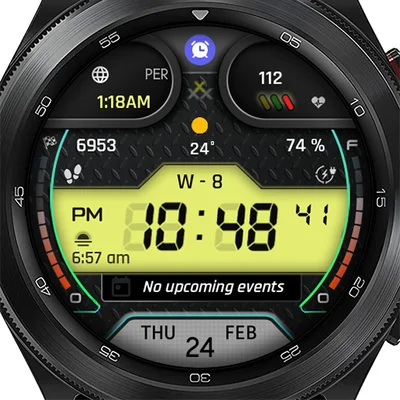
WearOS用の派手なウォッチフェイス
カスタマイズのための複数のオプションを備えた派手なカラフルなウォッチフェイス。
特徴:
>背景の選択
>色の選択
>データとショートカットの合併症の選択。
ステップ、バッテリー、HRデータ。
AODモードのシンプルなプレーンデジタルウォッチフェイス。
***心拍数機能***
ウォッチフェイスは、取り付け時にHRを自動的に測定したり、自動的に表示したりしないため、手動で操作してください。
これを行うには、心拍数表示領域をタップします(タップして時計で測定します)。
測定はWIPであるため、HRアイコンが赤に変わり、数秒以内にHR測定が表示されます。
完了すると、10分ごとに心拍数が測定されます。 HRエリアをいつでもタップして手動測定を行うことができます。
https://www.facebook.com/NDAN.Watchfaces/
https://www.instagram.com/Ndan.watchfaces/
メール:Ndan.Watchfaces@gmail.com
原文を表示
A fancy colorful watchface with multiple options for customization.
Features:
> Background selection
> Color Selection
> Complication Selection for data and shortcuts.
Steps, Battery, HR data.
Simple plain digital watch face in AOD mode.
*** Heart Rate function ***
As the watch face does not automatically measure and does not automatically display the HR when installed, please perform manual action.
To do this, tap on the heart rate display area (Tap to measure in the watch).
As the measurement is WIP, the HR Icon will turn Red and within few seconds, the HR measurement will be displayed.
Once done, it will measure Heart Rate every 10 min. You can always tap on HR Area to take manual measurements.
https://www.facebook.com/NDAN.Watchfaces/
https://www.instagram.com/Ndan.watchfaces/
email: Ndan.Watchfaces@gmail.com
データ セーフティ
このアプリが収集・共有するデータについて、NDAN WATCHFACESがGoogle Playで申告している内容です。
- 第三者と共有されるデータはありません詳しくは、デベロッパーが共有を申告する方法についての説明をご覧ください
- データは収集されません詳しくは、デベロッパーが収集を申告する方法についての説明をご覧ください
新機能
バージョン Initial Release · 2022/2/24
Initial Release for NDW8
開発元の連絡先
- メールndan.watchfaces@gmail.com
- プライバシーポリシーsites.google.com
- 住所FL. No. 16, A/2, Suncity Phase I Pune, Maharashtra 411051 India
情報
- 提供元
- NDAN WATCHFACES
- カテゴリ
- カスタマイズ
- バージョン
- Initial Release
- 更新日
- 2022/2/24
- リリース
- 2022/2/24
- 必要条件
- Android 9以降
- 対象年齢
- 3 歳以上
- 価格
- ¥90
- パッケージ名
- com.watchfacestudio.ndw8