NewAge Watch Face
RADU GHEORGHE TURCU- 3 歳以上対象年齢
- カスタマイズカテゴリ
- 2025/11/6更新日
- ¥150価格
com.turcuradu.newagewatchfaceのGoogle Play公式ページにリンクしています。最終確認:2026/11/14。
このアプリについて
Googleによる英語 (アメリカ合衆国)からの自動翻訳です。
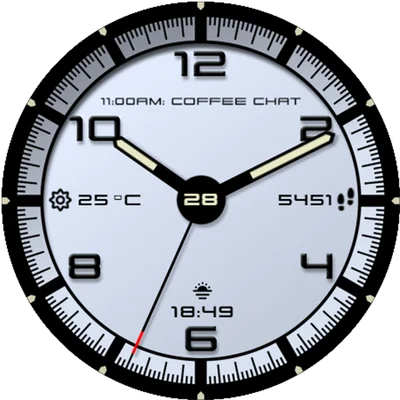
天気、イベント、歩数、日の出情報を表示するエレガントなクラシックアナログウォッチフェイス
このNewAge Classicアナログウォッチフェイスで、時代を超えたエレガンスをご体験ください⌚✨
シンプルさと精度を愛する方のためにデザインされたこのフェイスは、洗練された伝統的なスタイルと現代的なスマート機能を兼ね備えています。
🌤️ 天気予報で最新情報をお届けします
🏃♂️ 歩数計でアクティビティを記録
📅 日付とイベントのリマインダーでスケジュールを一目で確認できます
🌅 日の出・日の入りインジケーターで自然なリズムを刻みます
⚙️ 滑らかな秒針とクリーンなコントラストで優れた視認性を実現
スタイルと機能性の完璧なバランス。普段使いにもビジネスミーティングにも最適です。
📌 対応デバイス:
Wear OS 3.0以上
Samsung Galaxy Watchシリーズ、Google Pixel Watchなど
--------------------------------------------------------------------------------------------------------
スマートウォッチへのウォッチフェイスのインストールに関する注意事項:
スマートフォンアプリは、Wear OSウォッチへのウォッチフェイスのインストールと検索を容易にするためのプレースホルダーとしてのみ機能します。インストールのドロップダウンメニューからウォッチデバイスを選択してください。
携帯電話でヘルパーを直接ダウンロードする場合は、アプリケーションを開いて画面またはダウンロードボタンをタッチしてください。-> ウォッチへのインストールが開始されます。
Wear OS ウォッチを接続する必要があります。
この方法で動作しない場合は、そのリンクを携帯電話の Chrome ブラウザにコピーし、右から下矢印をクリックして、インストールするウォッチフェイスを選択してください。
.............................................
インストール後、そのウォッチフェイスを画面に設定する必要があります。Wear OS アプリからダウンロードしたウォッチフェイスまでスクロールすると見つかります。
問題が発生した場合は、raduturcu03@gmail.com までご連絡ください。
------------------------------------------------------------------------------------------------
Telegram でフォローしてください: https://t.me/TRWatchfaces
無料クーポンを入手するには、当社のウェブサイトをフォローしてください:
https://trwatches.odoo.com/
---------------------------------------------------------------------------------------------------
Google プロフィールで他のデザインもご覧ください。
原文を表示
Experience timeless elegance with this NewAge Classic Analog Watch Face ⌚✨
Designed for those who love simplicity and precision, this face combines modern smart features with a refined traditional style.
🌤️ Weather updates keep you informed
🏃♂️ Steps counter tracks your activity
📅 Date & Event reminder keeps your schedule at a glance
🌅 Sunrise & Sunset indicators for a natural daily rhythm
⚙️ Smooth seconds hand and clean contrast for perfect readability
Perfect balance between style and functionality — ideal for everyday wear or business meetings.
📌 Compatible with:
Wear OS 3.0+
Devices such as Samsung Galaxy Watch series, Google Pixel Watch, and others
--------------------------------------------------------------------------------------------------------
Watch face installation notes on smart watch:
Phone app serves only as a placeholder to make it easier to install & find the watch face on your Wear OS watch. You have to select your watch device from the install dropdown menu.
If you download the helper directly with the phone , you need to open application and touch on the display or the download button. -> will start to install on the watch.
A wear os watch need to be connected.
If not working in that way , you can copy that link into your phone chrome browser and click on arrow down from right , and you choose the watch face to install.
..............................................
After installation you need to set that watch face to your screen , from wear OS app , go down at downloaded watch faces and you will find it.
If you have problems , please contact me on raduturcu03@gmail.com
--------------------------------------------------------------------------------------------------
FOLLOW US AT TELEGRAM : https://t.me/TRWatchfaces
FOLLOW US WEBSITE TO GET FREE COUPONS :
https://trwatches.odoo.com/
--------------------------------------------------------------------------------------------------
Try to see others designs in my google profile.
データ セーフティ
このアプリが収集・共有するデータについて、RADU GHEORGHE TURCUがGoogle Playで申告している内容です。
- 第三者と共有されるデータはありません詳しくは、デベロッパーが共有を申告する方法についての説明をご覧ください
- データは収集されません詳しくは、デベロッパーが収集を申告する方法についての説明をご覧ください
開発元の連絡先
- ウェブサイトtrwatches.odoo.com
- メールraduturcu03@gmail.com
- プライバシーポリシーtrwatches.odoo.com
- 住所Str. Eduard Albert Bielz, Nr. 89d, Bl. b1, Sc. f, et.1, Ap. 60 550031 Sibiu Romania
情報
- 提供元
- RADU GHEORGHE TURCU
- カテゴリ
- カスタマイズ
- 更新日
- 2025/11/6
- リリース
- 2025/11/4
- 対象年齢
- 3 歳以上
- 価格
- ¥150
- パッケージ名
- com.turcuradu.newagewatchface