Nice Classic
Eugeniy Radzivill- 3 歳以上対象年齢
- カスタマイズカテゴリ
- 2025/8/26更新日
- ¥110価格
com.watchfacestudio.bigdataのGoogle Play公式ページにリンクしています。最終確認:2026/11/25。
このアプリについて
Googleによるロシア語 (ロシア)からの自動翻訳です。
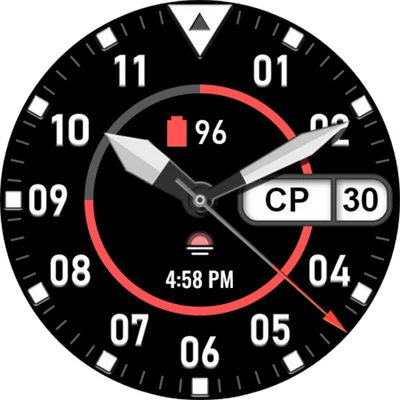
Wear OS プラットフォーム上のスマートウォッチの「心地よいクラシック」ダイヤル
Wear OS プラットフォーム上のスマート ウォッチのダイヤルは、次の機能をサポートしています。
・日付・曜日の多言語表示。ダイヤル言語はスマートフォンにインストールされている言語と同期されます。フォントが言語をサポートしていない場合、文字盤には自動的に英語で曜日が表示されます。
- 秒針は、5Hzの周波数でわずかに動く古典的な機械式時計の動作を模倣しています。
- バッテリー充電量を示す大きくて明確な数字と複製のアナログスケール。その色はダイヤルメニューで自由にカスタマイズできます。
- ダイヤルメニュー設定では、時計にインストールされているアプリケーションを呼び出すための 3 つのタップゾーンと、任意のアプリケーションからのデータを表示するための 1 つの情報ゾーンを設定できます。
すべてのウォッチ アプリがインフォメーション ゾーンに最適化されているわけではなく、データが表示されなかったり、正しく表示されなかったりする可能性があることに注意してください。インフォメーションゾーンの表示を非表示にしたい場合は、ダイヤルメニューで「不在」に設定してください(一部の国では翻訳の問題により、このメニュー項目の呼び方が異なる場合があります)。
また、Samsung 製の時計でのみタップ ゾーンのセットアップと操作を保証できます。他のメーカーの時計をお持ちの場合、タップゾーンが正しく動作しない可能性があります。ウォッチフェイスを購入する際は、この点を考慮してください。
このウォッチフェイス用にオリジナルのAODモードを作成しました。表示するには、ウォッチのメニューで有効にする必要があります。 AOD モードでは、時計上の画像は 1 分に 1 回再描画されることに注意してください。したがって、このモードでは秒針は表示されません。
コメントや提案については、電子メールでご連絡ください:eradzivill@mail.ru
ソーシャルネットワークに参加しましょう
https://vk.com/eradzivill
https://radzivill.com
https://t.me/eradzivill
https://www.facebook.com/groups/radzivill
心から
エフゲニー
原文を表示
The watch face for Wear OS smartwatches supports the following functionality:
- Multilingual display of date and day of the week. The watch face language is synchronized with the one installed on your smartphone. If the font does not support your language, the watch face will automatically display the day of the week in English.
- The second hand imitates the operation of classic mechanical watches with a slight twitching at a frequency of 5 Hz
- Large clear numbers showing the battery charge and a duplicate analog scale, the color of which you can customize in the watch face menu at your discretion
- In the watch face menu settings, you can customize 3 tap zones to call up applications installed on your watch and one information zone to display data from any application.
Please note that not all watch apps can be optimized to work with the info zone and may not display data or display it incorrectly. If you want to hide the info zone, then simply set it to "None" in the watch face menu (due to translation peculiarities in some countries, this menu item may be called differently)
I can also guarantee the setup and operation of tap zones only on watches from Samsung. If you have a watch from another manufacturer, the tap zones may not work correctly. Please take this into account when purchasing a watch face.
I made an original AOD mode for this watch face. To display it, you need to activate it in the menu of your watch. Please note that in AOD mode, the picture on the watch is redrawn once per minute. Therefore, the second hand is not displayed in this mode.
For comments and suggestions, please write to e-mail: eradzivill@mail.ru
Join us on social networks
https://vk.com/eradzivill
https://radzivill.com
https://t.me/eradzivill
https://www.facebook.com/groups/radzivill
Sincerely,
Eugeniy Radzivill
データ セーフティ
このアプリが収集・共有するデータについて、Eugeniy RadzivillがGoogle Playで申告している内容です。
- 第三者と共有されるデータはありません詳しくは、デベロッパーが共有を申告する方法についての説明をご覧ください
- データは収集されません詳しくは、デベロッパーが収集を申告する方法についての説明をご覧ください
開発元の連絡先
- ウェブサイトradzivill.com
- メールeradzivill@mail.ru
- プライバシーポリシーeradzivill.wixsite.com
- 住所дер. Терновка, ул. Песочная, д. 4 Наро-Фоминск Московская область Россия 143300
情報
- 提供元
- Eugeniy Radzivill
- カテゴリ
- カスタマイズ
- 更新日
- 2025/8/26
- リリース
- 2024/10/30
- 対象年齢
- 3 歳以上
- 価格
- ¥110
- パッケージ名
- com.watchfacestudio.bigdata