ORB-04 Quadratic
Orburis Watch- 3 歳以上対象年齢
- カスタマイズカテゴリ
- 2026/8/3更新日
- ¥150価格
com.watchfacestudio.orb04のGoogle Play公式ページにリンクしています。最終確認:2026/11/27。
このアプリについて
Googleによる英語 (アメリカ合衆国)からの自動翻訳です。
WearOS向けのカラフルな情報豊富なウォッチフェイス
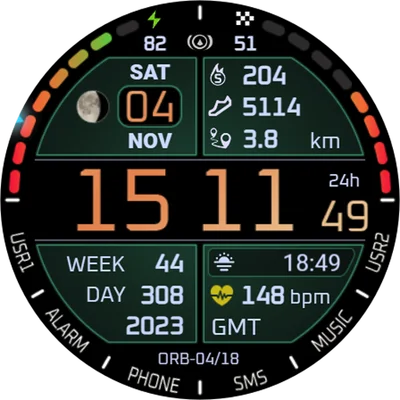
ORB-04 は、豊富な情報量を備えた高密度の文字盤で、豊富な魅力的なカラー オプションを備えています。顔は 4 つの情報象限に分割されているため、重要なデータが一目で理解できるようになります。フィットネス指標やビジネス機能に注目している人に適しています。
特徴:
象限 1 (右上):
- 歩数 - カロリー数 (歩数運動によるおおよその消費カロリー)
- 歩数
- おおよその移動距離(言語が英国英語または英語米国の場合はマイル、それ以外の場合はキロメートルを表示)
- 歩数目標パーセントを測定する 8 セグメント LED ゲージ
- 象限 1 をタップして、選択した健康アプリを選択/開きます。サムスンヘルス。
象限 2 (右下):
- ユーザーがカスタマイズ可能な情報ウィンドウ。現在の天気、日没/日の出時刻などの項目が表示されます。表示されるデータを設定するには、ウォッチフェイスを長押しし、「カスタマイズ」をタップしてから情報ウィンドウのアウトラインをタップし、メニューからデータソースを選択します。
- 4 つのカラーゾーンによる心拍数 (bpm):
- 青 (<=50 bpm)
- 緑 (51-120 bpm)
- アンバー (121-170 bpm)
- 赤 (>170 bpm)
- タイムゾーンコード、例:グリニッジ標準時、太平洋標準時
- 3 つの周辺アプリのショートカット - 音楽、SMS、および 1 つのユーザー定義可能なショートカット (USR2)
象限 3 (左下):
- (暦年の) 週番号
- (暦年の) 日番号
- 年
- 3 つの周辺アプリのショートカット - 電話、アラーム、および 1 つのユーザー定義可能なショートカット (USR1)
第 4 象限 (左上):
・日付(曜日、日、月名)
- 月相
- バッテリー充電レベルを測定する 8 セグメント LED ゲージ
- 象限 4 をタップすると、カレンダー アプリが開きます
時間:
- 電話の設定に応じて、12 時間形式または 24 時間形式での時、分、秒
- 文字盤の周囲に光る秒針
カスタマイズ:
文字盤を長押しして「カスタマイズ」を選択します。
時間とゲージの色 - 10 個のオプション
背景色 – 10 個のオプション
コンプリケーション – アプリのショートカットと情報ウィンドウのコンテンツを設定します
ノート:
- ユーザー定義可能なショートカット ヘルス アプリ、USR1 および USR2 は、フィールドをタップして開くアプリケーションを選択することで初期設定できます。変更するには、文字盤を長押しして「カスタマイズ」を選択し、関連するフィールドをタップして新しいアプリを選択します。
サポート:
この文字盤についてご質問がある場合は、support@orburis.com までご連絡ください。確認して対応させていただきます。
機能に関するメモ:
- 目標歩数: Wear OS 3.x を実行しているデバイスのユーザーの場合、これは 6000 歩に固定されます。 Wear OS 4 以降のデバイスの場合、歩数目標は着用者のヘルスケア アプリと同期されます。
- 現時点ではシステム値としてカロリーデータが取得できないため、この時計のカロリー数(歩行時の消費カロリー)は歩数×0.04で近似されます。
- 現在、距離はシステム値として利用できないため、距離は次のように概算されます: 1km = 1312 歩、1 マイル = 2100 歩。
- プリセットアプリのショートカットは、適切なアプリがインストールされている限り動作します
このバージョンの新機能は何ですか?
このリリースでは、いくつかの小さな変更が加えられています。
1. 各データ フィールドの最初の部分が切り取られていた一部の Wear OS 4 ウォッチ デバイスでフォントを正しく表示するための回避策が含まれています。
2. カラー選択方法を画面タップからカスタマイズメニューに変更しました。
3. Wear OS 4 ウォッチのヘルスアプリと同期するように歩数目標を変更しました。以前のバージョンの Wear OS を実行しているデバイスでは、目標はシステムによって 6000 ステップに設定されます。
Orburis の最新情報を入手してください:
インスタグラム:https://www.instagram.com/orburis.watch/
フェイスブック: https://www.facebook.com/orburiswatch/
ウェブ: https://www.orburis.com
開発者ページ: https://play.google.com/store/apps/dev?id=5545664337440686414
======
ORB-04 は、次のオープンソース フォントを使用します。
Oxanium、著作権 2019 The Oxanium Project Authors (https://github.com/sevmeyer/oxanium)
Oxanium は、SIL オープン フォント ライセンス バージョン 1.1 に基づいてライセンスされています。このライセンスは、http://scripts.sil.org/OFL の FAQ で入手できます。
======
原文を表示
ORB-04 is a high-density information-rich watch face with a selection of complimentary and attractive colour options. The face is divided in to four information quadrants, making key data easy to assimilate at a glance. Suitable for those keeping an eye on fitness indicators and business functions.
Features:
Quadrant 1 (Upper right):
- Steps-Calorie count (approx number of calories burnt due to step exercise)
- Step count
- Approximate distance travelled (displays miles if language is English UK, or English US, otherwise km)
- 8-segment LED gauge measuring step goal percent
- Tap quadrant 1 to select/open your chosen health app, e.g. Samsung Health.
Quadrant 2 (Lower right):
- An information window which is customisable by the user and displays items such as the current weather, sunset/sunrise times and so on. To configure the data displayed, long-press the watch face, tap ‘Customise’ then tap the info window outline and select the data source from the menu.
- Heart rate (bpm) with four colour zones:
- blue (<=50 bpm)
- green (51-120 bpm)
- amber (121-170 bpm)
- red (>170 bpm)
- Time Zone code, e.g. GMT, PST
- Three peripheral app shortcuts - Music, SMS and one user-definable shortcut (USR2)
Quadrant 3 (Lower left):
- Week Number (of calendar year)
- Day Number (of calendar year)
- Year
- Three peripheral app shortcuts - Phone, Alarm and one user-definable shortcut (USR1)
Quadrant 4 (Upper left):
- Date (Weekday, Day of month, Month name)
- Moon Phase
- 8-segment LED gauge measuring battery charge level
- Tapping quadrant 4 causes the Calendar app to open
Time:
- Hours, minutes and seconds in 12h or 24h format dependent on phone settings
- Glowing second hand around face perimeter
Customisations:
Long press the watch face and select ‘Customise’:
Time and Gauge Colours – 10 options
Background Colours – 10 options
Complication – set app shortcuts and info window content
Notes:
- User-definable shortcuts Health App, USR1 and USR2 can be initially set by tapping the field and choosing the application to be opened. To change, long press the watch face, select Customise, tap the relevant field and select the new app.
Support:
If you have any questions about this watch face you can contact support@orburis.com and we will review and respond.
Functionality Notes:
- Step Goal: For users of devices running Wear OS 3.x, this is fixed at 6000 steps. For Wear OS 4 or later devices, the step goal is sync’d with the wearer’s health app.
- At present, calorie data is unavailable as a system value so the calorie count on this watch (calories used whilst walking) is approximated as No-of-steps x 0.04.
- At present, distance is unavailable as a system value so distance is an approximated as: 1km = 1312 steps, 1 mile = 2100 steps.
- Preset app shortcuts operate as long as the appropriate app is installed
What’s new in this version?
A number of small changes in this release:
1. Included a workaround to display the font correctly on some Wear OS 4 watch devices, where the first part of each data field was being cut off.
2. Changed the colour selection method to be via the Customisation menu rather than by tapping the screen.
3. Changed the step goal to sync with the health-app on Wear OS 4 watches. On devices running previous versions of Wear OS the goal is set by the system at 6000 steps.
Keep up to date with Orburis:
Instagram: https://www.instagram.com/orburis.watch/
Facebook: https://www.facebook.com/orburiswatch/
Web: https://www.orburis.com
Developer Page: https://play.google.com/store/apps/dev?id=5545664337440686414
======
ORB-04 uses the following open source fonts:
Oxanium, copyright 2019 The Oxanium Project Authors (https://github.com/sevmeyer/oxanium)
Oxanium is licensed under the SIL Open Font License, Version 1.1. This license is available with a FAQ at http://scripts.sil.org/OFL
======
データ セーフティ
このアプリが収集・共有するデータについて、Orburis WatchがGoogle Playで申告している内容です。
- 第三者と共有されるデータはありません詳しくは、デベロッパーが共有を申告する方法についての説明をご覧ください
- データは収集されません詳しくは、デベロッパーが収集を申告する方法についての説明をご覧ください
新機能
2026/8/3
Updated to API Level 36 as directed by Google
開発元の連絡先
- ウェブサイトorburis.com
- メールsupport@orburis.com
- プライバシーポリシーdrive.google.com
- 住所38 Baxter Road SALE M33 3AL United Kingdom
情報
- 提供元
- Orburis Watch
- カテゴリ
- カスタマイズ
- 更新日
- 2026/8/3
- リリース
- 2021/11/24
- 対象年齢
- 3 歳以上
- 価格
- ¥150
- パッケージ名
- com.watchfacestudio.orb04