ORB-05 Classica
Orburis Watch- 3 歳以上対象年齢
- カスタマイズカテゴリ
- 2026/8/6更新日
- ¥150価格
com.watchfacestudio.orb05のGoogle Play公式ページにリンクしています。最終確認:2026/11/14。
このアプリについて
Googleによる英語 (アメリカ合衆国)からの自動翻訳です。
自動車をテーマにしたWearOSのアナログウォッチフェイス
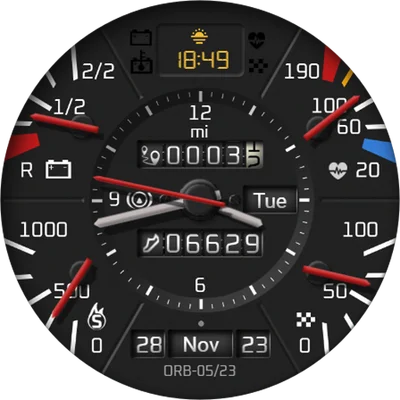
ORB-05は、クラシックな自動車計器からインスピレーションを得て、細部まで精緻でクリア、そしてリアルな外観を実現しています。
- リアルなゲージの質感、針の形状、目盛り
- 機械式オドメーター風表示
- 警告ランプ
主な機能:
- 走行距離表示は、リアルな機械式オドメーターの動きを再現
- 文字盤周りのハイライトリングはカスタマイズ可能
- 天気、日の出/日の入りなどを表示する情報ウィンドウはカスタマイズ可能
- メイン文字盤の周囲に4つのアナログ式サブゲージ
- 3種類の文字盤カラー
構成:
上から時計回りに、外側の6つのセクションと中央のセクションで構成されています。
警告ランプ:
- バッテリー警告ランプ(残量15%未満で赤、充電中は緑点滅)
- 目標達成ランプ(歩数目標が100%に達すると緑点灯)
- デジタル心拍数表示(心拍数が170bpmを超えると赤点灯)
- バッテリー温度警告(4℃以下で青、70℃以上でオレンジ点灯)
心拍数アナログ表示心拍数表示:
- 全体範囲:20~190拍/分
- 青色ゾーン:20~40拍/分
- 黄色の上限:150拍/分
- 赤色ゾーン開始:170拍/分
- ウォッチデバイスが対応している場合、このエリアをタップして心拍数を測定できます。
歩数目標アナログ表示:
- 全体範囲:0~100%
- このエリアをタップして、Samsung Healthなどのアプリを開くことができます。詳細は「カスタマイズ」セクションをご覧ください。
日付:
- 日付、月、年をオドメーター形式で表示
- 日付と月の名称は多言語に対応しています(詳細は下記参照)
- このエリアをタップして、カレンダーアプリを開くことができます。
歩数・消費カロリーアナログ表示:
- 全体範囲:0~1000kcal(機能に関する注記を参照)
- このエリアをタップして、アプリを開くことができます。詳細は「カスタマイズ」セクションをご覧ください。
バッテリー残量アナログ表示:
- 全体表示範囲:0~100%
- 赤色ゾーン:0~15%
- この部分をタップすると、バッテリー状態アプリが開きます。
中央セクション:
- 歩数カウンター
- 曜日
- 移動距離(言語が英国または米国英語の場合はマイル、それ以外の場合はキロメートルで表示されます)
カスタマイズ:
- ウォッチフェイスを長押しして「カスタマイズ」を選択すると、以下の操作が可能です。
- 背景色を変更できます。3種類から選択できます。時計盤の下にあるドットで選択されている色を確認できます。
- アクセントリングの色を変更できます。10種類から選択できます。
- 情報ウィンドウに表示する情報を選択できます。
- 歩数目標とカロリーゲージの上にあるボタンで開くアプリを設定/変更できます。
月と曜日の表示には、以下の多言語機能が含まれています。
対応言語:アルバニア語、ベラルーシ語、ブルガリア語、クロアチア語、チェコ語、デンマーク語、オランダ語、英語(デフォルト)、エストニア語、フランス語、ドイツ語、ギリシャ語、ハンガリー語アイスランド語、イタリア語、日本語、ラトビア語、マケドニア語、マレー語、マルタ語、ポーランド語、ポルトガル語、ルーマニア語、ロシア語、セルビア語、スロベニア語、スロバキア語、スペイン語、スウェーデン語、トルコ語、ウクライナ語。
機能に関する注記:
- 歩数目標:Wear OS 3.x搭載デバイスの場合、目標歩数は6000歩に固定されています。Wear OS 4以降のデバイスの場合、歩数目標はユーザーが選択したヘルスケアアプリと同期されます。
- 現在、カロリーデータはシステム値として利用できないため、この時計のカロリー数は歩数×0.04で概算されます。
- 現在、距離データはシステム値として利用できないため、距離は1km=1312歩、1マイル=2100歩で概算されます。
このバージョンの新機能:
1. 最新のWear OSバージョンの要件に準拠するように再構築しました。
2. 「心拍数測定」ボタンを追加しました( (ウォッチデバイスでサポートされています)
サポート:
このウォッチフェイスに関するご質問は、support@orburis.comまでお問い合わせください。
このウォッチフェイスにご関心をお寄せいただきありがとうございます。
======
ORB-05は以下のオープンソースフォントを使用しています。
Oxanium、著作権2019 The Oxanium Project Authors(https://github.com/sevmeyer/oxanium)
DSEG7-Classic-MINI、著作権(c)2017、keshikan(http://www.keshikan.net)、
予約フォント名「DSEG」付き。
OxaniumおよびDSEGフォントソフトウェアは、SILオープンフォントライセンスバージョン1.1に基づいてライセンスされています。このライセンスとFAQは、http://scripts.sil.org/OFLでご覧いただけます。
======
原文を表示
ORB-05 draws inspiration from classic automotive instrumentation to present a detailed, clear, authentic look including:
- Realistic gauge textures, needle styles and markings
- Mechanical odometer-style display
- ‘Warning lamp’ cluster
Key Features:
- The distance-travelled display has a realistic mechanical odometer movement
- Customisable highlight ring around the clock face
- Customisable info window to display weather, sunrise/sunset etc
- Four minor analogue gauges around the main clock face
- Three faceplate shades
Composition:
There are six outer sections plus a central section, clockwise from top
Warning light cluster with:
- Battery warning light (red below 15%, and flashes green when charging)
- Goal achieved light (green when step-goal reaches 100%)
- Digital heart rate (red when heart rate exceeds 170 bpm)
- Watch battery temperature alert (blue <= 4°C, amber >= 70°C)
Heart Rate analogue gauge:
- Overall range: 20 – 190 bpm
- Blue zone: 20-40 bpm
- Upper yellow mark: 150 bpm
- Red zone start: 170 bpm
- Tap this area to measure the heart rate where supported by the watch device
Steps Goal analogue gauge:
- Overall range: 0- 100%
- Tap this area to choose an app to open – e.g. Samsung Health. See ‘Customisation’ section for further details.
Date:
- Day, Month and Year in odometer style display
- Supports multilingual options for day and month names (details below)
- Tap this area to open the Calendar app.
Step-Calories analogue gauge:
- Overall range 0-1000 kcal (see functionality notes)
- Tap this are to choose an app to open. See ‘Customisation’ section for further details.
Battery Level analogue gauge:
- Overall range: 0 - 100%
- Red zone 0 – 15%
- Tap this area to open the battery status app
Central Section:
- Steps counter
- Day of the week
- Distance travelled (displays miles if language is UK or US English, otherwise km
Customisation:
- Long-press the watch face and select ‘Customise’ to:
- Change the background shade. 3 variations. A dot below the clock face indicates which shade is selected.
- Change the colour of the accent ring. 10 variations.
- Select the information to be displayed in the info window.
- Set/change the apps to be opened by the buttons situated over the steps goal and calories gauges.
The following multilingual capability is included for month and day-of-week fields:
Supported Languages: Albanian, Belarusian, Bulgarian, Croatian, Czech, Danish, Dutch, English (default), Estonian, French, German, Greek, Hungarian, Icelandic, Italian, Japanese, Latvian, Macedonian, Malay, Maltese, Polish, Portuguese, Romanian, Russian, Serbian, Slovenian, Slovakian, Spanish, Swedish, Turkish, Ukrainian.
Functionality Notes:
-Step Goal: For users of devices running Wear OS 3.x, this is fixed at 6000 steps. For Wear OS 4 or later devices, the step goal is sync’d with the wearer’s preferred health app.
- At present, calorie data is unavailable as a system value so the calorie count on this watch is approximated as No-of-steps x 0.04.
- At present, distance is unavailable as a system value so distance is an approximated as: 1km = 1312 steps, 1 mile = 2100 steps.
What’s new in this version?
1. Rebuilt to conform to latest Wear OS version requirements
2. Added ‘Measure Heart Rate’ button (where supported by the watch device)
Support:
If you have any questions about this watch face contact support@orburis.com.
Thank you for taking an interest in this watch face.
======
ORB-05 uses the following open source fonts:
Oxanium, copyright 2019 The Oxanium Project Authors (https://github.com/sevmeyer/oxanium)
DSEG7-Classic-MINI,Copyright (c) 2017, keshikan (http://www.keshikan.net),
with Reserved Font Name "DSEG".
Both Oxanium and DSEG Font Software are licensed under the SIL Open Font License, Version 1.1. This license is available with a FAQ at http://scripts.sil.org/OFL
======
データ セーフティ
このアプリが収集・共有するデータについて、Orburis WatchがGoogle Playで申告している内容です。
- 第三者と共有されるデータはありません詳しくは、デベロッパーが共有を申告する方法についての説明をご覧ください
- データは収集されません詳しくは、デベロッパーが収集を申告する方法についての説明をご覧ください
新機能
2026/8/6
Updated to API Level 36 as required by Google
開発元の連絡先
- ウェブサイトorburis.com
- メールsupport@orburis.com
- プライバシーポリシーdrive.google.com
- 住所38 Baxter Road SALE M33 3AL United Kingdom
情報
- 提供元
- Orburis Watch
- カテゴリ
- カスタマイズ
- 更新日
- 2026/8/6
- リリース
- 2021/12/3
- 対象年齢
- 3 歳以上
- 価格
- ¥150
- パッケージ名
- com.watchfacestudio.orb05