ORB-08-SRM Watch Face
Orburis Watch- 3 歳以上対象年齢
- カスタマイズカテゴリ
- 2026/8/10更新日
- ¥150価格
com.watchfacestudio.orb08SRMのGoogle Play公式ページにリンクしています。最終確認:2026/11/29。
スクリーンショット


このアプリについて
Googleによる英語 (イギリス)からの自動翻訳です。
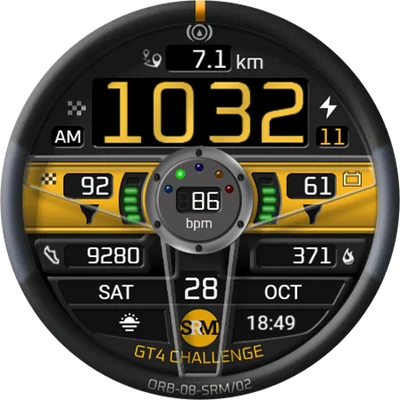
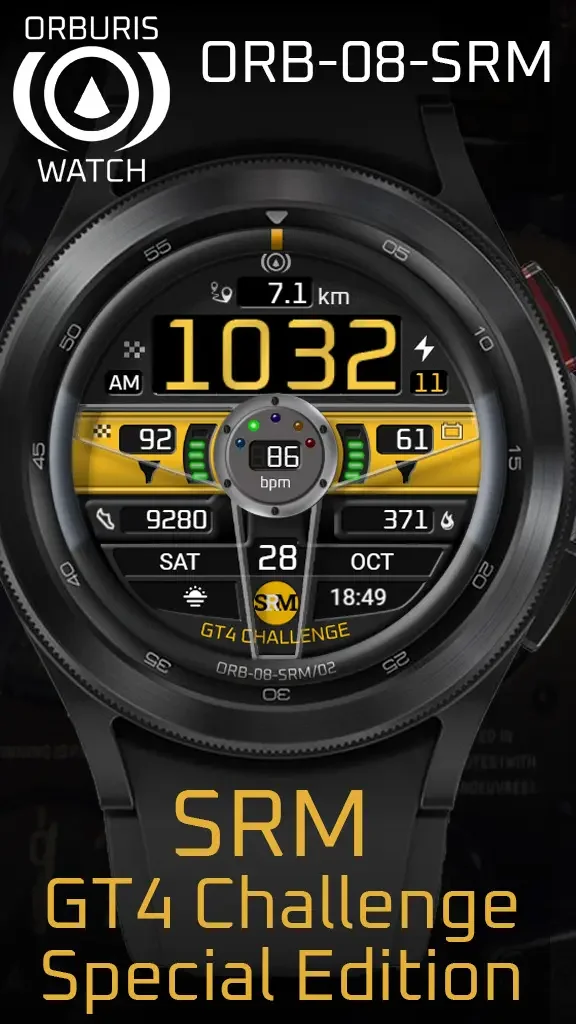
SRM GT4 Challenge Celebration Watchface for Wear OS
オーブリスがレースに出た! (正確にはシムレーシング)SRM(シムレーシングマガジン)のGT4チャレンジシリーズ。
ORB-08 ウォッチフェイスのこのバージョンは、強化された情報コンテンツ、SRM ロゴ、および「GT4 Challenge」スクリプトを特徴とするシリーズを記念したものです。
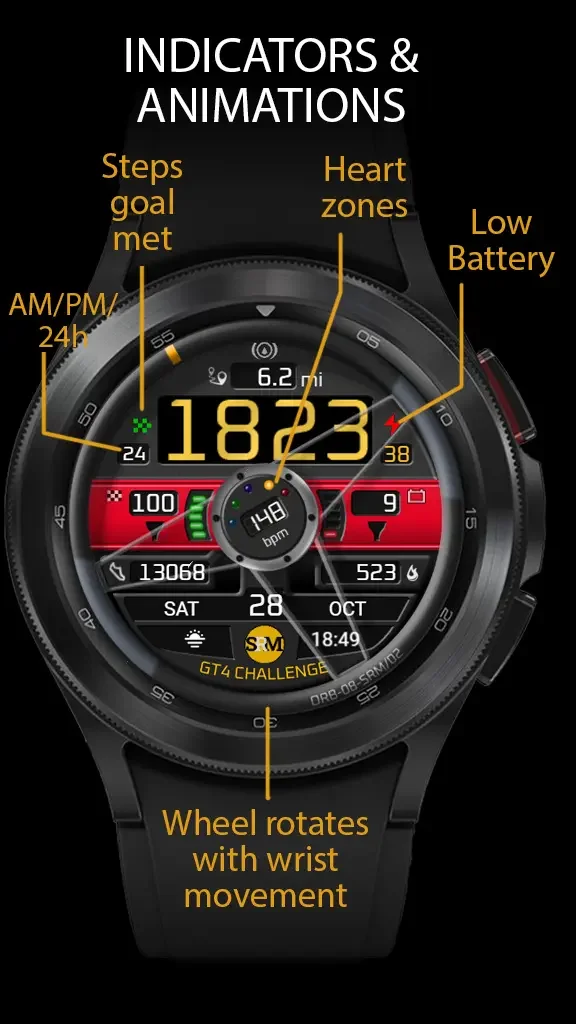
装着者が腕を動かすとステアリングホイールが回転します。メインのダッシュボード ディスプレイはホイールの上半分から見え、時間、距離、およびいくつかの警告ランプが表示されます。水平ダッシュ ストリップには歩数目標とバッテリー表示が表示され、ホイールの下半分のポッドには追加情報が表示されます。
時間の数字とダッシュボードのハイライト ストリップの色は、個別に変更できます。
注: この説明内の「*」マークが付いている項目には、「機能上の注意」セクションに追加情報が記載されています。
ダッシュストリップの色/時間の色:
- それぞれ 10 個のオプションがあり、文字盤を長押しして「カスタマイズ」をタップし、「センター ダッシュ ストリップ」画面と「時計の色見本」画面にスワイプすることで選択できます。
時間:
- 12/24 時間形式
- AM/PM/24時間モードインジケーター
日付:
- 曜日
- 月
- 毎月の日付
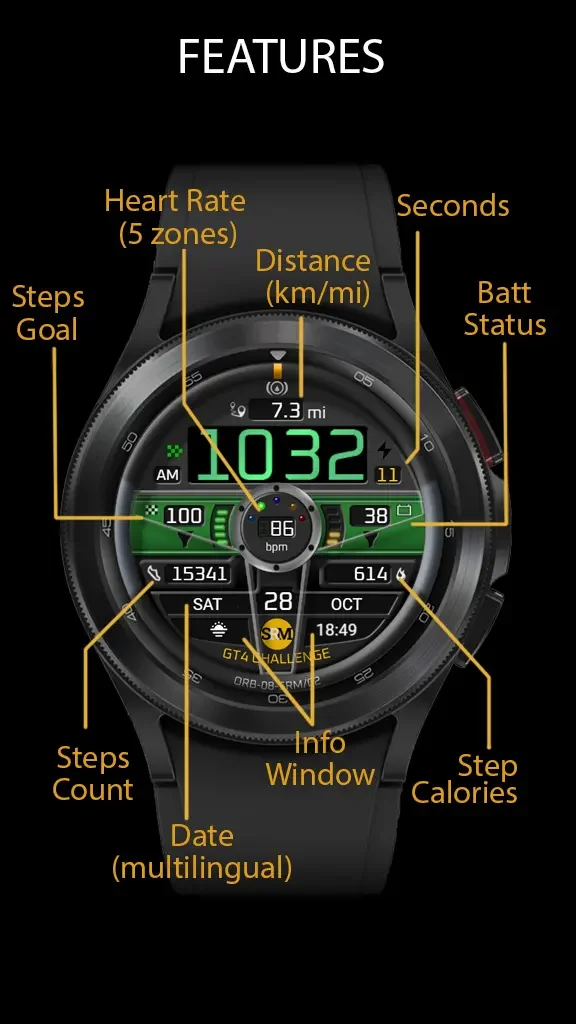
健康データ:
- 歩数
- 走行距離 (km/mi)*
- 歩数 - カロリー数 (kcal)*
- 歩数目標%*表示と5セグメントLEDメーター - 20/40/60/80/100%でセグメントが点灯
- 歩数目標が 100% で信号に到達しました
- 心拍数*および心拍ゾーン情報(5つのゾーン)
Z1 - <= 60 (bpm)
Z2-61-100
Z3-101-140
Z4-141-170
Z5 - >170
ウォッチデータ:
- バッテリー%表示と5セグメントLEDメーター - 0/15/40/60/80%でセグメントが点灯
- 電池残量低下警告ランプ (赤)、15% 以下の場合に点灯します。
情報ウィンドウ:
- 日付表示の下にあるユーザーがカスタマイズ可能な 2 ペイン表示。文字盤を長押しして「カスタマイズ」をタップし、「コンプリケーション」画面にスワイプすることでカスタマイズできます。
常時表示:
- バッテリー寿命を維持するために、ディスプレイのバージョンが表示されます。
曜日および月フィールドの多言語サポート:
アルバニア語、ベラルーシ語、ブルガリア語、クロアチア語、チェコ語、デンマーク語、オランダ語、英語 (デフォルト)、エストニア語、フランス語、ドイツ語、ギリシャ語、ハンガリー語、アイスランド語、イタリア語、日本語、ラトビア語、マラヤ語、マルタ語、マケドニア語、ポーランド語、ポルトガル語、ルーマニア語、ロシア語、セルビア語、スロベニア語、スロバキア語、スペイン語、スウェーデン語、トルコ語、ウクライナ語。
アプリのショートカット:
- プリセットのショートカット ボタン:
- 設定可能なショートカット – 通常は健康アプリ用 (歩数をタップする)
- バッテリーステータス (バッテリー%ゲージをタップ)
- スケジュール(日付フィールドをタップして)
*機能に関するメモ:
- 歩数目標: Wear OS 4.x 以降のデバイスの場合、歩数目標は着用者のヘルスケア アプリと同期されます。以前のバージョンの Wear OS では、歩数目標は 6,000 歩に固定されています。
- 現在、距離はシステム値として利用できないため、距離は次のように概算されます: 1km = 1312 歩、1 マイル = 2100 歩。
- 現在、カロリーデータはシステム値として入手できないため、この時計のカロリーカウントは運動中に消費されたカロリーを表し、歩数 x 0.04 として近似されます。
- ロケールが en_GB または en_US に設定されている場合、時計はマイル単位で距離を表示し、他のロケールでは km 単位で表示します。
このバージョンの新機能は何ですか?
1. 各データ表示の最初の部分が切り捨てられていた一部の Wear OS 4 ウォッチ デバイスでフォントを正しく表示するための回避策。
2. 歩数目標は、Wear OS 4 ウォッチのヘルスアプリと同期します。 (機能メモを参照してください)。
3. 「心拍数を測定」ボタンを削除しました(サポートされていません)
SRM GT4 チャレンジ レース シリーズの詳細については、http://www.simracingmagazine.co.uk/ をご覧ください。
サポート:
この文字盤についてご質問がある場合は、support@orburis.com までご連絡ください。確認して対応させていただきます。
Orburis の最新情報を入手してください:
インスタグラム:https://www.instagram.com/orburis.watch/
フェイスブック: https://www.facebook.com/orburiswatch/
ウェブ: http://www.orburis.com
======
ORB-08 は、次のオープンソース フォントを使用します。
オキサニウム (https://github.com/sevmeyer/oxanium)
DSEG7-Classic-MINI (http://www.keshikan.net)
SRM GT4 チャレンジのロゴとテキストは、Sim Racing Magazine の許可を得て使用されています。
======
原文を表示
Orburis has gone racing! (sim racing to be precise) in the SRM (Sim Racing Magazine) GT4 Challenge series.
This version of the ORB-08 watch face is a celebration of the series featuring enhanced information content, the SRM logo and “GT4 Challenge” script.
The steering wheel rotates as the wearer moves their arm. The main dashboard display is visible through the top half of the wheel and shows the time, distance and several warning lamps. A horizontal dash strip houses the steps goal and battery displays while pods in the lower half of the wheel show additional information.
The colour of the time digits and the dashboard highlight strip can be independently changed.
Note: Items in this description marked with ‘*’ have additional info in the “Functionality Notes” section.
Dash Strip Colour / Time Colour:
- Each has 10 options, selectable by long-pressing the watch face and tapping on “Customise”, and swiping to “Centre Dash Strip” and “Clock Colour swatch” screens.
Time:
- 12/24h formats
- AM/PM/24h time mode indicator
Date:
- Day of the week
- Month
- Day-of-the-month
Health Data:
- Step Count
- Distance travelled (km/mi)*
- Steps-Calorie Count (kcals)*
- Steps Goal%* display and 5-segment LED meter - Segments light at 20/40/60/80/100%
- Steps Goal reached flag lights at 100%
- Heart rate* and heart zone information (5 zones)
Z1 - <= 60 (bpm)
Z2 - 61-100
Z3 - 101-140
Z4 - 141-170
Z5 - >170
Watch Data:
- Battery% display and 5-segment LED meter - Segments light at 0/15/40/60/80%
- Low battery warning lamp (red), lights when <=15%
Info Window:
- A user-customisable 2-pane display below the date display, customisable by long-pressing the watch face and tapping on “Customise”, andswiping to the “Complication” screen
Always on Display:
- A version of the display, dimmed to preserve battery life is displayed
Multilingual support for day-of-the-week and month fields:
Albanian, Belarusian, Bulgarian, Croatian, Czech, Danish, Dutch, English (Default), Estonian, French, German, Greek, Hungarian, Icelandic, Italian, Japanese, Latvian, Malayan, Maltese, Macedonian, Polish, Portuguese, Romanian, Russian, Serbian, Slovenian, Slovakian, Spanish, Swedish, Turkish, Ukrainian.
App Shortcuts:
- Preset shortcut buttons for:
- Configurable shortcut – typically for health app (by tapping the step count)
- Battery Status (by tapping the battery % gauge)
- Schedule (by tapping the date fields)
*Functionality Notes:
- Step Goal: For Wear OS 4.x or later devices, the step goal is sync’d with the wearer’s health app. For earlier versions of Wear OS, step goal is fixed at 6,000 steps.
- At present, distance is unavailable as a system value so distance is an approximated as: 1km = 1312 steps, 1 mile = 2100 steps.
- At present, calorie data is unavailable as a system value so the calorie count on this watch represents calories spent during exercise and is approximated as No-of-steps x 0.04.
- The watch displays distance in miles when the locale is set to en_GB or en_US, and km in other locales.
What’s new in this version?
1. A workaround to display the font correctly on some Wear OS 4 watch devices, where the first part of each data display was being truncated.
2. Step goal syncs with the health-app on Wear OS 4 watches. (See functionality notes).
3. Removed ‘Measure Heart Rate’ button (not supported)
Find out more about the SRM GT4 Challenge race series at http://www.simracingmagazine.co.uk/
Support:
If you have any questions about this watch face you can contact support@orburis.com and we will review and respond.
Keep up to date with Orburis:
Instagram: https://www.instagram.com/orburis.watch/
Facebook: https://www.facebook.com/orburiswatch/
Web: http://www.orburis.com
======
ORB-08 uses the following open source fonts:
Oxanium (https://github.com/sevmeyer/oxanium)
DSEG7-Classic-MINI (http://www.keshikan.net)
SRM GT4 Challenge logos and text are used with the permission of Sim Racing Magazine
======
データ セーフティ
このアプリが収集・共有するデータについて、Orburis WatchがGoogle Playで申告している内容です。
- 第三者と共有されるデータはありません詳しくは、デベロッパーが共有を申告する方法についての説明をご覧ください
- データは収集されません詳しくは、デベロッパーが収集を申告する方法についての説明をご覧ください
新機能
2026/8/10
Updated to API Level 36 as required by Google
開発元の連絡先
- ウェブサイトorburis.com
- メールsupport@orburis.com
- プライバシーポリシーdrive.google.com
- 住所38 Baxter Road SALE M33 3AL United Kingdom
情報
- 提供元
- Orburis Watch
- カテゴリ
- カスタマイズ
- 更新日
- 2026/8/10
- リリース
- 2022/9/1
- 対象年齢
- 3 歳以上
- 価格
- ¥150
- パッケージ名
- com.watchfacestudio.orb08SRM