ORB-16 Revolution
Orburis Watch- 3 歳以上対象年齢
- カスタマイズカテゴリ
- 2026/8/22更新日
- ¥150価格
com.watchfacestudio.orb16のGoogle Play公式ページにリンクしています。最終確認:2026/11/28。
このアプリについて
Googleによる英語 (アメリカ合衆国)からの自動翻訳です。
WearOS向けのダイナミックで有益で楽しいウォッチフェイス
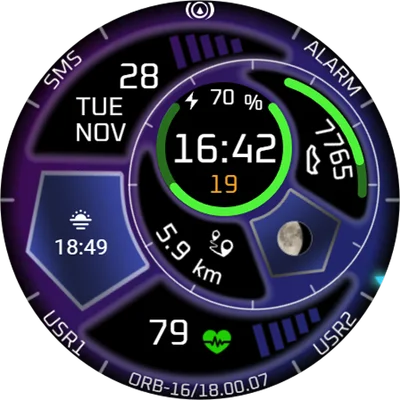
ORB-16 Revolution は、24 時間ごとに文字盤の周囲および相互に周転運動を記述する 3 つの同心円ディスクを使用した高密度ハイブリッド文字盤です。
説明内の「*」の注釈が付いている項目については、以下の「機能メモ」セクションに詳細情報が記載されています。
色のオプション:
10 個の背景色のオプションがあり、時計デバイスの [カスタマイズ] メニューから選択できます (背景色)。さまざまなカラー グラデーションおよび「プラズマ クラウド」テクスチャ オプションが利用可能です。背景も1分ごとに回転します。
時針と分針には 10 色のオプションがあり、時計デバイスのカスタマイズ メニュー (カラー) から選択できます。
添付画像の「Minute」、「Hour」、「Inner」の 3 つのディスクがあります。
ミニッツディスク:
分針と 2 つの三日月形の表示領域が特徴です。
- 大きな分針内には、天気や日の出/日の入り時刻などの項目を表示するように設計されたカスタマイズ可能な「情報ウィンドウ」があります。カスタマイズメニューから内容を設定するには、コンプリケーション画面が表示されるまで左にスワイプし、一番外側の青いボックスをタップします。
- 三日月型のセグメントには、それぞれ心拍数 (5 ゾーン) と日付情報が含まれています。
時間ディスク:
時針と 2 つの三日月形の表示領域が特徴です。
- 時針内にムーンフェイズが表示されます
- 三日月部分は、それぞれ歩数/目標歩数* メーターと移動距離* を表示します。
インナーディスク:
パーセンテージ表示/メーター付きバッテリーメーターとデジタル時間表示を備えています。
- デジタル時間表示は、電話機の設定に応じて 12 時間または 24 時間形式で表示できます。
- 充電レベルが 15% 以下になると、充電アイコンが赤に変わります
- 充電中は緑色の充電アイコンが点灯します。
常時表示:
- 常時表示ディスプレイにより、重要なデータが常に表示されます。
顔の周囲にある 4 つのアプリ ショートカット ボタン (画像を参照):
- SMSメッセージ
- 警報
- USR1 および USR2 のユーザー構成可能なアプリのショートカット。
ウォッチフェイス上の 4 つのアプリ ショートカット領域を優先順位に従ってオーバーレイします。
- バッテリー状態
- スケジュール
- 「コンプリケーション」カスタマイズ画面の青い丸に対応する領域は、アプリのショートカットとして設定できます。選択した健康アプリケーション。
- ウォッチフェイスの残りの部分をタップすると、情報ウィンドウに表示されているデータの詳細が表示されます(利用可能な場合)。
時計の「カスタマイズ/コンプリケーション」機能を使用して、ユーザーが構成可能なショートカットを構成します。
*機能に関するメモ:
- 歩数目標: Wear OS 4.x 以降のデバイスの場合、歩数目標は着用者のヘルスケア アプリと同期されます。以前のバージョンの Wear OS では、歩数目標は 6,000 歩に固定されています。
- 移動距離: 距離は次のように概算されます: 1km = 1312 歩、1 マイル = 2100 歩。
- 距離単位: ロケールが en_GB または en_US に設定されている場合はマイルを表示し、それ以外の場合は km を表示します。
- 多言語: 月名と曜日のスペースは限られています。状況や言語設定によっては、オーバーランを避けるためにこれらの項目が切り捨てられる場合があります。
このリリースの新機能:
1. 各データ フィールドの最初の部分が切り捨てられる一部の Wear OS 4 ウォッチ デバイスでフォントを正しく表示するための回避策が含まれています。
2. Wear OS 4 ウォッチのヘルスアプリと同期するように歩数目標を変更しました。 (機能メモを参照してください)。
3.カスタマイズメニューで背景色を選択できるように変更(10色)
4.手の色のカスタマイズオプションを追加(10種類)
サポート:
support@orburis.com に電子メールを送信してください。確認して返答いたします。
Orburis の最新情報を入手してください:
インスタグラム:https://www.instagram.com/orburis.watch/
フェイスブック: https://www.facebook.com/orburiswatch/
ウェブ: http://www.orburis.com
開発者ページ: https://play.google.com/store/apps/dev?id=5545664337440686414
=====
ORB-16 は、次のオープンソース フォントを使用します。
Oxanium、著作権 2019 The Oxanium Project Authors (https://github.com/sevmeyer/oxanium)
Oxanium は、SIL オープン フォント ライセンス バージョン 1.1 に基づいてライセンスされています。このライセンスは、http://scripts.sil.org/OFL の FAQ で入手できます。
=====
原文を表示
ORB-16 Revolution is a high density hybrid watch face using three concentric discs which describe an epicyclic motion around the face and each other every 24 hours.
Items in the description annotated with a ‘*’ have further info in the Functionality Notes section below.
Colour Options:
There are 10 background colour options, selectable through the Customise menu on the watch device (Background Colour). A variety of colour-gradient and ‘plasma-cloud’ textured options are available. The background also rotates every minute.
There are 10 colour options for the hour and minute hands, selectable through the Customise menu on the watch device (Color).
There are three discs: ‘Minute’, ‘Hour’ and ‘Inner’ on the accompanying images.
Minute Disc:
Features a minute hand and two crescent shaped display areas.
- Within the large minute hand there is a customisable “Info Window” designed to display items such as weather or sunrise/sunset times. The contents can be set through the customise menu, swiping left until the Complication screen is displayed and tapping on the outermost blue box.
- The crescent shaped segments contain heart rate (5 zones) and date info respectively.
Hour Disc:
Features an hour hand and two crescent shaped display areas.
- Within the hour hand the moon-phase is displayed
- The crescent sections show step-count/step-goal* meter, and distance-travelled* respectively.
Inner Disc:
Features a battery meter with percentage display/meter and a digital time display.
- The digital time display can display in 12 or 24 hour format dependent on phone setting.
- The charge icon turns red at or below a charge level of 15%
- A green charging icon illuminates when charging.
Always on Display:
- An always-on display ensures that key data is always displayed.
Four app shortcut buttons on the face perimeter (see images):
- SMS messages
- Alarm
- USR1 and USR2 user-configurable app shortcuts.
Four overlaying app-shortcut areas on the watch face in order of precedence:
- Battery Status
- Schedule
- An area corresponding to the blue circle on the ‘Complication’ customisation screen can be set to be an app shortcut – e.g. your chosen health application.
- The remainder of the watch face, when tapped will provide detail, if available, on the data displayed in the Info Window.
Use the ‘Customise/Complication’ feature of the watch to configure user-configurable shortcuts.
*Functionality Notes:
- Step Goal: For Wear OS 4.x or later devices, the step goal is sync’d with the wearer’s health app. For earlier versions of Wear OS, step goal is fixed at 6,000 steps.
- Distance Travelled: Distance is an approximated as: 1km = 1312 steps, 1 mile = 2100 steps.
- Distance Units: Displays miles when the locale is set to en_GB or en_US, otherwise km.
- Multilingual: Space for month name and day-of-the-week is limited. In some circumstances and language settings these items may be truncated to avoid overrun.
What’s new in this release:
1. Included a workaround to display the font correctly on some Wear OS 4 watch devices, where the first part of each data field was being truncated.
2. Changed the step goal to sync with the health-app on Wear OS 4 watches. (See functionality notes).
3. Changed background colours to be selectable via the Customisation menu (10 options)
4. Added a customisation option for hand colours (10 options)
Support:
Please email support@orburis.com and we will review and respond.
Keep up to date with Orburis:
Instagram: https://www.instagram.com/orburis.watch/
Facebook: https://www.facebook.com/orburiswatch/
Web: http://www.orburis.com
Developer Page: https://play.google.com/store/apps/dev?id=5545664337440686414
=====
ORB-16 uses the following open source font:
Oxanium, copyright 2019 The Oxanium Project Authors (https://github.com/sevmeyer/oxanium)
Oxanium is licensed under the SIL Open Font License, Version 1.1. This license is available with a FAQ at http://scripts.sil.org/OFL
=====
データ セーフティ
このアプリが収集・共有するデータについて、Orburis WatchがGoogle Playで申告している内容です。
- 第三者と共有されるデータはありません詳しくは、デベロッパーが共有を申告する方法についての説明をご覧ください
- データは収集されません詳しくは、デベロッパーが収集を申告する方法についての説明をご覧ください
新機能
2026/8/22
Updated to API Level 36 as required by Google
開発元の連絡先
- ウェブサイトorburis.com
- メールsupport@orburis.com
- プライバシーポリシーsites.google.com
- 住所38 Baxter Road SALE M33 3AL United Kingdom
情報
- 提供元
- Orburis Watch
- カテゴリ
- カスタマイズ
- 更新日
- 2026/8/22
- リリース
- 2022/7/12
- 対象年齢
- 3 歳以上
- 価格
- ¥150
- パッケージ名
- com.watchfacestudio.orb16