ORB-30 The Wave
Orburis Watch- 3 歳以上対象年齢
- カスタマイズカテゴリ
- 2026/8/22更新日
- ¥150価格
com.watchfacestudio.orb30のGoogle Play公式ページにリンクしています。最終確認:2026/11/22。
このアプリについて
Googleによる英語 (イギリス)からの自動翻訳です。
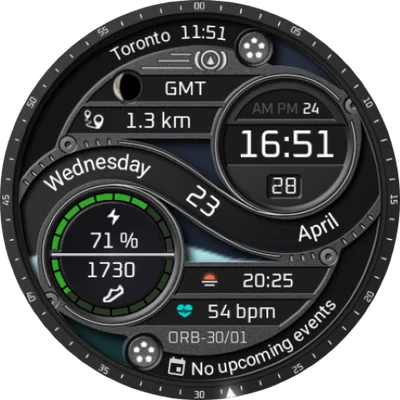
海をイメージしたWear OS用のアニメーションハイブリッドウォッチフェイス
このハイブリッド/デジタル ウォッチフェイスは、中央の「波」テーマを使用しており、ローリングするアニメーションの波と高いデータ密度を特徴としています。 ユーザーは時計をハイブリッド モードまたはデジタル モードで設定でき、カスタマイズ可能なデータ フィールドがあり、多くの色の組み合わせが可能です。
主な特徴:
アニメーションの海のテーマには波が動き、鳥や魚が背景を通過します。
ハイブリッドおよびデジタル時間モード
ユーザーがkmとマイルの間で距離単位を切り替え可能
歩数目標とバッテリーレベルを表示する 2 つのアークゲージ
2000 年代の色の組み合わせ
3 つの設定可能なアプリ ショートカット
2 つの設定可能な追加機能フィールド
1 つの固定合併症 (ワールドタイム)
詳細:
注: 説明内の「*」の注釈が付いている項目については、「機能に関する注意」セクションに詳細が記載されています。
色の組み合わせ -
デジタル時間表示の 9 色 (「色」カスタマイズを使用)
文字盤のハイライト用に 9 色 (ハイライトカラー)
フェイストリムリング9色(Trim Ring Color)
これらの項目は、「カスタマイズ」メニューから個別に変更できます。
表示されるデータ:
• 時間 - [カスタマイズ] メニューで次のように構成できる形式:
◦ (12 時間および 24 時間デジタル形式)、または
◦ アナログ時間
• 日付 (曜日、月日、月)
• タイムゾーン
• デジタルモードのAM/PM/24時間モードインジケーター
• ワールドタイム
• ユーザーが構成可能な短い情報ウィンドウ。天気や日の出/日の入り時刻などの項目の表示に適しています。
• ユーザーが構成可能な長い情報ウィンドウ。次のカレンダーの予定などの項目を表示するのに最適です。
• バッテリー充電レベルのパーセンテージとメーター
• 歩数
• 歩数目標* パーセンテージメーター
• 走行距離 (マイル/km)*、カスタマイズメニューから設定可能
• 心拍数メーター(5 ゾーン)
◦ <60 bpm、ブルーゾーン
◦ 60 ~ 99 bpm、グリーン ゾーン
◦ 100 ~ 139 bpm、紫色のゾーン
◦ 140 ~ 169 bpm、イエロー ゾーン
◦ >=170bpm、レッドゾーン
常時表示:
• 常時表示ディスプレイにより、重要なデータが常に表示されます。
*機能に関するメモ:
- 歩数の目標: Wear OS 3.x を実行しているデバイスのユーザーの場合、これは 6000 歩に固定されます。 Wear OS 4 以降のデバイスの場合、歩数目標は着用者が選択したヘルスケア アプリと同期されます。
- 移動距離: 距離は次のように概算されます: 1km = 1312 歩、1 マイル = 2100 歩。
「コンパニオン アプリ」は、携帯電話/タブレットでも利用できます。このアプリの唯一の機能は、ウォッチ デバイスへのウォッチフェイスのインストールを容易にすることであり、ウォッチフェイスが機能するためには必要ありません。 インストールのターゲットデバイスとしてウォッチを選択し、Play ストアからウォッチフェイスをウォッチデバイスに直接インストールするのが最適です。
楽しいこと:
- 時折波に乗っているサーファーに注目してください!
Play ストアにレビューを残すことをご検討ください。
サポート:
このウォッチフェイスについてご質問がある場合は、support@orburis.com までご連絡ください。確認して対応させていただきます。
このウォッチフェイスと他の Orburis ウォッチフェイスの詳細情報:
インスタグラム:https://www.instagram.com/orburis.watch/
フェイスブック: https://www.facebook.com/orburiswatch/
ウェブ: https://orburis.com
開発者ページ: https://play.google.com/store/apps/dev?id=5545664337440686414
======
ORB-30 は、次のオープンソース フォントを使用します。
オキサニウム
DSEG14-クラシック
Oxanium と DSEG14 は両方とも、SIL Open Font License バージョン 1.1 に基づいてライセンスされています。 このライセンスは、http://scripts.sil.org/OFL の FAQ で入手できます。
=====
原文を表示
This hybrid/digital watchface uses a central 'wave' theme, features rolling animated waves and a high data density. The user can configure the watch in hybrid or digital modes, has customisable data fields and features a number of colour combinations.
Key features:
Animated ocean theme has moving waves, with birds and fish passing in the background
Hybrid and digital time modes
Distance units user-switchable between km and miles
Two arc-gauges for step-goal and battery level
‘00s of colour combinations
Three configurable app-shortcuts
Two configurable complication fields
One fixed complication (world time)
Details:
Note: Items in the description annotated with a ‘*’ have further details in the ‘Functionality Notes’ section.
Colour combinations –
9 colours for the digital time display (using the ‘Colour’ customisation)
9 colours for the watchface highlights (Highlight Colour)
9 colours for the face trim ring (Trim Ring Colour)
These items can be independently changed via the ‘Customise’ menu.
Data displayed:
• Time - format configurable via the Customise menu to be:
◦ (12h & 24h digital formats), or
◦ Analogue time
• Date (Day-of-week, Day-of-month, Month)
• Time Zone
• AM/PM/24h mode indicator in digital mode
• World Time
• Short user-configurable information window, suitable for displaying items such as weather or sunrise/sunset times
• Long user-configurable information window, ideal for displaying items such as the next calendar appointment
• Battery charge level percentage and meter
• Step count
• Step goal* percentage meter
• Distance travelled (miles/km)*, configurable via customisation menu
• Heart rate meter (5 zones)
◦ <60 bpm, blue zone
◦ 60-99 bpm, green zone
◦ 100-139 bpm, purple zone
◦ 140-169 bpm, yellow zone
◦ >=170bpm, red zone
Always on Display:
• An always-on display ensures that key data is always displayed.
*Functionality Notes:
- Step goal: For users of devices running Wear OS 3.x, this is fixed at 6000 steps. For Wear OS 4 or later devices, the step goal is sync’d with the wearer’s chosen health app.
- Distance travelled: Distance is approximated as: 1km = 1312 steps, 1 mile = 2100 steps.
Note that a 'companion app' is also available for your phone/tablet whose sole function is to facilitate installation of the watchface on your watch device and is not required for the watchface to function. It is best if the watchface is installed directly to the watch device from Play Store by selecting your watch as the target device for installation.
Fun stuff:
- Look out for the occasional surfer riding the waves!
Please consider leaving a review in Play Store.
Support:
If you have any questions about this watchface you can contact support@orburis.com and we will review and respond.
More information on this watch face and on other Orburis watch faces:
Instagram: https://www.instagram.com/orburis.watch/
Facebook: https://www.facebook.com/orburiswatch/
Web: https://orburis.com
Developer Page: https://play.google.com/store/apps/dev?id=5545664337440686414
======
ORB-30 uses the following open source fonts:
Oxanium
DSEG14-Classic
Both Oxanium and DSEG14 are licensed under the SIL Open Font License, Version 1.1. This license is available with a FAQ at http://scripts.sil.org/OFL
=====
データ セーフティ
このアプリが収集・共有するデータについて、Orburis WatchがGoogle Playで申告している内容です。
- 第三者と共有されるデータはありません詳しくは、デベロッパーが共有を申告する方法についての説明をご覧ください
- データは収集されません詳しくは、デベロッパーが収集を申告する方法についての説明をご覧ください
新機能
2026/8/22
Updated to API Level 36 as required by Google
開発元の連絡先
- ウェブサイトorburis.com
- メールsupport@orburis.com
- プライバシーポリシーsites.google.com
- 住所38 Baxter Road SALE M33 3AL United Kingdom
情報
- 提供元
- Orburis Watch
- カテゴリ
- カスタマイズ
- 更新日
- 2026/8/22
- リリース
- 2025/5/5
- 対象年齢
- 3 歳以上
- 価格
- ¥150
- パッケージ名
- com.watchfacestudio.orb30