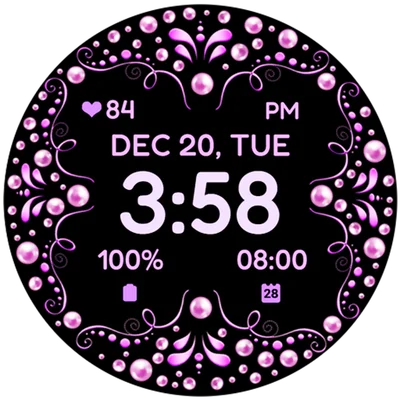
Pearls
Bloomfield Watchfaces- 3 歳以上対象年齢
- カスタマイズカテゴリ
- 2022/12/7更新日
- ¥140価格
com.bloomfield.pearlsのGoogle Play公式ページにリンクしています。最終確認:2026/11/24。
このアプリについて
Googleによる英語 (アメリカ合衆国)からの自動翻訳です。
スタイリッシュなデジタル ウォッチフェイス (購入前にインストールに関する注意事項をお読みください)
バタフライ パールをテーマにした WEAR OS のウォッチフェイス
インストールに関する注意事項!
1. ウォッチフェイスはウォッチに自動的にインストールされません。時計が Bluetooth 経由で携帯電話に正しく接続されていることを確認します。ウォッチフェイスがウォッチに転送されるまで数分待ちます。
2. WATCH でプレイストア アプリを開き、検索ボックスにウォッチフェイスの名前を入力します。
3. 表示されたら、インストール ボタンをクリックします。
4. インストールに成功しても、ウォッチフェイスは自動的に変更されません。ウォッチのホームに移動し、ウォッチフェイス メニューからウォッチフェイスを選択します。
5. Samsung Developers は、さまざまな方法で Wear OS ウォッチフェイスをインストールする際に役立つビデオを提供しました: https://www.youtube.com/watch?v=vMM4Q2-rqoM
* デバイスの非互換性/「このアプリはお使いのデバイスでは利用できません」については、スマートフォンの Play ストア アプリを使用する代わりに、PC またはラップトップから WEB ブラウザー (CHROME) で Play ストアを使用してください。
ウォッチフェイスのリンクをWEBブラウザ(CHROME)にコピー&ペーストしてインストール。
* 設定 -> アプリケーション -> 権限からすべての権限を有効にします。
* このウォッチフェイスは、Samsung Galaxy Watch 4 のような新しい Wear OS Google / One UI Samsung オペレーティング システムに基づくデバイス用に、Samsung の「Watch Face Studio」ツールで開発されました。
※返金は48時間以内のみ可能です。
しばらくお待ちください。また、インストールの問題を制御できないことをご承知おきください。当社のウォッチフェイス アプリは、実際のデバイス (Galaxy Watch 4) で徹底的にテストされ、公開前に Google Play ストア チームによってレビューおよび承認されています。ユーザーがウォッチフェイスを楽しめるようにすることを目指しています。
特徴:
-12/24 時間デジタル時間 (自動同期、電話の設定に基づく)
-日付 (多言語)
-5 プリセットのアプリ ショートカット (シングル タップで開く / 修正不可)
設定、アラーム、カレンダー、メッセージ、電話
-2 カスタマイズ可能なショートカット (変更可能)
さまざまな合併症から選択できます。天気、歩数、タイムゾーン、日没/日の出、気圧計、次の予定など。
-常時オン (AOD)
-変更可能なLCDスタイルとフォントカラーパレット(ディスプレイを長押し。カスタマイズオプションをタップ)
心拍数を測定する(手動リフレッシュ)
***ショートカットは心拍数アプリを開きませんが、独立した測定を開始します。 Wear OS 心拍数アプリは更新されません。このウォッチフェイスは計測時の心拍数を表示するもので、Wear OS アプリとは異なる値を示す場合があります。
***心拍数を測定するには: ウォッチを正しく着用し、画面をオンにして、測定中はじっとしていることを確認してください。次に、ハートアイコンをシングルタップして心拍数を測定します。
* データを表示する権限を許可します。
* 一部の機能は、一部の時計では使用できない場合や異なる場合があります。
完全なコレクション: https://play.google.com/store/apps/developer?id=Bloomfield+Watchfaces
お問い合わせ先: Bloomfieldwatchfaces@gmail.com
Facebook ページ: https://www.facebook.com/bloomfieldwatchfaces
ユーチューブ: https://www.youtube.com/watch?v=IIi7s0Uio8Q
原文を表示
Butterfly Pearls Themed Watch Face for WEAR OS
INSTALLATION NOTES!
1. Watchface won't automatically install on watch. Make sure the watch is properly connected to your phone via Bluetooth. Wait for a few minutes for the watchface to be transferred on watch.
2. Open the playstore app on your WATCH and type the name of the watchface on the search box.
3. It will then show up and then hit install button.
4. Watchfaces don't automatically change after successfully installing. Go to your watch home and select the watchface from the watchfaces menu.
5. Samsung Developers provided a helpful video in installing Wear OS watch face in so many ways: https://www.youtube.com/watch?v=vMM4Q2-rqoM
* For device incompatibility / "This app is not available for your device", use Play Store on a WEB browser (CHROME) from PC or Laptop instead of using the playstore app on phone.
Copy and paste the watch face link on a WEB browser (CHROME) and install.
* Enable all permissions from settings -> applications -> permissions.
* This watch face was developed with Samsung's "Watch Face Studio" tool for devices based on the new Wear OS Google / One UI Samsung operating system like Samsung Galaxy Watch 4.
*Refund is only allowed within 48 hours.
Please be patient and be reminded that we don't have control over the installation issue. Our watch face apps are thoroughly tested in a real device (Galaxy Watch 4) and are reviewed and approved by the Google Play Store team before publishing them. We aim to make sure users will enjoy our watch faces.
FEATURES:
-12/24hr Digital Time (auto-sync, based on phone settings)
-Date (Multi-language)
-5 Preset App Shortcuts (Single tap to open/ fixed not editable)
Settings, Alarm, Calendar, Messages & Phone
-2 Customizable Shortcuts (changeable)
Different complications to choose from; weather, steps, time zone, sunset/sunrise, barometer, next appointment and more.
-Always-On (AOD)
-Changeable LCD styles and font color palette (Touch and hold display. Tap on customize option)
Measuring Heart Rate (Manual Refresh)
***The shortcut does not open the Heart Rate app but starts independent measurement. It doesn't update the Wear OS heart rate app. This watch face displays the heart rate at the time of measurement and it may have different reading from the Wear OS app.
***To measure heart rate: Please make sure to wear your watch properly, screen turned on and stay still while measuring. Then single tap the heart icon to measure heart rate.
* Allow permissions to display data.
* Some features may not be available or may be different on some watches.
Full Collection: https://play.google.com/store/apps/developer?id=Bloomfield+Watchfaces
Contact us at: bloomfieldwatchfaces@gmail.com
Facebook Page: https://www.facebook.com/bloomfieldwatchfaces
Youtube: https://www.youtube.com/watch?v=IIi7s0Uio8Q
データ セーフティ
このアプリが収集・共有するデータについて、Bloomfield WatchfacesがGoogle Playで申告している内容です。
- 第三者と共有されるデータはありません詳しくは、デベロッパーが共有を申告する方法についての説明をご覧ください
- データは収集されません詳しくは、デベロッパーが収集を申告する方法についての説明をご覧ください
開発元の連絡先
- ウェブサイトfacebook.com
- メールbloomfieldwatchfaces@gmail.com
- プライバシーポリシーsites.google.com
- 住所0015 BLOCK 5 BLK Beverly Homes Hugo Perez, Trece Martirez City 4109 Philippines
情報
- 提供元
- Bloomfield Watchfaces
- カテゴリ
- カスタマイズ
- 更新日
- 2022/12/7
- リリース
- 2022/12/7
- 必要条件
- Android 9以降
- 対象年齢
- 3 歳以上
- 価格
- ¥140
- パッケージ名
- com.bloomfield.pearls