PER101 Digital Watch Face
Persona Watch Face- 3 歳以上対象年齢
- カスタマイズカテゴリ
- 2026/11/19更新日
- ¥520価格
com.watchfacestudio.per101のGoogle Play公式ページにリンクしています。最終確認:2026/11/26。
このアプリについて
Googleによる英語 (アメリカ合衆国)からの自動翻訳です。
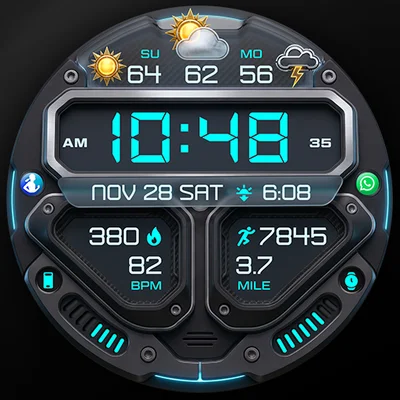
PER101 Digitalは、PERSONAがデザインしたWearOSウォッチフェイスです。
🚀 PER101 デジタルウォッチフェイスは、Wear OSスマートウォッチ向けに設計された、堅牢な3Dデジタルウォッチフェイスです。美しいメタリックテーマ、カスタマイズ可能なフォントスタイル、リアルな3D天気予報、そして必須の健康トラッキング機能を備えています。
🎨 無限のカスタマイズ
• 時刻表示のフォントスタイルを10種類から選択可能(12時間表示/24時間表示)
• 背景を10種類選択可能
• 30色以上のカラーバリエーション
• お気に入りのデータやショートカットをカスタマイズできるコンプリケーションを7種類選択可能
☀️ 天気と健康機能
• 天気と現在の気温(℃/℉)
• 翌日の天気予報と気温(℃/℉)
• 降雨確率と紫外線指数
• 歩数計、1日の目標歩数、移動距離(km/マイル)
• 心拍数モニター
• スマートフォンとウォッチのバッテリー残量
🛠️ カスタマイズできるコンプリケーションを7種類選択可能
ウォッチフェイスを長押しすると、Wear OSのデータを使ってレイアウトをカスタマイズできます。
• 次の予定/カレンダーイベントと世界時計(タイムゾーン)
• 日の出と日の入り、月の満ち欠け、気圧計
• スマートフォンのバッテリー残量、消費カロリー、階数
• カスタムアプリのショートカットと追加の天気情報ウィジェット
注:スマートフォンのバッテリー残量、消費カロリー、階数などの追加ウィジェットを使用するには、スマートフォンとスマートウォッチの両方に無料のコンパニオンアプリ(例:Phone Battery Complication)をインストールする必要があります。
🌙 高度な常時表示ディスプレイ(AOD)
• ウォッチフェイスの表示に合わせて色が同期されます
• カスタマイズメニューでAODの明るさを6段階で調整できます
• AODのレイアウトを変更できるカスタム「AOD Dim」オプション
⚡ スマートフォンのバッテリー残量 スマートウォッチにスマートフォンのバッテリー残量を表示するには、スマートフォンとスマートウォッチの両方にこの無料のコンパニオンアプリをインストールする必要があります:Phone Battery Complication https://play.google.com/store/apps/details?id=com.weartools.phonebattcomp ❓ 天気予報が更新されない? 「❓」アイコンが表示されていますか? Bluetoothとインターネット接続を確認するか、天気コンプリケーションプロバイダーを設定してください。• スマートフォンとスマートウォッチにSimple Weatherをインストールします:https://play.google.com/store/apps/details?id=com.thewizrd.simpleweather • 更新間隔を1時間に設定します。• 同期が完了するまで数分お待ちください⏳
📖 インストールと設定ガイド
インストール手順とコンプリケーションの設定方法については、ガイドとFAQをご覧ください:
👉 https://persona-wf.com/installation/
⌚ 対応デバイス
APIレベル35以上(Wear OS 5およびWear OS 6)を搭載したすべてのWear OSスマートウォッチに対応しています。対応機種:
• SAMSUNG: Galaxy Watch Ultra 2 - Ultra、Watch 9 - 8 - 7 - 6 - 5 - 4
• Google: Pixel Watch 5 - 4 - 3 - 2 - 1
• OnePlus / OPPO: Watch 4 - 3、OPPO Watch X3 - X2 - X
• Xiaomi: Watch 5、Fitbit Ace LTE
🌐 詳細とポートフォリオ
https://persona-wf.com/portfolios/galaxy/
📩 カスタマーサポート
セットアップやカスタマイズでお困りですか?ご質問等ございましたら、お気軽にお問い合わせください。
support@persona-wf.com
💜 コミュニティに参加しよう
最新のWear OSウォッチフェイスデザイン、プロモーション、限定オファーをお見逃しなく!
🌐 https://persona-wf.com
📩 ニュースレター
https://persona-wf.com/register
👍 Facebook
https://www.facebook.com/Persona-Watch-Face
📸 Instagram
https://www.instagram.com/persona_watch_face
💬 Telegram
https://t.me/persona_watchface
▶️ YouTube
https://www.youtube.com/c/PersonaWatchFace
💖 PERSONAをお選びいただきありがとうございます!
私たちのデザインが、あなたの毎日と手首を明るく彩りますように。😊
Ayla GOKMENが心を込めてデザインしました
原文を表示
🚀 PER101 Digital Watch Face is a rugged 3D digital watch face crafted for Wear OS smartwatches. It combines stunning metallic themes, customizable font styles, 3D realistic weather forecasts, and essential health tracking.
🎨 Endless Customization
• 10 changeable font styles for time (12h / 24h)
• 10 backgrounds
• 30+ colors
• 7 customizable complications for your favorite data & shortcuts
☀️ Weather & Health Features
• Weather & current temperature (°C / °F)
• Next day weather forecast & temperature (°C / °F)
• Rain probability & UV Index
• Step counter, daily step goal & distance (km / miles)
• Heart rate monitor
• Phone & watch battery level
🛠️ 7 Customizable Complications
Touch and hold the watch face to personalize your layout with Wear OS data:
• Next appointment / calendar event & world clock (time zone)
• Sunrise & sunset, moon phase & barometer
• Phone battery level, active calories burned & floors
• Custom app shortcuts & extra weather widgets
Note: Extra widgets such as phone battery, active calories, or floors require a free companion app (such as Phone Battery Complication) installed on both your phone and watch.
🌙 Advanced Always-On Display (AOD)
• Synchronized colors matching your active watch face view
• 6 adjustable AOD brightness levels in the customization menu
• Custom "AOD Dim" option to change the AOD layout
⚡ Phone Battery Level To display phone battery on your watch, you’ll need to install this free companion app on both your phone and watch: Phone Battery Complication https://play.google.com/store/apps/details?id=com.weartools.phonebattcomp ❓ Weather Not Updating? Seeing a "❓" icon? Check your Bluetooth & internet connection, or set up a weather complication provider: • Install Simple Weather on phone and watch: https://play.google.com/store/apps/details?id=com.thewizrd.simpleweather • Set update interval to 1 hour • Wait a few minutes for sync ⏳
📖 Installation & Setup Guide
For step-by-step installation instructions and complication setup tips, check our guide and FAQ:
👉 https://persona-wf.com/installation/
⌚ Supported Devices
Compatible with all Wear OS smartwatches running API Level 35+ (Wear OS 5 & Wear OS 6), including:
• SAMSUNG: Galaxy Watch Ultra 2 - Ultra, Watch 9 - 8 - 7 - 6 - 5 - 4
• GOOGLE: Pixel Watch 5 - 4 - 3 - 2 - 1
• ONEPLUS / OPPO: Watch 4 - 3, OPPO Watch X3 - X2 - X
• XIAOMI: Watch 5, FITBIT Ace LTE
🌐 More Details & Portfolio
https://persona-wf.com/portfolios/galaxy/
📩 Customer Support
Need assistance with setup or customization? We’re here to help:
support@persona-wf.com
💜 Join Our Community
Get the latest Wear OS watch face designs, promotions & exclusive offers:
🌐 https://persona-wf.com
📩 Newsletter
https://persona-wf.com/register
👍 Facebook
https://www.facebook.com/Persona-Watch-Face
📸 Instagram
https://www.instagram.com/persona_watch_face
💬 Telegram
https://t.me/persona_watchface
▶️ YouTube
https://www.youtube.com/c/PersonaWatchFace
💖 Thank You for Choosing PERSONA!
We hope our design brightens your day and your wrist. 😊
Designed with love by Ayla GOKMEN
データ セーフティ
このアプリが収集・共有するデータについて、Persona Watch FaceがGoogle Playで申告している内容です。
- 第三者と共有されるデータはありません詳しくは、デベロッパーが共有を申告する方法についての説明をご覧ください
- データは収集されません詳しくは、デベロッパーが収集を申告する方法についての説明をご覧ください
開発元の連絡先
- ウェブサイトpersona-wf.com
- メールsupport@persona-wf.com
- プライバシーポリシーiubenda.com
- 住所ALACAATLI MAH. SİNPAŞ KMEV. NO:E1 BLK 15/1 06810 MERKEZ ÇANKAYA/Ankara Türkiye
情報
- 提供元
- Persona Watch Face
- カテゴリ
- カスタマイズ
- 更新日
- 2026/11/19
- リリース
- 2026/11/11
- 対象年齢
- 3 歳以上
- 価格
- ¥520
- パッケージ名
- com.watchfacestudio.per101