Pie O'Clock
StarWatchfaces広告を含む
- 3 歳以上対象年齢
- カスタマイズカテゴリ
- 2026/11/10更新日
- 無料価格
com.starwatchfaces.pieoclockのGoogle Play公式ページにリンクしています。最終確認:2026/11/19。
このアプリについて
Googleによる英語 (アメリカ合衆国)からの自動翻訳です。
一日を通して少しずつ食べていくパンプキンパイ。ナイフとフォークが時間を教えてくれる。
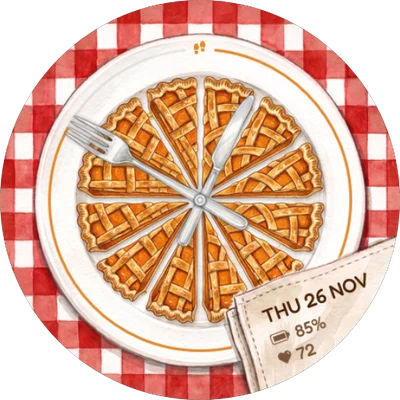
🥧 パイ・オクロックは、お皿の上に時間を刻みます。金色の格子模様のパンプキンパイが、赤いギンガムチェックのテーブルクロスの上に置かれた白い陶器の器にのり、銀色のナイフとフォークが時計の針のように見えます。まるで絵本の挿絵のようですが、その場面のあらゆる要素が、あなたのデータで生き生きと表現されています。
🥧 一日かけて食べるパイ
🕛 真夜中にはパイは丸ごと12切れ。12切れは1日2時間ごとに1切れずつ。
🍰 2時間ごとに1切れずつ、上から時計回りに消えていき、お皿にはパンくずだけが残ります。
👀 お皿を一目見れば、1日の経過時間がわかります。まさにあなたの1日を円グラフで表したようなもの。
🍴 ナイフとフォークで時間を知る
🔪 銀色のナイフは時針
🍴 フォークは分針
🕐 デザートとあなたの間に何も遮るもののない、すっきりとしたアナログ時計
👟 お皿の縁に残る足跡
👟 お皿の縁には細い色の線が走っています。
📈 12時の位置にある足跡から始まり、あなたの1日の経過に合わせて時計回りに伸びていきます。歩数目標
🏆 100%達成で、お皿の周囲に線が表示されます
🧺 すべてが一目でわかる
📅 リネンナプキンに、お好みの言語で日付と曜日が表示されます
🔋 日付のすぐ下にバッテリー残量が表示されます
❤️ バッテリー残量の下に心拍数が表示されます
✨ 小さくて目立たないので、パイがテーブルの主役になります
👆 タップショートカット
日付、バッテリー残量、心拍数、または足跡をタップすると、関連アプリが開きます。
⭐ テーブルクロスには、お皿の左右に2つのカスタマイズ可能なアプリショートカットスロットがあります。タイマー、音楽プレーヤー、ワークアウト、アラームなど、お好きなアプリを登録できます。
⚠️ 歩数と心拍数のショートカットはSamsungアプリを開くため、Galaxy Watchでのみ動作します。他のWear OSウォッチでは、情報は表示されますが、これらの2つのショートカットをタップしても何も起こりません。日付とバッテリーのショートカットはどこでも使えます。
🎨 自分だけのスタイルに
🌈 20種類のカラーテーマ。各テーマには3つのスロットがあります。日付、バッテリーと心拍数、歩数表示用です。パンプキン、ギンガムレッド、クランベリー、フォレストグリーン、ネイビー、ハニー、プラム、ティール、シナモン、チャコールなど、豊富なカラーバリエーションをご用意。
🌑 常時表示
バッテリー消費を抑えたクリーンなAOD(常時表示)モードでは、選んだカラーテーマに関わらず、テーブルの背景は柔らかなトーンで表示され、ナイフ、フォーク、日付が常に明るく表示されます。
⚙️ カスタマイズ方法
1️⃣ ウォッチフェイスを長押しします。
2️⃣ カスタマイズをタップします。
3️⃣ スワイプしてテーマカラーと2つのアプリショートカットを選択します。
📱 互換性
Wear OS 4以降に対応し、ウォッチフェイスフォーマットで作成されています。Samsung Galaxy Watch 4 / 5 / 6 / 7 / 8 / Ultra、Google Pixel Watch、およびその他のWear OS 4以降のスマートウォッチで動作します。
⚠️ TizenまたはWear OS 2 / 3以前のスマートウォッチには対応していません。
ℹ️ 知っておくと便利な情報
• パイグラフは、お使いのウォッチの時刻形式に関わらず、24時間表示で表示されます。2時間ごとに1つのスライスが表示され、午前0時に新しいパイグラフが表示されます。
• 歩数線は、ウォッチで設定した1日の歩数目標に沿って表示されます。
• 心拍数と歩数データを取得するには、センサーのアクセス許可が必要です。
• スマートフォンアプリ(インストールは必須ではありませんが、ウォッチフェイスの動作には必須ではありません)は、ウォッチフェイスをスマートウォッチにインストールする手順をサポートし、よくある質問への回答を提供します。
📱 もっと詳しく
スマートフォンのコンパニオンアプリを使用するか、ウェブサイト www.starwatchfaces.com にアクセスして、私たちが作成した他の素晴らしいウォッチフェイスをご覧ください!
🥧 ハッピーサンクスギビング!パイを食べる余裕も残しておきましょう!Pie O'Clockを気に入っていただけたら、ぜひ⭐⭐⭐⭐⭐のレビューをお願いします。皆様からのレビューは、より美しい無料ウォッチフェイスを作成する励みになります。
原文を表示
🥧 Pie O'Clock serves the time on a plate. A golden lattice pumpkin pie sits on white china over a red gingham tablecloth, with a silver knife and fork as the clock hands. It looks like a storybook illustration, but every part of the scene is alive with your data.
🥧 A PIE THAT GETS EATEN THROUGH THE DAY
🕛 At midnight the pie is whole: 12 tasty slices, one for every two hours of the day
🍰 Every two hours one slice disappears, clockwise from the top, leaving only crumbs on the plate
👀 One glance at the plate and you know how much of the day is gone: a real pie chart of your day
🍴 KNIFE AND FORK TELL THE TIME
🔪 The silver knife is the hour hand
🍴 The fork is the minute hand
🕐 A clean analog dial with nothing between you and dessert
👟 YOUR STEPS ON THE RIM OF THE PLATE
👟 A thin colored line runs around the rim of the plate
📈 It starts at the footprints at 12 o'clock and grows clockwise with your daily step goal
🏆 Reach 100% and the line goes all the way around the plate
🧺 EVERYTHING AT A GLANCE
📅 Day and date in your language, written on the linen napkin
🔋 Battery percentage right under the date
❤️ Heart rate under the battery
✨ Small and discreet, so the pie stays the star of the table
👆 TAP SHORTCUTS
Tap the date, battery, heart rate or the footprints to open the related app.
⭐ Two customizable app shortcut slots on the tablecloth, left and right of the plate: put any app you like there, a timer, your music player, a workout, the alarm, anything
⚠️ The steps and heart rate shortcuts open the Samsung apps, so they work on Galaxy Watch only. On other Wear OS watches the information is still displayed, only those two taps do nothing. The date and battery shortcuts work everywhere.
🎨 MAKE IT YOURS
🌈 20 color themes, each with three slots: one for the date, one for battery and heart rate and one for the step line. Pumpkin, gingham red, cranberry, forest green, navy, honey, plum, teal, cinnamon, charcoal and more
🌑 ALWAYS-ON DISPLAY
A clean, battery-friendly AOD mode keeps the knife, the fork and the date bright over a softly dimmed version of the table, whatever color theme you chose.
⚙️ HOW TO CUSTOMIZE
1️⃣ Touch and hold the watch face
2️⃣ Tap Customize
3️⃣ Swipe to choose the theme colors and the two app shortcuts
📱 COMPATIBILITY
Made for Wear OS 4 and newer, built with the Watch Face Format. Works with Samsung Galaxy Watch 4 / 5 / 6 / 7 / 8 / Ultra, Google Pixel Watch, and other Wear OS 4+ smartwatches.
⚠️ Not compatible with Tizen or older Wear OS 2 / 3 watches.
ℹ️ GOOD TO KNOW
• The pie follows the 24-hour day, whatever time format your watch uses: one slice for every two hours, a new pie at midnight.
• The step line follows the daily step goal set on your watch.
• Heart rate and step data need the sensor permissions to be granted.
• The phone app (if installed, not mandatory for the watch face to work) only helps you install the watch face on your watch and provides answers to most common FAQs.
📱 DISCOVER MORE
Don't forget to use the companion app on your phone or visit our website www.starwatchfaces.com to discover other amazing watch faces made by us!
🥧 Happy Thanksgiving, and save room for pie! If you like Pie O'Clock, please leave a ⭐⭐⭐⭐⭐ review, it really helps us create more beautiful free watch faces.
データ セーフティ
このアプリが収集・共有するデータについて、StarWatchfacesがGoogle Playで申告している内容です。
- 第三者と共有されるデータはありません詳しくは、デベロッパーが共有を申告する方法についての説明をご覧ください
- このアプリは以下の種類のデータを収集することがありますアプリのアクティビティ、デバイスまたはその他の ID
- データは送信中に暗号化されます
- データを削除できません
開発元の連絡先
- ウェブサイトstarwatchfaces.com
- メールfreesupport@starwatchfaces.com
- プライバシーポリシーstarwatchfaces.com
- 住所Strada Carol Davila 8 bloc 118A sc A et 1 ap 5 100462 Ploiești Romania
情報
- 提供元
- StarWatchfaces
- カテゴリ
- カスタマイズ
- バージョン
- 1.0.0
- 更新日
- 2026/11/10
- リリース
- 2026/11/10
- 対象年齢
- 3 歳以上
- 価格
- 無料
- パッケージ名
- com.starwatchfaces.pieoclock