Pixel Days Watch Face
AppRerum広告を含む
- 3 歳以上対象年齢
- カスタマイズカテゴリ
- 2026/9/28更新日
- ¥360価格
com.djay.pixeldayswatchfaceのGoogle Play公式ページにリンクしています。最終確認:2026/11/13。
このアプリについて
Googleによる英語 (アメリカ合衆国)からの自動翻訳です。
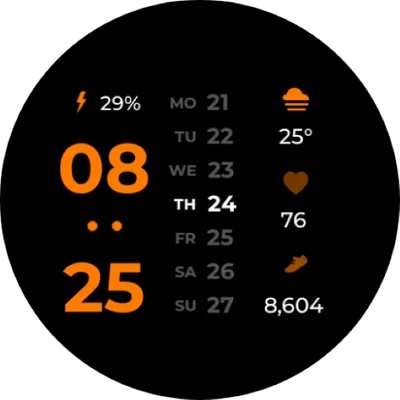
スマートなコンプリケーションとテーマを備えた、ダイナミックなフルウィークカレンダーのWear OSウォッチフェイス。
Pixel Daysウォッチフェイス(Wear OS対応)でスマートウォッチをグレードアップしましょう。アクティブなライフスタイルと日々のスケジュール管理をスムーズにするためにデザインされた、モダンでミニマルなタイムピースです。直感的な1週間カレンダー表示とカスタマイズ可能なスマートコンプリケーションを備えたPixel Daysは、明瞭さ、エレガンス、そして必要なデータを手首に届けます。
📅 ダイナミックな1週間カレンダー
• ウォッチフェイスに7日間(月曜日から日曜日)のカレンダー概要を表示。
• 現在の日付をダイナミックにハイライト表示し、日付は月をまたいでシームレスに表示されます。
• 日付表示が明確なので、1週間のスケジュールを一目で把握できます。
⚡ スマートコンプリケーションとバッテリー残量表示
• 専用のバッテリーグループ:リアルタイムのバッテリー残量と充電状態アイコン、ワンタップでバッテリー状態を確認できるショートカットを搭載。
• 3つのカスタマイズ可能なコンプリケーションスロット:歩数、心拍数、日の出/日の入り時刻、天気、そしてお気に入りのWear OSアプリに対応。
• タップするだけでアプリを起動できるショートカット。
🎨 鮮やかなカラーパレットとテーマ
• AMOLEDダークモード:高コントラストのネオングリーンとアドベンチャーアンバーのアクセントを施したピュアブラックの文字盤で、バッテリー消費を抑え、屋外での視認性も向上。
• 鮮明なデイライトテーマ:エレガントなソフトビネット効果のあるセラミックホワイトとスレートクールシルバーの文字盤に、シャープで読みやすいタイポグラフィを採用。
• 真の常時表示ディスプレイ(AOD):電力効率に優れたアンビエントモードで、週間スケジュールを保持しながらディスプレイの消費電力を最小限に抑えます。
🔋 Wear OS向けに最適化されたバッテリー
• Googleの最新の宣言型ウォッチフェイスフォーマット(WFF)を採用。
• 軽量で電力効率に優れ、バックグラウンドでのスマートフォンの電力消費はゼロ。
• Wear OS 4およびWear OS 5搭載スマートウォッチに対応。
📱 コンパニオンアプリ
• ワンタップでスマートウォッチに直接インストールできるショートカット。
• シームレスなセットアップガイドとバッテリー最適化の推奨事項を提供。
• AppRerumのプレミアムWear OSウォッチフェイスのポートフォリオをご覧ください。
サポートとプライバシー:
• プライバシーポリシー:https://apprerum.com/our-privacy-policy/
• サポートメールアドレス:support@apprerum.com
• ウェブサイト:https://apprerum.com
原文を表示
Elevate your smartwatch with Pixel Days Watch Face (Wear OS), a modern, minimalist timepiece designed for active lifestyles and effortless daily organization. Featuring an intuitive full-week calendar view and customizable smart complications, Pixel Days brings clarity, elegance, and essential data right to your wrist.
📅 DYNAMIC FULL-WEEK CALENDAR
• Complete 7-day calendar overview (Monday to Sunday) right on your watch face.
• Dynamic highlight on the current day with seamless date wrapping across months.
• Clear date indicator keeping you ahead of your weekly schedule at a glance.
⚡ SMART COMPLICATIONS & BATTERY GAUGE
• Dedicated Top Battery Group: Real-time battery percentage with active charging state icon and one-tap battery status shortcut.
• 3 Customizable Complication Slots: Support for Steps, Heart Rate, Sunrise/Sunset, Weather, and your favorite Wear OS providers.
• Direct app launcher shortcuts on tap.
🎨 VIBRANT COLOR PALETTES & THEMES
• AMOLED Dark Modes: Pure black dial with high-contrast Neon Green and Adventure Amber accents for maximum battery savings and outdoor visibility.
• Crisp Daylight Themes: Elegant soft-vignette Ceramic White and Slate Cool Silver dials with sharp, legible typography.
• True Always-On Display (AOD): Power-efficient ambient mode preserving your weekly schedule while minimizing display power.
🔋 BATTERY OPTIMIZED FOR WEAR OS
• Built using Google’s modern declarative Watch Face Format (WFF).
• Lightweight and highly power-efficient with zero background phone drain.
• Compatible with all Wear OS 4 and Wear OS 5 smartwatches.
📱 COMPANION PHONE APP
• One-tap install shortcut directly to your smartwatch.
• Seamless setup guides and battery optimization recommendations.
• Explore the AppRerum portfolio of premium Wear OS watch faces.
SUPPORT & PRIVACY:
• Privacy Policy: https://apprerum.com/our-privacy-policy/
• Support Email: support@apprerum.com
• Website: https://apprerum.com
データ セーフティ
このアプリが収集・共有するデータについて、AppRerumがGoogle Playで申告している内容です。
- このアプリはサードパーティと以下の種類のデータを共有することがありますファイル、ドキュメント
- このアプリは以下の種類のデータを収集することがありますファイル、ドキュメント
- データは送信中に暗号化されます
- データを削除できません
新機能
2026/9/28
Pixel Days Companion App. Effortless one-tap installation on Wear OS .
開発元の連絡先
- ウェブサイトapprerum.com
- メールsupport@apprerum.com
- プライバシーポリシーapprerum.com
- 住所Behind Mahindra Service Center Hulas Vihar Colony Phase 2, Post office Beur Anisabad Patna, Bihar 800002 India
情報
- 提供元
- AppRerum
- カテゴリ
- カスタマイズ
- 更新日
- 2026/9/28
- リリース
- 2026/9/24
- 対象年齢
- 3 歳以上
- 価格
- ¥360
- パッケージ名
- com.djay.pixeldayswatchface