Pixel Face 7
NeoPlayLabs- 3 歳以上対象年齢
- カスタマイズカテゴリ
- 2026/10/22更新日
- ¥180価格
com.neolabs.pixelface7のGoogle Play公式ページにリンクしています。最終確認:2026/11/21。
このアプリについて
Googleによる英語 (イギリス)からの自動翻訳です。
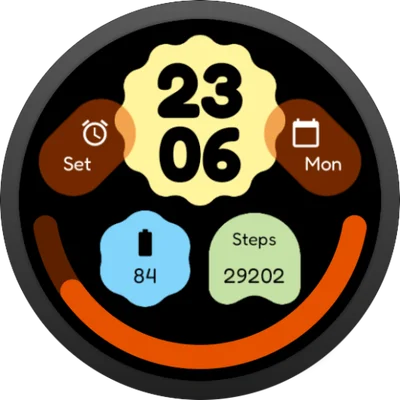
モダンマテリアル3デジタルフェイス、ダイナミックバッテリーアーク、カスタマイズ可能な6つの形状
Pixel Face:モダンで鮮やか、そして高度なカスタマイズが可能
Wear OS体験をさらに向上させるPixel Faceは、モダンなMaterial 3デザインと高度なパーソナライゼーションを融合させたデジタルウォッチフェイスです。視認性、スタイル、そしてバッテリー効率を追求して設計されたPixel Faceは、遊び心のある幾何学的なレイアウトの中に、最も重要なデータを前面に表示します。
✨ 独自のカスタマイズ機能
• 個別にカスタマイズ可能な形状:下部のコンプリケーションスロットそれぞれに、6種類のユニークな幾何学的背景(アーチ、ゴースト、五角形、六角形、正方形、角丸正方形)から選択できます。
• Material 3カラーパレット:プロが厳選した4つのテーマ(ひまわり、海、森、ラベンダー)から、お好みのスタイルにマッチさせることができます。
• アダプティブコンテンツ:スマートコンプリケーションスロットは、利用可能な場合はアイコンよりもタイトルを優先表示し、すっきりとしたテキスト優先の外観を実現します。
🧩 豊富な機能
• 4つのコンプリケーションスロット:
◦ 下部に2つの大きな幾何学的スロット。
• コンパクトでモダンな印象を与える、時計上部に斜めに配置された2つのユニークな「ピル型」スロット。
• デジタル時計:時と分を太字で読みやすいフォントで表示。
• アンビエント最適化:常時表示ディスプレイ(Always-On Display)では、すべての要素が専用の「アウトライン」モードで設計されており、高い視認性と超低消費電力を実現。
⚙️ 技術仕様
• Wear OS 4および5+に完全対応。
• 円形ディスプレイ(450x450)に最適化。
カスタマイズ方法:
1. ウォッチフェイスを長押しします。
2. 「カスタマイズ」アイコンをタップします。
3. メニューをスワイプして、カラーパレットまたはコンプリケーションの形状を変更します。
原文を表示
Pixel Face: Modern, Vibrant & Highly Customizable
Elevate your Wear OS experience with Pixel Face—a digital watch face that blends modern Material 3 aesthetics with deep personalization. Designed for clarity, style, and battery efficiency, Pixel Face puts your most important data front and center within a playful, geometric layout.
✨ EXCLUSIVE CUSTOMIZATION
• Individually Customizable Shapes: Choose from 6 unique geometric backgrounds (Arch, Ghost, Pentagon, Hexagon, Square, Rounded Square) for each of your bottom complication slots independently.
• Material 3 Color Palettes: Match your style with four professionally curated themes: Sunflower, Ocean, Forest, and Lavender.
• Adaptive Content: Smart complication slots prioritize titles over icons when available, ensuring a clean, text-first look.
🧩 FEATURE RICH
• 4 Complication Slots:
◦ 2 Large geometric slots at the bottom.
◦ 2 Unique "Pill" slots angled over the clock for a compact, modern feel.
• Digital Clock: Bold, easy-to-read typography for both hours and minutes.
• Ambient Optimized: Every element is designed with a dedicated "Outline" mode for high visibility and ultra-low power consumption in Always-On Display.
⚙️ TECHNICAL SPECS
• Fully compatible with Wear OS 4 and 5+.
• Optimized for circular displays (450x450).
How to Customize:
1. Long-press on the watch face.
2. Tap the "Customize" icon.
3. Swipe through the menus to change your Color Palette or Complication Shapes.
データ セーフティ
このアプリが収集・共有するデータについて、NeoPlayLabsがGoogle Playで申告している内容です。
- 第三者と共有されるデータはありません詳しくは、デベロッパーが共有を申告する方法についての説明をご覧ください
- データは収集されません詳しくは、デベロッパーが収集を申告する方法についての説明をご覧ください
- Play ファミリー ポリシーの遵守に努めています
新機能
バージョン 1.5 · 2026/10/22
Initial public release
Added 6 new colour themes (making a total of 10)
Added an option to keep complications background shape as blank for a cleaner look.
開発元の連絡先
- ウェブサイトneohome.casa
- メールnishantkumar713@gmail.com
- プライバシーポリシーfreeprivacypolicy.com
- 住所116/3 OFFICERS MESS, AIR FORCE 1, AIR FORCE STN JAMNAGAR Jamnagar, Gujarat 361003 India
情報
- 提供元
- NeoPlayLabs
- カテゴリ
- カスタマイズ
- バージョン
- 1.5
- 更新日
- 2026/10/22
- リリース
- 2026/10/22
- 対象年齢
- 3 歳以上
- 価格
- ¥180
- パッケージ名
- com.neolabs.pixelface7