Pixel Style Digital Pro
WL Digital- 3 歳以上対象年齢
- カスタマイズカテゴリ
- 2026/10/4更新日
- ¥260価格
com.wldigital.watchface.pixelstyleproのGoogle Play公式ページにリンクしています。最終確認:2026/11/13。
このアプリについて
Googleによる英語 (アメリカ合衆国)からの自動翻訳です。
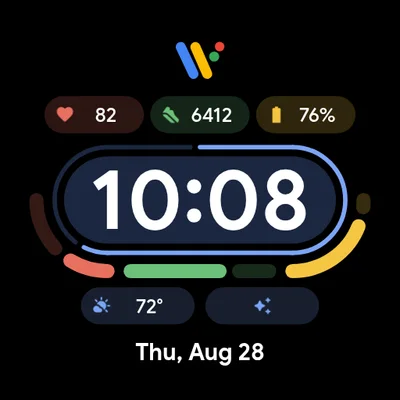
健康状態を示すゲージと10色のカラーバリエーションを備えた、大胆なピクセルスタイルのデジタルウォッチフェイス。
Pixel Style Digital Proは、Googleのマテリアルデザインを採用した、大胆でモダンなデジタルウォッチフェイスです。大きく見やすい時刻表示、一目でわかる健康状態データ、そして一日を通して変化していくカラフルなゲージが特徴です。
⌚ 大きく見やすい時刻表示
• 丸みを帯びたフレームに太字で時刻を表示し、一目で読み取れます
• 時計の設定に合わせて12時間表示または24時間表示を選択可能
• 時計を一周する滑らかな秒針リング(オフにすることもできます)
❤️ 健康状態を一目で把握
• 心拍数、歩数、バッテリー残量を常に表示
• それぞれの数値は時計の下にゲージで表示され、一日を通して数値が上昇していきます
• 心拍数、歩数、バッテリー残量をタップすると、時計のアプリが開きます
🧩 カスタムタイル
• カスタムタイルをオンにすると、上部の3つのタイルをカスタマイズできます
• 心拍数、歩数、バッテリー残量、天気、タイマーなど、お好みのコンプリケーションを追加できます
• 時計はすべての表示が均等に配置されるように動きます
📲 アプリショートカット
• 時計の上のロゴをタップすると、時計のアプリへのショートカットとして使用できます
✨ お好みのコンプリケーション
• 天気、ジェミニ、日付の3つのコンプリケーションスロットデフォルト
• ウォッチの機能に合わせて、次のイベント、タイマー、音楽、日の出・日の入り時刻など、あらゆる機能を追加できます。
• チップが長いテキストを途中で切り捨てることなく、画面に収まるように調整します。
🎨 10色展開
ブルー、ミント、ラベンダー、ローズ、コーラル、ゴールド、ライム、スカイ、スノー、グラファイトの10色。
🌙 常時表示、バッテリー消費も少ない
落ち着いた雰囲気の常時表示:時刻と各種ゲージのみを表示し、画面のわずか1割程度を点灯させ、表示内容は1分に1回しか変わりません。
📱 専用アプリ
無料の専用アプリを使えば、ウォッチをワンタップで検出し、ウォッチフェイスを開くことができます。設定手順も分かりやすく案内してくれます。
Googleのウォッチフェイスフォーマットを採用。バッテリー効率に優れた最新のウォッチフェイス作成方法です。 Wear OS 5以降が必要です。Samsung Galaxy WatchやGoogle Pixel Watchなど、Wear OS 5を搭載したモデルに対応しています。
🔒 データはウォッチ内に保存されます
このウォッチフェイスは、いかなるデータも収集または共有しません。心拍数、歩数、バッテリー残量は、ウォッチ上でのみ読み取られ、表示されます。
設定方法
インストール後、現在使用しているウォッチフェイスを長押しし、画面を右端までスワイプして「追加」をタップし、「Pixel Style Digital Pro」を選択します。色、秒針リング、カスタムタイル、アプリショートカット、コンプリケーションを変更するには、ウォッチフェイスを長押しして「カスタマイズ」をタップします。
ご質問やご意見は、minimalisticwatchfaces@gmail.comまでメールでお寄せください。
原文を表示
Pixel Style Digital Pro is a bold, modern digital watch face in Google's Material style: a big, clear time, your health stats at a glance, and colorful gauges that fill up through the day.
⌚ BIG, CLEAR TIME
• Bold time in a rounded frame, easy to read at a glance
• 12 or 24 hour, following your watch's setting
• A smooth seconds ring that sweeps around the clock (or turn it off)
❤️ YOUR HEALTH AT A GLANCE
• Heart rate, steps and battery, always on the face
• Each one has its own gauge under the clock, filling as your day goes on
• Tap heart rate, steps or battery to open its app on your watch
🧩 CUSTOM TILES
• Turn on Custom tiles to make the three top tiles your own
• Put any complication in them: heart rate, steps, battery, weather, timers and more
• The clock moves to keep everything evenly spaced
📲 APP SHORTCUT
• Turn the logo above the clock into a shortcut to any app on your watch
✨ YOUR COMPLICATIONS
• Three complication slots: weather, Gemini and the date by default
• Swap in anything your watch offers: your next event, timers, music, sunrise and sunset, and more
• The chips adapt long text to fit instead of cutting it off
🎨 10 COLORS
Blue, Mint, Lavender, Rose, Coral, Gold, Lime, Sky, Snow and Graphite.
🌙 ALWAYS ON, EASY ON BATTERY
A calm, dim always-on view: just the time and your gauges, lighting barely a tenth of the screen and changing only once a minute.
📱 PHONE COMPANION APP
The free companion app finds your watch and opens the watch face on it in one tap, with step-by-step setup help.
Made with Google's Watch Face Format, the modern, battery-efficient way to build watch faces. Requires Wear OS 5 or later, including Samsung Galaxy Watch and Google Pixel Watch models that run Wear OS 5.
🔒 YOUR DATA STAYS ON YOUR WATCH
This watch face doesn't collect or share any data. Heart rate, steps and battery are read and shown on your watch only.
HOW TO SET IT
After installing, touch and hold your current watch face, swipe to the end, tap Add and choose Pixel Style Digital Pro. To change the color, the seconds ring, Custom tiles, the app shortcut or the complications, touch and hold the face and tap Customize.
Questions or ideas? Email minimalisticwatchfaces@gmail.com.
データ セーフティ
このアプリが収集・共有するデータについて、WL DigitalがGoogle Playで申告している内容です。
- 第三者と共有されるデータはありません詳しくは、デベロッパーが共有を申告する方法についての説明をご覧ください
- データは収集されません詳しくは、デベロッパーが収集を申告する方法についての説明をご覧ください
- データは送信中に暗号化されます
新機能
2026/10/4
Welcome to Pixel Style Digital Pro: a bold, colorful digital watch face with health gauges, 10 colors and a phone companion app.
開発元の連絡先
- ウェブサイトparkerloney.github.io
- メールminimalisticwatchfaces@gmail.com
- プライバシーポリシーparkerloney.github.io
- 住所204 Wilson Hall Dr Madison, AL 35757 United States
情報
- 提供元
- WL Digital
- カテゴリ
- カスタマイズ
- 更新日
- 2026/10/4
- リリース
- 2026/10/3
- 対象年齢
- 3 歳以上
- 価格
- ¥260
- パッケージ名
- com.wldigital.watchface.pixelstylepro