PMO Performance Dashboard
PMOAPP- 3 歳以上対象年齢
- カスタマイズカテゴリ
- 2026/10/12更新日
- ¥850価格
com.pmo.performancedashboard.watchfaceのGoogle Play公式ページにリンクしています。最終確認:2026/11/14。
このアプリについて
Googleによる英語 (アメリカ合衆国)からの自動翻訳です。
Wear OSスポーツダッシュボードウォッチフェイス:秒針ホイール、ライブデータ、24種類のテーマ
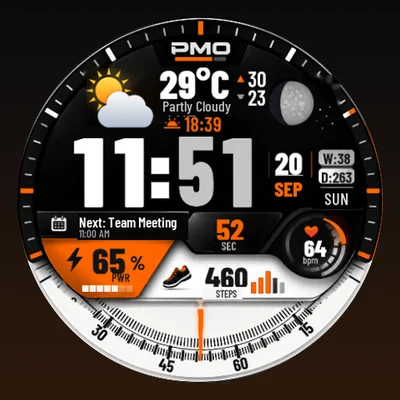
PMO Performance Dashboardは、Wear OSとGalaxy Watchに対応したスポーツテックウォッチフェイスです。時刻、秒、天気、フィットネス、イベントを1つの画面に表示します。
主な機能
大きく見やすい時計
2色の太字で表示されるコンパクトな時計。12時間表示または24時間表示に対応しています。
回転式秒針
画面下部の秒針が固定されたポインターの下で回転し、正確な秒数を一目で確認できます。デジタル秒針は上部のパネルに表示されます。
リアルタイムの天気と月齢
Wear OSの天気情報から、気温(最高・最低)、天候、日の出・日の入り、月齢を表示します。
日付、曜日、通算日
日付(日、月、曜日、週番号(W)、通算日(D))を表示します。
バッテリー残量、歩数、心拍数、次のイベント
各パネルはコンプリケーションとして機能します。画面を長押しし、「カスタマイズ」を選択して、任意のアプリまたはデータソースを選択できます。バッテリー残量はブロック表示、心拍数はリアルタイムのアーク表示で表示されます。
24種類のアクセントテーマ
ウォッチフェイスエディターでワンタップするだけで、アクセント、時計、リングの色を変更できます。定番のオレンジからフルカラーまで、多彩なカラーバリエーションをご用意しています。
常時表示ディスプレイ
画面が暗くなると、静かでバッテリー消費を抑えたレイアウトになります。
Wear OS 6以降(Galaxy Watch8 / Watch Ultraクラスを含む)に対応したWatch Face Format 4で開発されています。
スマートフォン連携アプリ
このアプリをスマートフォンにインストールすると、簡単な操作説明、アクセントテーマのプレビュー、プライバシーポリシーと利用規約へのリンク、そしてワンタップでペアリング済みのスマートウォッチにアプリをインストールできます。
プライバシーポリシー:https://sites.google.com/view/pmoapp/%D7%91%D7%99%D7%AA
利用規約:https://sites.google.com/view/pmoapp/terms-of-service
スマートウォッチでカスタマイズ:ウォッチフェイスを長押しし、「カスタマイズ」を選択してください。
原文を表示
PMO Performance Dashboard is a sport-tech watch face for Wear OS and Galaxy Watch. One clear screen for time, seconds, weather, fitness and events.
What you get
Huge readable clock
A bold condensed clock in two tones. Follows your watch 12 or 24 hour setting.
Rotating seconds wheel
A measuring wheel along the bottom edge turns under a fixed pointer so you see the exact second at a glance. Digital seconds sit in the panel above.
Live weather and moon
Temperature, high and low, condition, sunrise or sunset, and moon phase from Wear OS weather.
Date, week and day of year
Day, month and weekday plus week number (W) and day of the year (D).
Battery, steps, heart rate and next event
Each panel is a real complication: long-press the face, choose Customize, and pick any app or data source. Battery shows level blocks; heart rate a live arc.
24 accent themes
One tap in the watch face editor recolors accents, clock and ring — classic orange through a full color spectrum.
Always-On Display
A quiet, battery-friendly layout when the screen dims.
Built with Watch Face Format 4 for Wear OS 6 and up, including Galaxy Watch8 / Watch Ultra class devices.
Phone companion
Install this app on your phone for a short walkthrough, accent theme preview, Privacy Policy and Terms links, and a one-tap Install on Watch to open the listing on your paired watch.
Privacy Policy: https://sites.google.com/view/pmoapp/%D7%91%D7%99%D7%AA
Terms of Service: https://sites.google.com/view/pmoapp/terms-of-service
Customize on watch: long-press the watch face, then Customize.
データ セーフティ
このアプリが収集・共有するデータについて、PMOAPPがGoogle Playで申告している内容です。
- 第三者と共有されるデータはありません詳しくは、デベロッパーが共有を申告する方法についての説明をご覧ください
- データは収集されません詳しくは、デベロッパーが収集を申告する方法についての説明をご覧ください
新機能
バージョン 1.0.3 · 2026/10/12
• "Install on watch" is now at the top of the screen
• Privacy Policy and Terms of Service open inside the app
• Layout fixed on phones with gesture navigation
• Stability and library updates
開発元の連絡先
- メールpmoapp.support@gmail.com
- プライバシーポリシーfiles.instinct.com
- 住所63 הראשונים 6 חיפה, 2630271 Israel
情報
- 提供元
- PMOAPP
- カテゴリ
- カスタマイズ
- バージョン
- 1.0.3
- 更新日
- 2026/10/12
- リリース
- 2026/10/11
- 対象年齢
- 3 歳以上
- 価格
- ¥850
- パッケージ名
- com.pmo.performancedashboard.watchface