PPANK Premium Analog
PPANK- 3 歳以上対象年齢
- カスタマイズカテゴリ
- 2026/11/8更新日
- 無料価格
com.ppank.premiumanalog.watchfaceのGoogle Play公式ページにリンクしています。最終確認:2026/11/22。
このアプリについて
Googleによる英語 (アメリカ合衆国)からの自動翻訳です。
7色のカラーバリエーション、天気予報、4つのカスタムコンプリケーションを備えたアナログWear OSウォッチフェイス
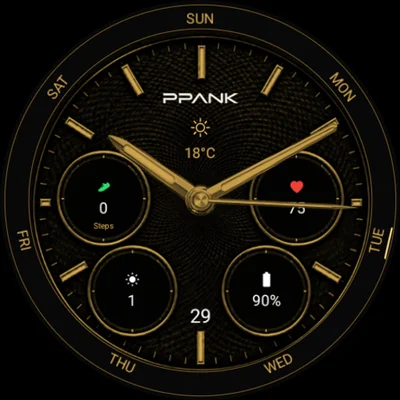
手首に映える、時代を超越したディテール。PPANK Premium Analogは、ダークな織り目模様、メタリック調の針、そして4つの円形データフィールドを組み合わせた、Wear OS対応のアナログウォッチフェイスです。外側の曜日リングと下部の日付表示窓が、クラシックなレイアウトを完成させています。
7種類のカラーテーマ
ゴールド、シルバー、サファイアブルー、エメラルドグリーン、ルビーレッド、アメジストパープル、ローズゴールドからお選びいただけます。リング、インデックス、針、カラーラベルは、選択したカラーパレットに合わせて表示されます。ゴールドがデフォルトです。Wear OSウォッチフェイスエディターでテーマを変更できます。
4つのカスタマイズ可能なコンプリケーション
4つのフィールドそれぞれに、お使いのウォッチで利用可能な対応プロバイダーから個別に表示内容を選択できます。デフォルトでは、左上と左下のフィールドには歩数、右上のフィールドには心拍数、右下のフィールドにはウォッチのバッテリー残量が表示されます。
フィールドには、数値、短いテキスト、プロバイダーラベル、アイコンを表示できます。表示内容、更新頻度、タップ操作は、選択したプロバイダーとその権限によって異なります。心拍数はウォッチのプロバイダーから取得され、ウォッチフェイス自体が計測を開始するわけではありません。
天気情報
ウォッチのWFF(Weight Friends Fellowship)データを使用すると、上部付近に天気アイコンと現在の気温が表示されます。アイコンは昼夜両方の状況に対応しています。気温はデータソースに応じて摂氏または華氏で表示されます。天気情報表示中は、カスタマイズ可能な4つのコンプリケーションすべてに、お好みの情報を表示できます。
表示状況は、ウォッチ、システム天気サービス、および設定によって異なります。データが利用できない場合は、短いダッシュが表示され、気温は空白になります。最後に利用可能な天気情報の横に小さな感嘆符が表示される場合は、更新エラーを示しています。
曜日リング、日付、月
外側のリングには英語の曜日の略語が表示され、下線は現在の日付を示します。これらの曜日ラベルは英語のままです。下部のウィンドウには、現在の日付が表示されます。
PPANKロゴの設定をオフにすると、上部付近に月名が大文字で表示されます。月名は、英語とハンガリー語を含む、お使いのスマートウォッチのシステム言語に従います。
常時表示(AOD)
AODでは、時針、分針、インデックス、日付、選択したロゴまたは月名、および利用可能な天気データが表示されます。テクスチャ背景、4つのコンプリケーション、外側の曜日リング、秒針は非表示になります。この表示は、選択したカラーテーマに準拠します。常時表示を使用するには、スマートウォッチの設定で常時表示を有効にしてください。
インストールとカスタマイズ
Wear OS 5以降を搭載し、ウォッチフェイスフォーマット2に対応したスマートウォッチが必要です。ウォッチフェイスをスマートウォッチにインストールし、ウォッチフェイスコレクションから選択後、長押ししてエディターを開きます。カラーテーマ、4つのコンプリケーション、PPANKロゴの設定を行ってください。エディターのラベルは英語とハンガリー語で表示されます。
これはスマートウォッチ用のウォッチフェイスであり、スマートフォン単体では使用できません。
PPANK ― 個性あふれるウォッチフェイス。
サポート:ppank@ppank.hu
ウェブサイト:https://ppank.hu/
スマートフォンアプリ
スマートフォンアプリでは、ウォッチフェイスのプレビュー、インストールガイド、Google Playへのリンクを提供しています。ウォッチへのインストールは、接続済みの対応ウォッチで製品ページを開くことで行われます。ウォッチが接続されていない場合は、スマートフォンのGoogle Playページまたはガイドをご利用ください。購入とインストールはGoogle Playで行われます。このスマートフォンアプリは、このWear OSウォッチフェイスをサポートするものであり、スマートフォン上で動作するウォッチフェイスではありません。
原文を表示
Timeless details on your wrist. PPANK Premium Analog is an analog Wear OS watch face combining a dark woven texture, metallic-style hands and four circular data fields. An outer weekday ring and a lower date window complete the classic layout.
SEVEN COORDINATED COLOR THEMES
Choose gold, silver, sapphire blue, emerald green, ruby red, amethyst purple or rose gold. Rings, markers, hands and colored labels follow your selected palette. Gold is the default; change your theme in the Wear OS watch face editor.
FOUR CUSTOMIZABLE COMPLICATIONS
Choose each of the four fields independently from compatible providers available on your watch. By default, the top-left and bottom-left fields show step count, the top-right field shows heart rate and the bottom-right field shows your watch's battery level.
The fields can show numbers, short text, provider labels or icons. Their content, refresh rates and tap actions depend on the selected provider and its permissions. Heart rate comes from your watch's provider; the watch face does not start a measurement itself.
WEATHER AT A GLANCE
A separate weather icon and current temperature can appear near the top using your watch's WFF weather data. The icon supports daytime and nighttime conditions. Temperature appears in Celsius or Fahrenheit according to the data source. Weather leaves all four customizable complications available for your chosen information.
Availability depends on your watch, its system weather service and its settings. When data is unavailable, a short dash appears and the temperature remains blank. A small exclamation mark indicates a refresh error alongside the last available weather information.
WEEKDAY RING, DATE AND MONTH
The outer ring uses English weekday abbreviations, with an underline marking the current day. These weekday labels remain in English. The lower window shows the current day of the month.
Turn off the PPANK logo setting to display the full month name in uppercase near the top. The month name follows your watch's system language, including English and Hungarian.
ALWAYS-ON DISPLAY
In AOD, hour and minute hands, markers, the date, your chosen logo or month name and available weather data remain visible. The textured background, four complications, outer weekday ring and seconds hand are hidden. This view follows the selected color theme. Enable always-on display in your watch settings to use it.
INSTALLATION AND CUSTOMIZATION
Requires a smartwatch running Wear OS 5 or later with Watch Face Format 2 support. Install the face on your watch, select it from your watch face collection, then press and hold to open the editor. Set your color theme, four complications and PPANK logo preference. Editor labels are available in English and Hungarian.
This is a smartwatch watch face and cannot be used on a phone by itself.
PPANK — watch faces with character.
Support: ppank@ppank.hu
Website: https://ppank.hu/
PHONE COMPANION
The phone app provides watch face previews, an installation guide and Google Play links. Install on Watch requests opening the product page on a connected compatible watch; if no watch is available, use the phone Play page or the guide. Google Play handles purchase and installation. The phone companion supports this Wear OS watch face; it is not a watch face running on your phone.
データ セーフティ
このアプリが収集・共有するデータについて、PPANKがGoogle Playで申告している内容です。
- 第三者と共有されるデータはありません詳しくは、デベロッパーが共有を申告する方法についての説明をご覧ください
- データは収集されません詳しくは、デベロッパーが収集を申告する方法についての説明をご覧ください
開発元の連絡先
- ウェブサイトppank.hu
- メールppank@ppank.hu
- プライバシーポリシーppank.hu
- 住所Debrecen DERÉK UTCA 16. 10. emelet 87. ajtó 4031 Hungary
情報
- 提供元
- PPANK
- カテゴリ
- カスタマイズ
- 更新日
- 2026/11/8
- リリース
- 2026/9/29
- 対象年齢
- 3 歳以上
- 価格
- 無料
- パッケージ名
- com.ppank.premiumanalog.watchface