Pride Cat Watch face
Malith Wimalarathna- 3 歳以上対象年齢
- カスタマイズカテゴリ
- 2026/7/27更新日
- ¥500価格
com.mpw.pridecat.wfのGoogle Play公式ページにリンクしています。最終確認:2026/11/24。
このアプリについて
Googleによる英語 (アメリカ合衆国)からの自動翻訳です。
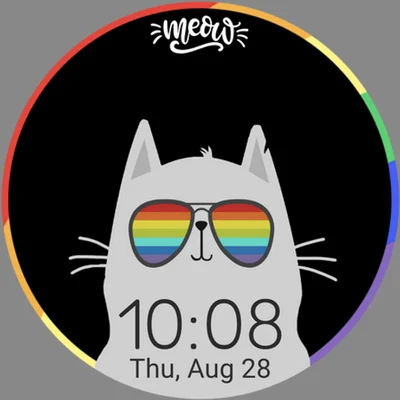
レインボーリング、猫のアイコン、デジタル時刻と日付表示を備えたミニマルなプライドウォッチフェイス
Pride Cat ウォッチフェイスは、黒い文字盤の周りに細い虹色のリングがあしらわれ、時刻の下に小さな猫のアイコンが配置された、ミニマルなWear OSウォッチフェイスです。
機能
• デジタル時刻表示(12時間表示と24時間表示)
• 日付と曜日表示
• 文字盤周りの虹色のリング
• 小さな猫のアイコン
• カスタマイズ可能なコンプリケーション
• 常時表示(AOD)モード
• AMOLEDディスプレイ対応の真の黒背景
シンプルに、プライド
どんな服装にも合うデザインで、毎日さりげなくプライドを表現できます。
適用方法
1. Google Playからアプリをインストールし、インストールデバイスとしてスマートウォッチを選択します。
2. スマートウォッチで、現在のウォッチフェイスを長押しし、Pride Cat までスワイプします。
3. 「カスタマイズ」をタップして、色やコンプリケーションを変更します。
互換性
Wear OS 3以降のスマートウォッチに対応しています。Samsung Galaxy Watch 4以降、Google Pixel Watch、TicWatch、Fossil Gen 6などが含まれます。Apple WatchおよびTizen搭載スマートウォッチには対応していません。
原文を表示
Pride Cat Watch Face is a minimal Wear OS watch face with a thin rainbow ring around a black dial and a small cat icon below the time.
Features
• Digital time, 12h and 24h
• Day and date
• Rainbow ring around the dial
• Small cat icon
• Configurable complications
• Always-On Display (AOD) mode
• True black background for AMOLED screens
Pride, simply
A quiet way to show pride every day, with a design that suits any outfit.
How to apply
1. Install from Google Play and select your watch as the install device.
2. On your watch, long-press the current watch face and swipe to Pride Cat.
3. Tap Customize to change colors and complications.
Compatibility
Made for Wear OS 3 and newer smartwatches, including Samsung Galaxy Watch 4 and later, Google Pixel Watch, TicWatch and Fossil Gen 6. Not compatible with Apple Watch or Tizen watches.
データ セーフティ
このアプリが収集・共有するデータについて、Malith WimalarathnaがGoogle Playで申告している内容です。
- 第三者と共有されるデータはありません詳しくは、デベロッパーが共有を申告する方法についての説明をご覧ください
- データは収集されません詳しくは、デベロッパーが収集を申告する方法についての説明をご覧ください
開発元の連絡先
- メールmalithmpw@gmail.com
- プライバシーポリシーsites.google.com
- 住所Gurugala Imbulana Ruwanwella 71313 Sri Lanka
情報
- 提供元
- Malith Wimalarathna
- カテゴリ
- カスタマイズ
- 更新日
- 2026/7/27
- リリース
- 2025/6/30
- 対象年齢
- 3 歳以上
- 価格
- ¥500
- パッケージ名
- com.mpw.pridecat.wf