PW47 Number Sync Clock
PW Watchfaces by PAPY WATCH DESIGN- 3 歳以上対象年齢
- カスタマイズカテゴリ
- 2026/10/26更新日
- ¥160価格
com.watchfacestudio.pww47のGoogle Play公式ページにリンクしています。最終確認:2026/11/12。
このアプリについて
Googleによる英語 (アメリカ合衆国)からの自動翻訳です。
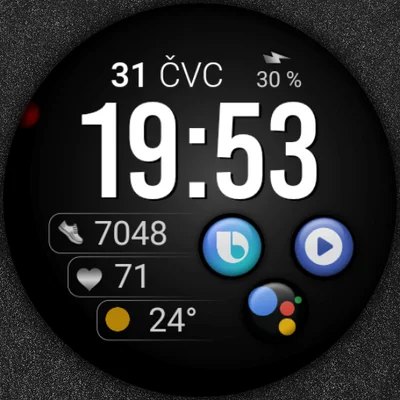
PWW47 - Sport Digi Watch Face、Wear OS のスタイリッシュなウォッチフェイス
PWW47 - Sport Digi Watch Face、Wear OS 用のスタイリッシュなウォッチフェイス
高級感あふれるスタイリッシュなウォッチフェイスと豊富な設定オプションをご紹介します。
情報が含まれます:
- 携帯電話の設定に基づく 12/24 時間のデジタル時間
- 日付
- 日
- ステップ
- バッテリー %
- 調整可能なウィジェット
- 3つのアプリショートカット - 任意のアプリケーションを設定できます
- 常時表示ディスプレイ
- BPM心拍数
心拍数に関するメモ:
ウォッチフェイスは自動測定を行わず、HR 結果を自動的に表示しません。
現在の心拍数データを表示するには、次のことが必要です。
手動で測定します。
これを行うには、心拍数表示領域をタップします。
数秒待ちます。ウォッチフェイスには時間がかかります
測定し、現在の結果を表示します。
カスタマイズ:
テキストの色を変更する可能性
背景の色を変更する可能性
必要なアプリケーションを 3 回選択可能
必要なデータでフィールドをカスタマイズする可能性があります - たとえば、天気、タイムゾーン、日没/日の出、気圧などを選択できます (!一部の機能は一部の時計では利用できない場合があります!)
スマートフォンで Galaxy Wearable を開き、→ ウォッチフェイス→ カスタマイズし、好みに合わせてウォッチフェイスを設定します。
または
- 1. ディスプレイを長押しします
- 2.カスタマイズオプションをタップします
!!!インストールメモ!!!
電話アプリは、Wear OS ウォッチに文字盤を簡単にインストールして見つけられるようにするためのプレースホルダーとしてのみ機能します。インストールドロップダウンメニューからウォッチデバイスを選択する必要があります。
場合によっては、ウォッチフェイスがウォッチにダウンロードされるまでに少し時間がかかることがあります。
数分後、時計の文字盤が時計に転送されます。携帯電話のウェアラブル アプリによってインストールされた文字盤を確認してください。
注: 支払いループに陥った場合でも、2 回目の支払いを求められた場合でも、請求は 1 回だけ行われますので、ご心配なく。 5 分間待つか、時計を再起動してもう一度お試しください。デバイスと Google サーバー間の同期の問題である可能性があります。
または
2 - 携帯電話と Play ストアの間で同期の問題が発生している場合は、時計からアプリを直接インストールします。時計の Play ストアで「PWW45」を検索し、インストール ボタンを押します。
3 - あるいは、PC の Web ブラウザからウォッチフェイスをインストールしてみてください。
この側の問題は開発者に依存しないことを考慮してください。開発者は、こちら側から Play ストアを制御することはできません。ありがとう。
このウォッチフェイスは、API レベル 28 以上のすべての Wear OS デバイスをサポートしています
✉ ご不明な点がございましたら、papy.hodinky@gmail.com までメールでお問い合わせください。
喜んでお手伝いさせていただきます。
https://sites.google.com/view/papywatchプライバシーポリシー
原文を表示
PWW47 - Sport Digi Watch Face, is stylish Watch Face for Wear OS
I would like to introduce you to a stylish watch face with a premium look and many setting options.
Contains information:
- 12/24hr Digital Time based on phone settings
- Date
- Day
- Steps
- Battery %
- Adjustable widget
- 3 App Shortcuts - You can set any application you want
- Always ON Display
- BPM Heart Rate
HEARTRATE NOTES:
The watch face does not automatically measure and does not automatically display the HR result.
To view your current heart rate data you'll need to
take a manual measurement.
To do this, tap on the heart rate display area.
Wait a few seconds. The watch face will take a
measurement and displaythe current result.
Customization:
Possibility to change the color of the text
Possibility to change the color of the background
Possibility to select any application you want 3x
Possibility customize the fields with the any data you want - For example, you can select weather, time zone, sunset/sunrise, barometer and more ( !some features may not be available on some watches! )
Open Galaxy Wearable on your phone → watch faces → customize and set the watch face to your preference.
or
- 1. Touch and hold display
- 2. Tap on customize option
!!! Installation Notes !!!
Phone app serves only as an placeholder to make it easier to install & find the watch face on your Wear OS watch. You have to select your watch device from the install dropdown menu.
Sometimes it takes a little longer for the watch face to download to your watch !
After a few minutes the watch face will transferred on watch : check the watch faces installed by the Wearable app on the phone.
Note: If you stuck at payment loop, DON'T WORRY, only one charge will be made even if you are asked to pay a second time. Wait 5 minutes or restart your watch and try again. It could be a synchronization problem between your device and Google servers.
or
2 - If you are having synchronization problems between your phone and Play Store, install the app directly from watch: search "PWW45" from Play Store on watch and hit on install button.
3 - Alternatively, try installing the watch face from web browser on your PC.
Please consider that any issues on this side are NOT developer dependent. The developer has no control over the Play Store from this side. Thank you.
This watch face supports all Wear OS devices with API Level 28+
✉ If you have any questions, please contact us by e-mail papy.hodinky@gmail.com
We will be happy to assist you!
https://sites.google.com/view/papywatchprivacypolicy
データ セーフティ
このアプリが収集・共有するデータについて、PW Watchfaces by PAPY WATCH DESIGNがGoogle Playで申告している内容です。
- 第三者と共有されるデータはありません詳しくは、デベロッパーが共有を申告する方法についての説明をご覧ください
- データは収集されません詳しくは、デベロッパーが収集を申告する方法についての説明をご覧ください
新機能
2026/10/26
- Application improvements
- Update the application to Android 14 (API level 34)
開発元の連絡先
- ウェブサイトfacebook.com
- メールpapy.hodinky@gmail.com
- プライバシーポリシーsites.google.com
- 住所Masarykova 184 67521 Okříšky Czechia
情報
- 提供元
- PW Watchfaces by PAPY WATCH DESIGN
- カテゴリ
- カスタマイズ
- 更新日
- 2026/10/26
- リリース
- 2022/8/1
- 対象年齢
- 3 歳以上
- 価格
- ¥160
- パッケージ名
- com.watchfacestudio.pww47