Racing Pro+ x4
MW Design- 3 歳以上対象年齢
- カスタマイズカテゴリ
- 2023/11/11更新日
- ¥290価格
com.watchfacestudio.turbospeedのGoogle Play公式ページにリンクしています。最終確認:2026/11/21。
このアプリについて
Googleによる英語 (イギリス)からの自動翻訳です。
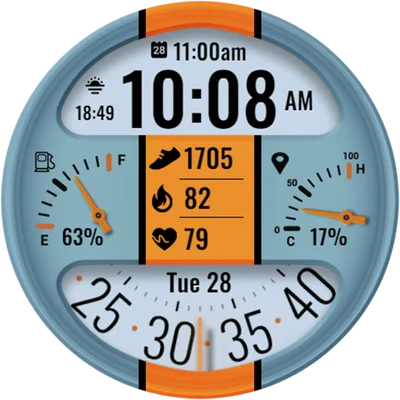
Racing Pro+ x4 カスタマイズ可能な 4 つのスタイルに変更
このウォッチフェイスは、Samsung Galaxy Watch 4、5、6、Pixel Watch など、API レベル 28 以上のすべての Wear OS デバイスをサポートしています。
Racing Pro+ x4 へようこそ。4 つのスタイルのカスタマイズ可能なフェイスとカスタマイズ可能なコンプリケーションがあり、天気や気圧などの好みのデータを設定できます。
*心拍数に関するメモ:
ウォッチフェイスは、インストール時に自動的に測定されず、HR 結果が自動的に表示されません。
現在の心拍数データを文字盤に表示するには、手動で測定する必要があります。これを行うには、心拍数表示領域をタップします。数秒待ちます。時計の文字盤が測定を行い、現在の結果が表示されます。
ウォッチフェイスをインストールするときにセンサーの使用を許可していることを確認してください。そうでない場合は、別のウォッチフェイスと交換してから、この設定に戻ってセンサーを有効にしてください。
最初の手動測定の後、時計の文字盤は 10 分ごとに心拍数を自動的に測定できます。手動測定も可能になります。
**一部の時計では一部の機能が利用できない場合があります。
特徴:
- 電話の設定に基づいて 12/24 時間
- 日
- バッテリーダイヤル
- ステップ
- 心拍数
- カロリー
- 距離ダイヤル
- 2 つのカスタマイズ可能なコンプリケーション
- 変更可能なレーシングスキンと秒ダイヤル。
カスタマイズ:
1 - ディスプレイをタッチアンドホールドします
2 - カスタマイズオプションをタップします
何でも聞いてください - https://www.facebook.com/MWGearDesigns/
原文を表示
This watch face supports all Wear OS devices with API Level 28+ like Samsung Galaxy Watch 4, 5, 6, Pixel Watch etc.
Welcome to Racing Pro+ x4 it has 4 Styles Customizable faces and customizable complications where you can have the data you prefer like weather, barometer etc.
*Heart Rate notes:
The watch face does not automatically measure and does not automatically display the HR result when installed.
To view your current heart rate data on the watch faces, you’ll need to take a manual measurement. To do this, tap on the heart rate display area. Wait a few seconds. The watch face will take a measurement and display the current result.
Make sure you have allowed the use of the sensors when installed the watch face otherwise swap with another watch face and then come back to this to enable the sensors.
After the first manual measurement, the watch face can automatically measure your heart rate every 10 minutes. Manual measurement will also be possible.
**some features may not be available on some watches.
Features:
- 12/24hr based on phone settings
- Day
- Battery Dial
- Steps
- Heart Rate
- Calories
- Distance Dial
- 2 customizable complications
- Changeable racing skins and seconds dials.
Customization:
1 - Touch and hold display
2 - Tap on customize option
Ask me anything at - https://www.facebook.com/MWGearDesigns/
データ セーフティ
このアプリが収集・共有するデータについて、MW DesignがGoogle Playで申告している内容です。
- 第三者と共有されるデータはありません詳しくは、デベロッパーが共有を申告する方法についての説明をご覧ください
- データは収集されません詳しくは、デベロッパーが収集を申告する方法についての説明をご覧ください
開発元の連絡先
- ウェブサイトfacebook.com
- メールmwdesignhelp@gmail.com
- プライバシーポリシーsites.google.com
- 住所33 Huntspill Street LONDON SW17 0AA United Kingdom
情報
- 提供元
- MW Design
- カテゴリ
- カスタマイズ
- バージョン
- 1.0.1
- 更新日
- 2023/11/11
- リリース
- 2023/11/11
- 必要条件
- Android 11以降
- 対象年齢
- 3 歳以上
- 価格
- ¥290
- パッケージ名
- com.watchfacestudio.turbospeed